Open source · local-first · macOS, Linux & Windows

Build software.
Get work done.

One terminal agent for code, research, analysis, and everyday tasks. Choose a local or hosted model, open your folder, and describe the outcome. Collomia brings the tools, durable sessions, and explicit permissions to help you get there.

One binary Your choice of model Free · Apache-2.0
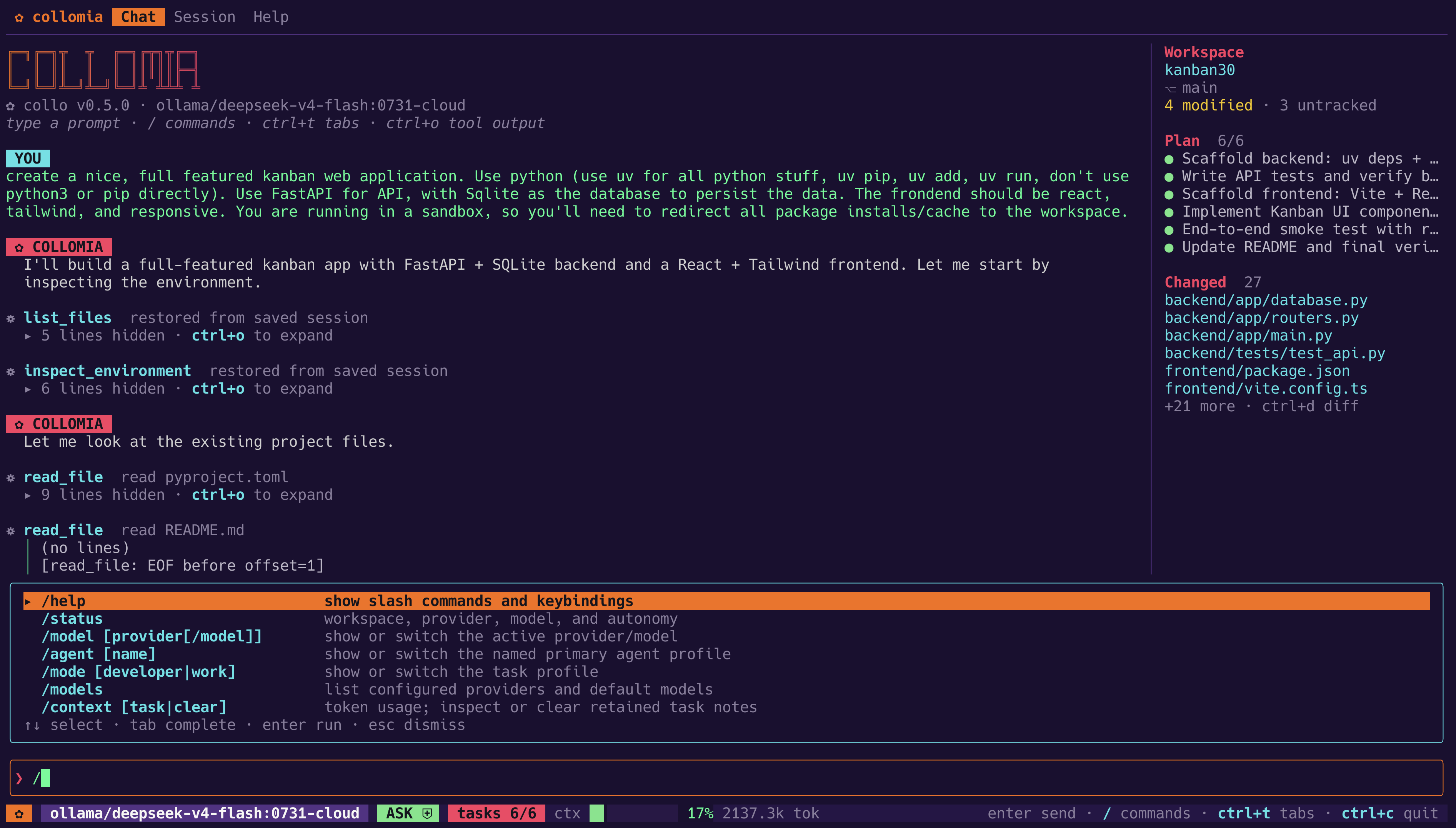
collo — Developer mode · Kanban application
Collomia developing a Kanban application. The workspace sidebar shows a six-step plan and changed files; the command palette includes switching between Developer and Work modes.
Your conversation, tool activity, plan, and changes in one view. Shown in Developer mode. View full size ↗
Developer + Work

A codebase. A folder of files.
A question you want answered.

Choose the task profile that fits. Both share your models, sessions, tools, skills, and permission controls.

Default profile

Developer

Build applications, understand unfamiliar code, fix bugs, and carry changes through relevant builds and tests.

$collo
  • Work with the repository: Git inspection, atomic edits, code navigation, and LSP diagnostics.
  • Close the loop: run project checks and review what changed.
General-purpose profile

Work

Research a question, analyze data, write a report, automate a routine, or investigate a system problem. Start with your real files and your own request.

$collo --mode work
  • Any ordinary folder: no Git repository, starter project, or reporting template required.
  • Ask naturally: the agent chooses tools and methods; direct Q&A needs no artificial deliverable.

Switch within a session with /mode work or /mode developer. Your permission settings stay the same. Explore Work mode ↗

ANALYZE

“Compare these monthly CSV exports. Explain the changes and write a report with the calculations.”

RESEARCH

“Research these options using current sources. Compare the tradeoffs and cite what you find.”

MAINTAIN

“Find what is taking up disk space. Explain what can be cleaned up before making changes.”

Examples are starting prompts. Available models, installed tools, skills, and permissions determine what can run. Specialized document or browser tasks may need additional tools.

Built for the whole task

From the first question to a result you can inspect.

Read, reason, act, and check the outcome in the same session. Bring the models and tools that fit your work.

01 / MODELS

Your choice of model

Connect Ollama, vLLM, or LM Studio locally, or use OpenAI-compatible, Anthropic-compatible, Azure, and AWS Bedrock APIs. Choose where model requests go.

02 / DEVELOPMENT

A complete coding loop

Read a codebase, edit files, run tests, inspect language-server diagnostics, and review the diff. Background processes keep development servers within reach.

03 / EXTENSIONS

Bring your tools and skills

Connect tools through MCP and install skills for specialized methods. Work mode uses the tools available to it, so you can shape it around your own tasks.

04 / CONTINUITY

Pick up where you left off

Durable sessions preserve your conversation and work history. Resume after an interruption, steer an active turn, and review recorded file changes.

05 / VISIBILITY

See the work happening

Follow streamed text, tool activity, plan progress, and model reasoning when the provider exposes it. Keep the conversation in the terminal or open the local browser interface.

06 / COMPLETION

Checks that fit the task

Use tests for code, calculations for analysis, and sources for research. Collo records observed results and makes remaining verification gaps visible.

Execution, at your pace

Start with a conversation. Add structure when you need it.

Standard execution is the default for both task profiles: describe the result and let the agent choose its approach. Developer sessions can also opt into Orchestrated Goal. Work mode currently uses Standard execution.

Permanent default

Standard mode

Describe the task; Collomia works through its ordinary governed tool loop — reading, editing, running commands, checking diagnostics, asking when a decision is yours to make. The agent chooses task-specific checks; the runtime records their results against the current work.

$ collo > Add rate limiting to the upload endpoint read_file internal/api/upload.go edit_file internal/api/upload.go run_command go test ./... (sandboxed)
  • You can steer a running turn — type and press enter, and the guidance lands at the next iteration boundary, never mid-tool and never as a permission grant.
  • Clear completion status: appropriate checks count as evidence. If the work is done but verification remains incomplete, Collo says so instead of treating that alone as a blocked task.
  • Review and undo built in: full-screen unified or side-by-side diffs, hunk-level acceptance, and a restore that reverses recorded changes as one operation.
Opt in per session

Orchestrated Goal

The model proposes a bounded dependency graph; you approve it. From there the runtime — not model prose — owns readiness, immutable attempts, evidence freshness, conservative recovery, budgets, and the terminal outcome.

/orchestrate Implement the feature and verify it /orchestrate status /orchestrate approve /orchestrate integrate node-4 ← user only /orchestrate done
  • Explicit and TUI-only. Repository content, configuration, instructions, skills, hooks, model output, and saved graph bytes cannot opt you in.
  • Durable but inert. Graph state survives restart and stays inert until you resume it. Interrupted attempts are closed, not resumed in place.
  • Bounded on purpose. A visible whole-graph envelope of iterations, tokens, cost, and active minutes that you can size — and that no repository or model can widen.
  • Publication is yours. Verified candidate work stops and waits; applying it takes your command, under a recoverable checkpoint and ordinary permission.
Operating-system sandboxing

Real kernel containment on macOS, Linux, and Windows.

Permission prompts are in-process policy. The sandbox is the part the operating system enforces. Collomia requests it by default on all three platforms using inbox facilities — no Docker, no Hyper-V, no privileged driver, no extra runtime.

macOS
Seatbelt via sandbox-exec

Confines command writes to the workspace and approved temporary locations, and can optionally prohibit reads outside it.

  • Deny command networkyes
  • Host-scoped egressexperimental
  • Process-tree cleanupprocess group
Linux
Landlock LSM

Kernel-enforced filesystem access rules applied to the command's own process tree, with no daemon or root setup.

  • Deny command networkyes
  • Host-scoped egressnot supported
  • Process-tree cleanupprocess group
Windows 11
AppContainer + Job Objects

The child is created suspended and joined to a job object before it runs, so cancellation reaches the whole tree with no window to escape.

  • Deny command networkyes
  • Host-scoped egressnot claimed
  • Process-tree cleanupjob object
sandbox: require

Fails closed. If the requested backend can't be established, the command doesn't run. Use this when degraded execution is unacceptable.

sandbox: auto

The default. Compatibility-first: it visibly reports degradation and continues when a backend is unavailable — fail-visible, not silent.

sandbox: off

An explicit opt-out that only the global configuration owner can make. No project can select it for you.

Sandbox state is always on screen — contained, unsandboxed, or degraded. Sandboxed commands also get a documented minimal environment by default, which omits common API tokens, cloud credentials, proxy settings, and unrelated toolchain state; full inheritance stays available as a deliberate compatibility choice. OS sandboxing and the scoped-egress broker are marked experimental — the security model states exactly what each backend does and does not guarantee.

Explore permissions, audit, and the trust boundary
Layered monotonic policy

Configuration composes in one direction: tighter.

Four layers merge into the settings a session actually runs with. Each one may raise the floor. None may lower it — so cloning an unfamiliar repository can't quietly relax the posture you chose, and you can always see which layer decided what.

01 Built-in defaults Safe starting posture, shipped with the binary
02 Your global configuration The only layer that can disable the OS sandbox
03 Trusted project configuration Quarantined until you explicitly trust the repository
04 Environment overrides For CI and one-off runs
✓ ALLOWED A project may demand a stricter sandbox, deny command network access, forbid outside-workspace reads, or add catastrophic-command patterns.
✗ REFUSED & REPORTED A project may not disable the sandbox, widen network posture, weaken credential or publication protection, or remove an inherited denial.

The clamp isn't limited to one setting. It applies to sandbox policy, sandbox network and outside-workspace reads, the command environment, outside-workspace access, command posture, network posture, scoped egress, credential protection, publication posture, and containment presets. An attempt to weaken any of them is refused and reported rather than silently ignored.

Untrusted repositories stay quarantined. A project's .collomia.json, AGENTS.md instructions, skills, and MCP servers are inert until you trust that repository's content — and trust is content-bound, so a meaningful change invalidates it.

Hooks can only push the same direction. Prompt and tool-start hooks, and an optional external reviewer command, may block or escalate an action. Neither can grant permission, bypass the sandbox, or turn a denial into an approval.

Three presets — frictionless, standard, and hardened — expand into ordinary inspectable fields rather than hiding behavior, and collo config show reports both effective values and where each one came from.
Security & safety

Decisions scoped to the action, not to the tool.

Broad approvals are where agent safety usually leaks. In Collomia, a session grant covers the exact declared capability and nothing else, and the consequential categories are carved out so that no blanket "always allow" can quietly include them.

Ordered, scoped rules

allow, prompt, and deny rules can name tools, paths, command operations, hosts, and MCP servers. A pattern with a space matches an operation — so npm install can be routine while npm publish is not.

Credential access is protected

Conventional credential stores and files need an exact rule or an exact session grant. Blanket tool approval and full autonomy mode don't cover them, and under deny no interactive grant can override the prohibition.

Publishing is its own decision

Package and container registries, source remotes, code-forge writes, infrastructure applies, and commands run on another host are governed separately. Read verbs and --dry-run rehearsals stay ordinary.

Commands judged by outcome

Analysis reads what a command is likely to do, not just which binary it names. Wrappers are unwrapped, nested shell payloads are inspected, and anything unreadable always asks. Catastrophic outcomes have no override at all.

An attributable audit ledger

Every permission decision and execution outcome outside the workspace is written to a JSONL ledger naming the session and the actor — primary, or agent:<profile>. A write failure is counted and declared as a gap in the file, never silently dropped.

Web tools that can't reach inward

web_search and web_fetch enforce a non-configurable public-internet-only address guard: loopback, private, link-local, cloud-metadata, and reserved ranges are rejected at connect time, proxies are ignored, URL credentials are stripped, and no cookies are kept.

External content stays external

MCP results, fetched pages, and search results are wrapped with provenance so they arrive as data rather than as trusted instructions. Injection resistance is part of the offline evaluation suite, not an assumption.

Sub-agents inherit, never expand

Delegated profiles can narrow model, tools, skills, iterations, budget, and write scope — and only narrow. Agents with disjoint write scopes may run concurrently; overlapping ones are serialized.

Nothing published without you

Delegated and orchestrated work never commits, merges, pushes, or deletes worktrees on its own. Candidates are verified in place and wait for your review.

Tools for daily use

Everything you'd expect from a daily driver, in one binary.

Built-in tools, integrations, and session controls share Collo's permission and lifecycle policies. Command sandboxing applies to shell execution; provider and MCP connections have separate controls.

Editing & code intelligence

  • Atomic writes with mode preservation and undo
  • Exact-match edits and multi-file patches
  • Symlink, hard-link, and TOCTOU protections
  • Incremental symbol indexing for Go, Python, JS/TS, Rust
  • LSP diagnostics, definitions, references, formatting
  • Auto-discovery of gopls, Pyright, tsserver, rust-analyzer

Git & verification

  • Read-only status, diff, log, and blame
  • Narrowly scoped git_commit and git_branch — neither pushes
  • /review against uncommitted work or any ref
  • /verify discovers and runs build, lint, and test
  • Verification evidence is preserved across compaction

Providers

  • OpenAI and OpenAI-compatible (Ollama, vLLM, LM Studio)
  • Anthropic-compatible APIs
  • Azure OpenAI and Azure AI Foundry
  • AWS Bedrock ConverseStream and Mantle
  • Capability registry with pre-flight compatibility checks
  • Classified failures, bounded retries, circuit health
  • Automatic prompt caching where the route supports it

Sessions & context

  • Durable sessions with resume, fork, rewind, crash recovery
  • Append-only storage that fails safely, never silently
  • Searchable transcripts and prompt history
  • Restore reverses recorded file changes as one operation
  • Automatic and manual compaction that keeps failures
  • Per-turn and per-session token and cost accounting

Interface

  • 19 themes, syntax highlighting, tabs, command palette
  • Live reasoning when the model and provider expose it
  • Developer and Work task profiles
  • NO_COLOR support and a color-independent theme
  • Side-by-side or unified diffs with hunk review
  • Workspace-aware @ file selection and image input
  • Activity center, status dashboard, transcript browser
  • Reduced-motion and reduced-dimming options
  • Toggleable mouse reporting for native text selection
  • Completions for Bash, Zsh, Fish, and PowerShell

Extend & automate

  • collo run --jsonl versioned event stream
  • Published event schema via collo schema events
  • Offline trace replay with no providers or tools loaded
  • MCP over stdio and streamable HTTP, with server pinning
  • Skills with SHA-256 identity and progressive loading
  • Hooks on session, prompt, permission, tool, and stop events
  • Named agent profiles with their own budgets and scopes
  • collo --web embedded loopback browser terminal
Install

One binary. No sudo, no elevation, no runtime.

Both installers verify the download's SHA-256 checksum and its reported version before replacing anything already installed.

macOS & Linux

Installs to $HOME/.local/bin. Doesn't use sudo or modify your PATH.

$ curl --proto '=https' --tlsv1.2 -fsSL https://raw.githubusercontent.com/robert-mcdermott/collomia/main/install.sh | sh

Windows

AMD64 and ARM64. No elevation and no execution-policy change; open a new terminal afterward.

> irm https://raw.githubusercontent.com/robert-mcdermott/collomia/main/install.ps1 | iex
  1. Choose a model. Setup discovers supported local endpoints and helps configure hosted providers. It checks that your choice can answer and accept tool definitions before saving the configuration.
    $collo setup
  2. Open your folder and start. Use collo for development or collo --mode work for general tasks. If no provider is configured, interactive startup opens setup automatically.
    $collo --cwd /path/to/your-folder --mode work
  3. Check what's actually enforced. doctor inspects build, platform, merged configuration, repository trust, Git, credentials, MCP definitions, and sandbox availability; capabilities prints the generated implementation matrix.
    $collo doctor && collo capabilities

Prefer to build it yourself? go build -o collo ./cmd/collo against the Go version declared in go.mod. Release artifacts ship with checksums, CycloneDX SBOMs, and Sigstore/GitHub attestations — version pinning, provenance verification, rollback, and uninstall are all documented.

What this doesn't claim

Collomia is a technical beta, and its documentation is deliberate about the edges of each control. A few that are worth knowing before you point it at something valuable:

  • Default auto sandboxing is fail-visible, not fail-closed. Deployments that require strict containment should set require.
  • OS sandboxing and the macOS scoped-egress broker are marked experimental. Landlock filters TCP by port rather than address, and Windows AppContainer can't reach a loopback broker at all — so neither platform is given an enforcement claim it couldn't keep.
  • Host rules and publication classification are policy layers, not egress enforcement. They read what a command's text says it will do; a program that opens a socket or uploads an artifact without naming it is outside their view.
  • Credential protection is location- and convention-based, not content detection. A key in an unconventional place isn't recognized, and a secret the agent legitimately reads still reaches the model.
  • The audit ledger records what the permission layer decided and what execution returned. It is not a system-call audit.
  • Provider traffic, remote MCP connections, hooks, and LSP processes run in the Collomia process — outside the command sandbox.
  • Autonomy modes change approval behavior. They are explicitly not presented as an operating-system security boundary.

The full accounting lives in the security model and beta status, and the generated capability matrix is the canonical word on what is implemented today.

Free, Apache-2.0, and yours to inspect

No Collomia account or subscription. Sessions and configuration stay on your machine. Hosted model providers may charge for usage and receive the content sent to them; choose a local model when you want local inference.