Latest stable release available  ·  Apache-2.0  ·  No enterprise tier. Ever.

The enterprise LLM gateway
without the enterprise paywall

Phlox-GW is a self-hosted gateway and governance layer between your users, apps, and every LLM provider — cloud or local. SSO, cost accounting, budget enforcement, guardrails, audit logs, and clustering — the features other gateways lock behind enterprise licenses are free here, forever.

single Go binary · SQLite or Postgres · macOS / Linux / WSL / Windows
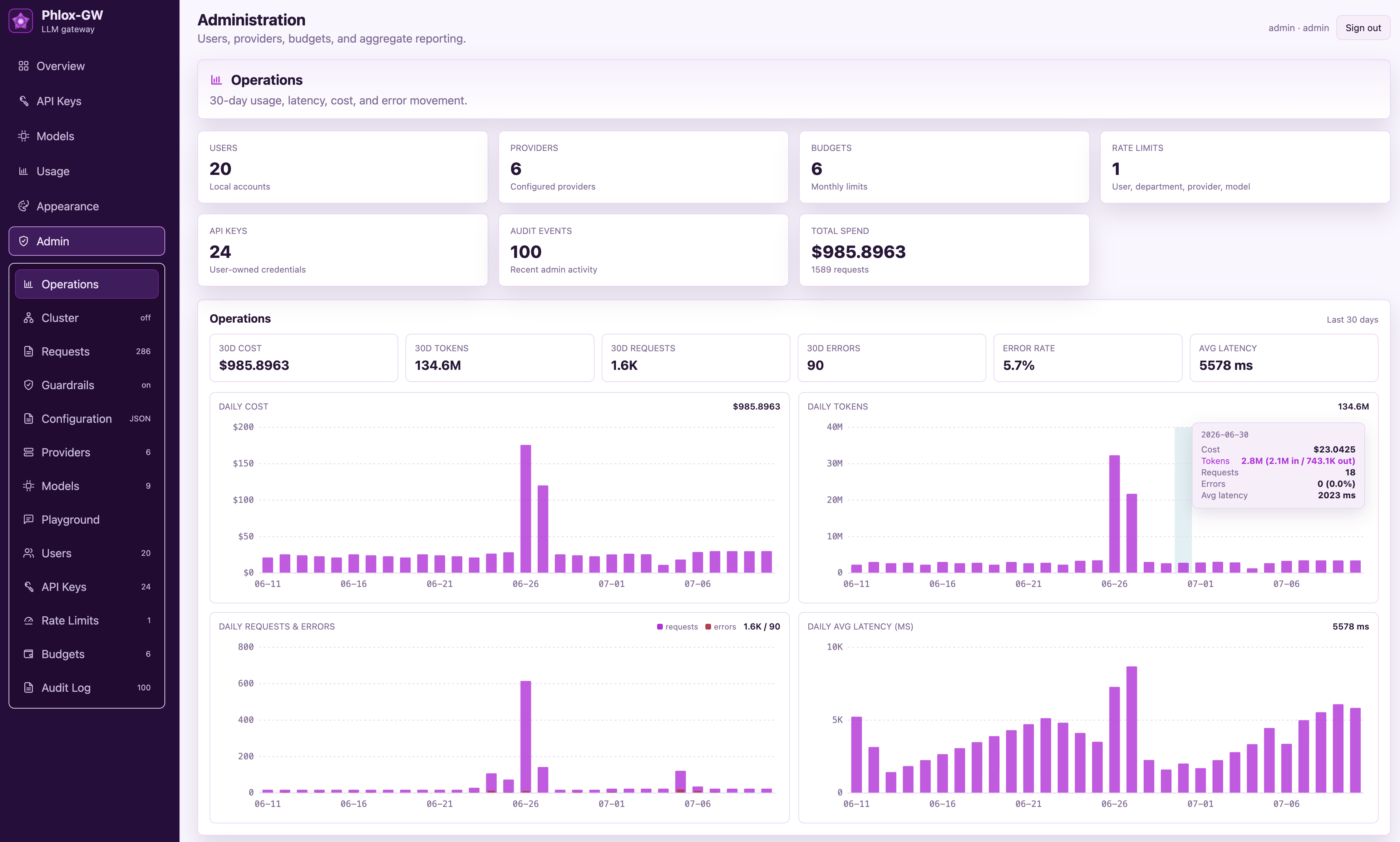
phlox-gw · Admin → Operations
Phlox-GW operations dashboard showing 30-day cost, token, request, error, and latency trends
One gateway · every provider · cloud or local
OpenAI Anthropic Azure OpenAI Azure AI Foundry (Claude) AWS Bedrock Google Gemini OpenRouter LiteLLM Ollama vLLM LM Studio any OpenAI-compatible API
The open-source pledge

“Open source” shouldn’t come with an asterisk

Most open-source LLM gateways publish the proxy and paywall the governance. The features an organization actually needs to run LLMs responsibly end up behind an enterprise license. Phlox-GW ships everything under Apache-2.0.

CapabilityTypical “open-source” gatewaysPhlox-GW
SSO (Entra ID / OIDC)Enterprise licenseFree, built in
Audit logsEnterprise licenseFree, built in
Guardrails & PII redactionEnterprise licenseFree, built in
Prometheus metrics & OTel tracesEnterprise licenseFree, built in
Clustering / HAEnterprise licenseFree, built in
Budgets & departmental chargebackEnterprise license / SaaS tierFree, built in
LicenseOpen core + commercialApache-2.0, all of it

This is a project principle, not a launch promo: every feature ships fully open source under Apache-2.0. Capabilities that comparable products gate behind enterprise licenses stay free here — permanently.

Full-featured by default

Everything between your users and your models

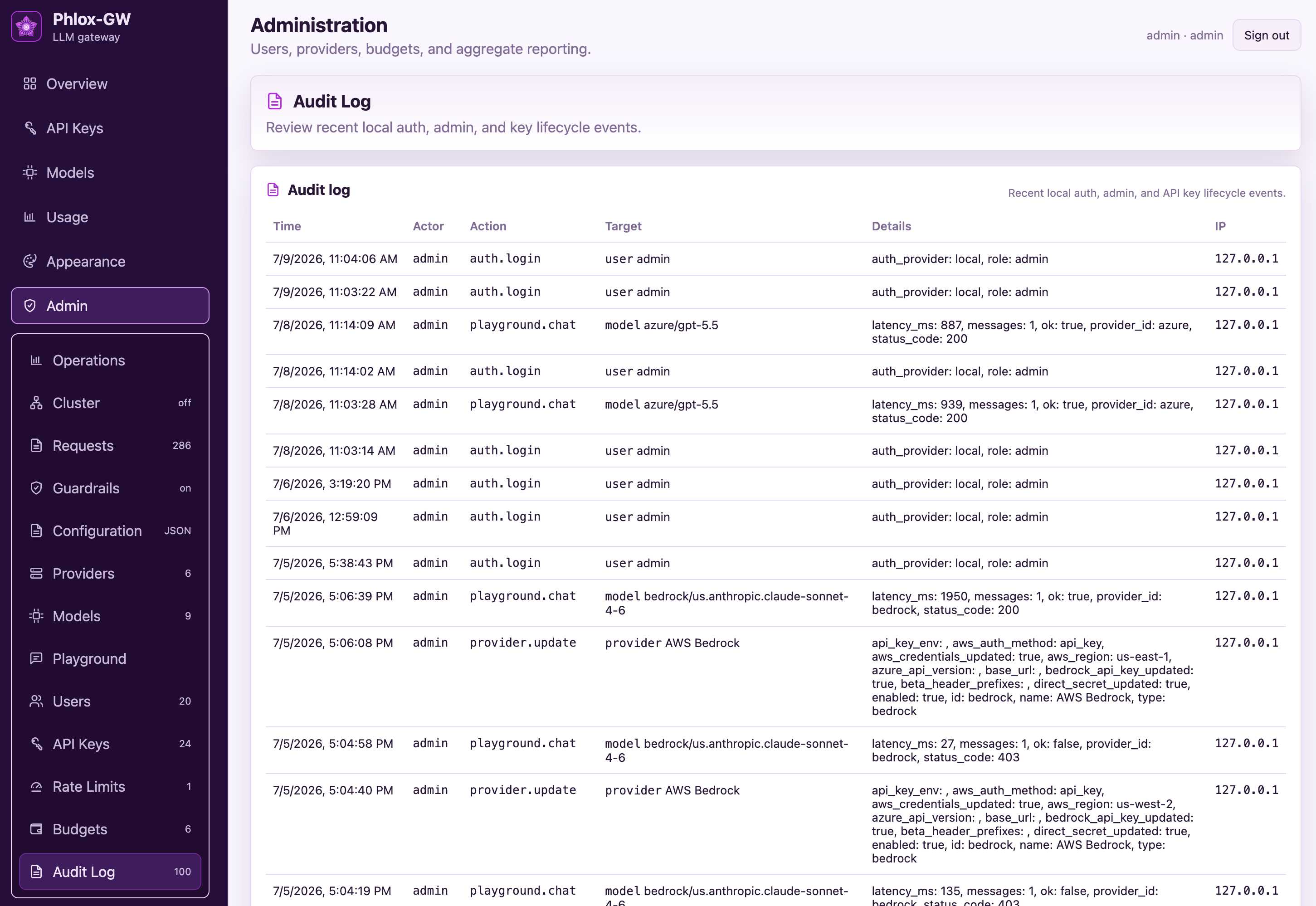
Publish model routes, control who can use them, attach prices, enforce budgets and rate limits, and report usage for chargeback — from one admin console.

🔐

Entra ID & OIDC SSO

Browser SSO with any OIDC identity provider. Auto-provisioning on first login, department claim mapping for chargeback, and group-based admin role mapping. Local accounts work too.

💰

Cost accounting & chargeback

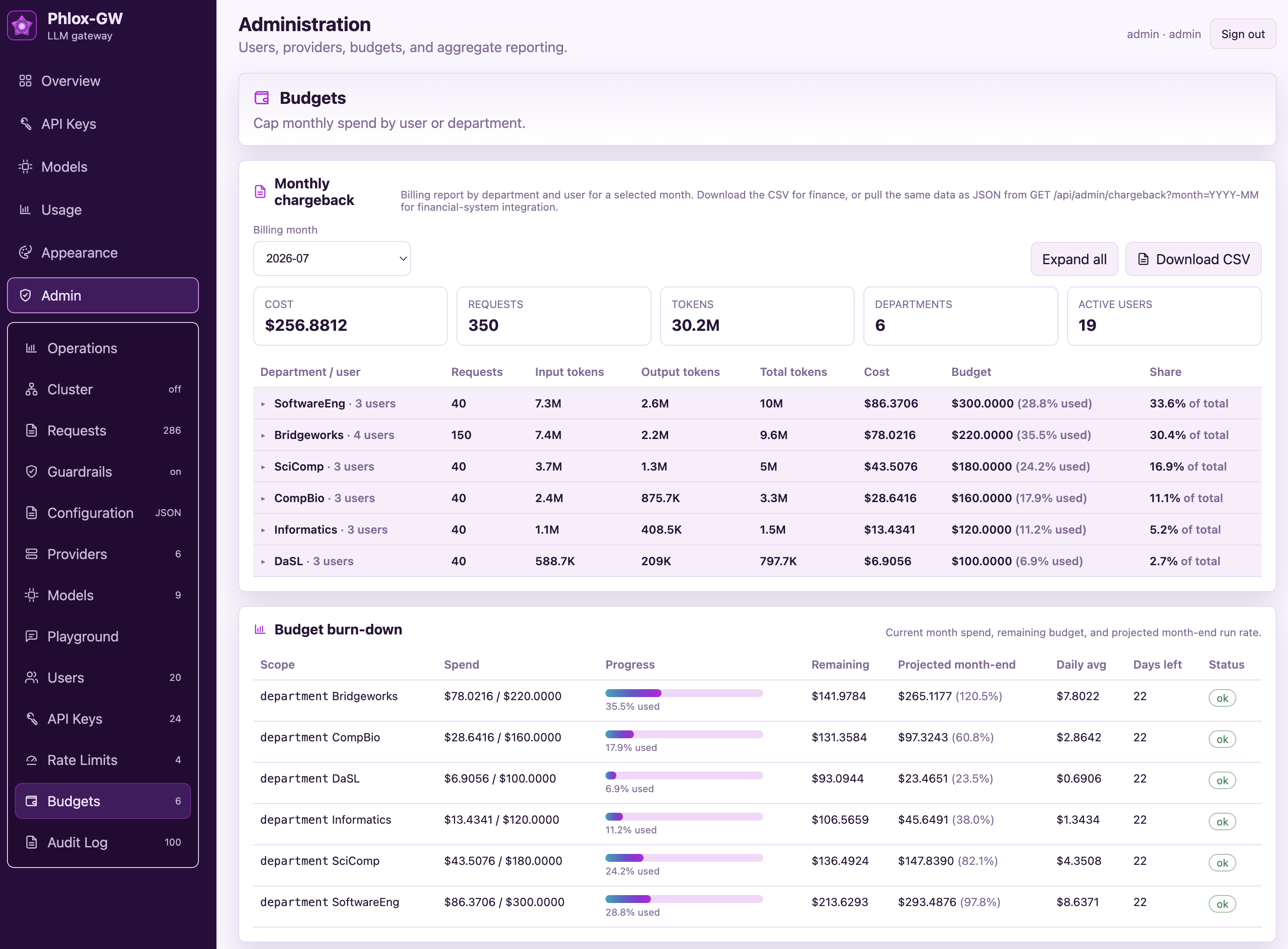
Per-user and per-department monthly chargeback from an append-only usage ledger, with per-model USD pricing per million tokens. CSV download for finance, JSON API for automation.

Budgets with real enforcement

Monthly budgets per user, department, and API key with hard-limit enforcement — not just alerts. Burn-down views show spend, remaining budget, and projected month-end run rate.

⏱️

Rate limits at every scope

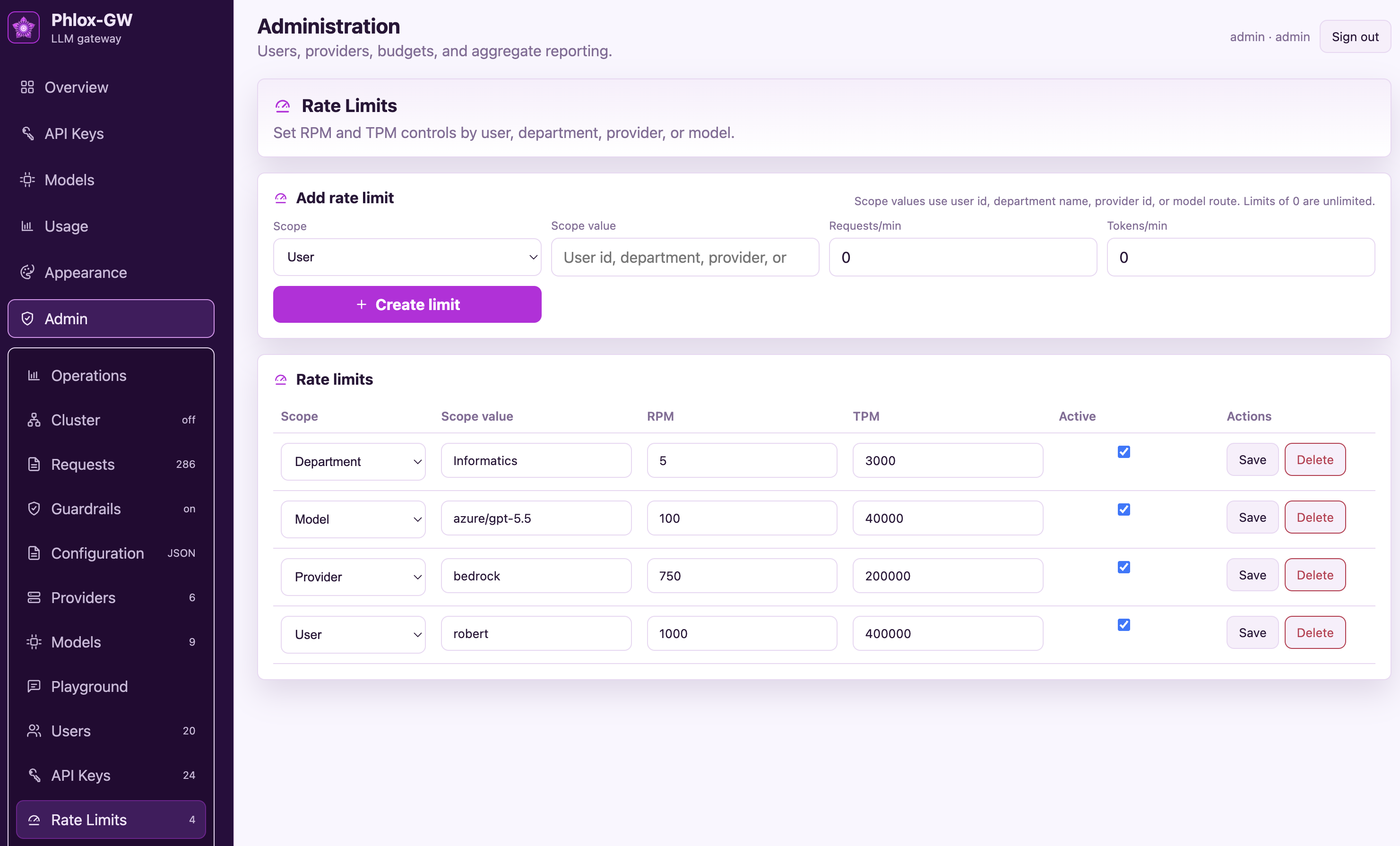
RPM and TPM controls by user, department, provider, model, and API key. Blunt one noisy script without throttling the whole org.

🔀

Smart routing & failover

Stable route aliases like chat/default, ordered fallbacks, retries, per-attempt timeouts, health-aware routing, and weighted traffic splits — swap providers without touching clients.

🛡️

Built-in guardrails

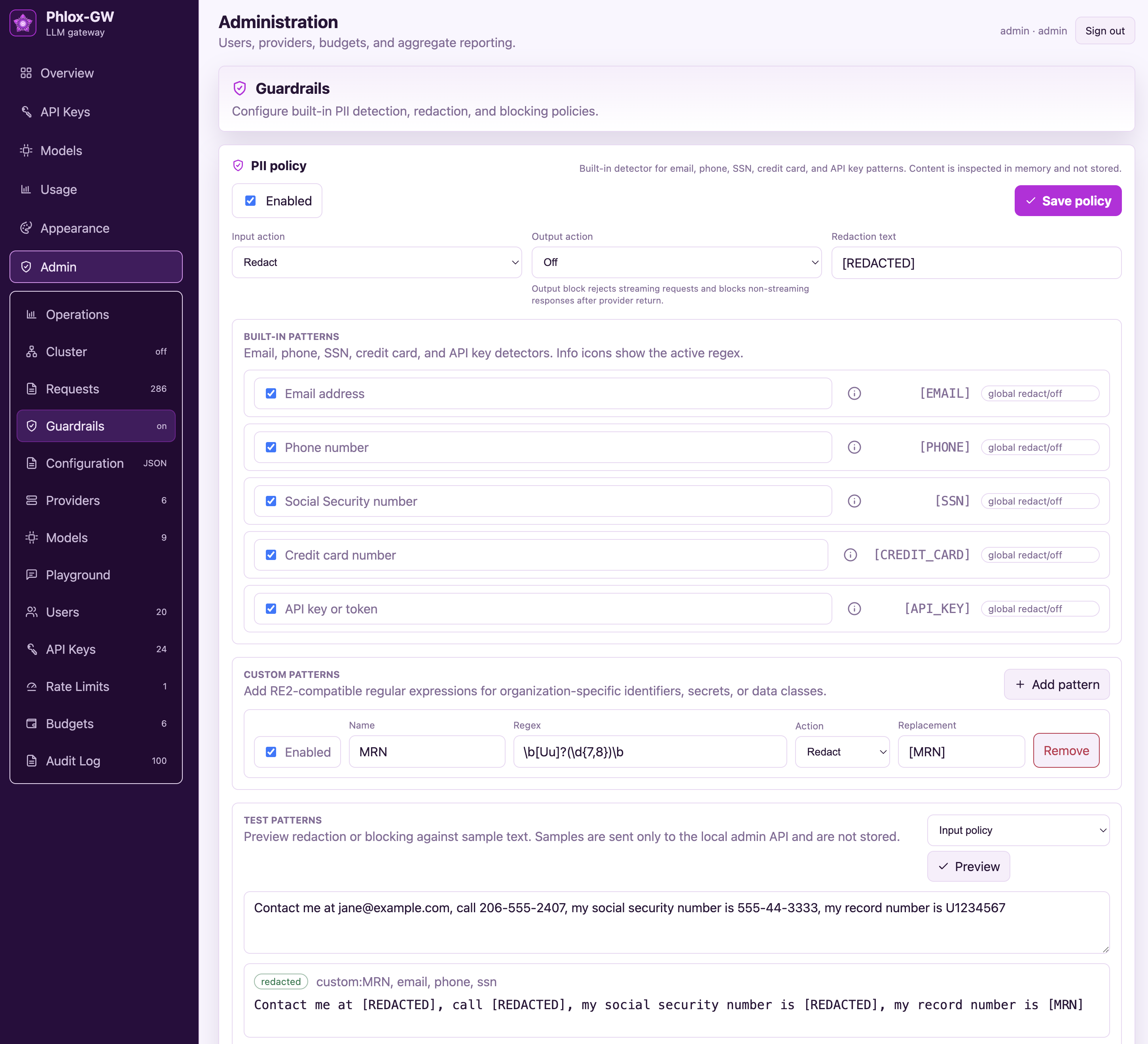
Detect emails, phone numbers, SSNs, credit cards, API keys, and custom regex patterns. Redact or block on input and output, with an admin preview tool for testing policies before saving.

🔑

User-owned API keys

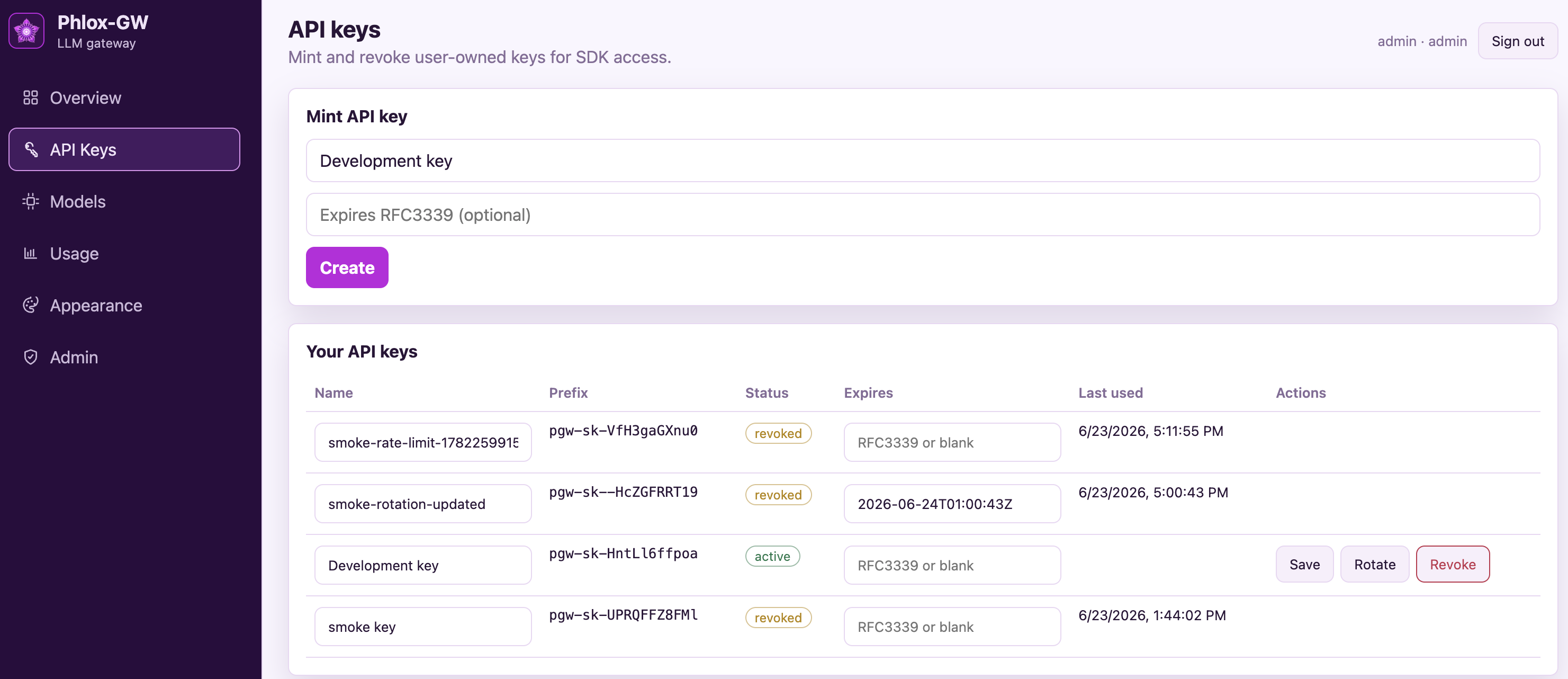
Self-service key minting, rotation, and expiration. Admin key inventory with per-key model allowlists, budgets, and rate limits.

📈

Observability included

Operations dashboards for cost, tokens, requests, errors, and latency, plus Prometheus metrics and OpenTelemetry traces for your existing monitoring stack.

📜

Immutable audit log

Every login, admin action, and API-key lifecycle event recorded with actor, target, details, and source IP.

🕵️

Private by design

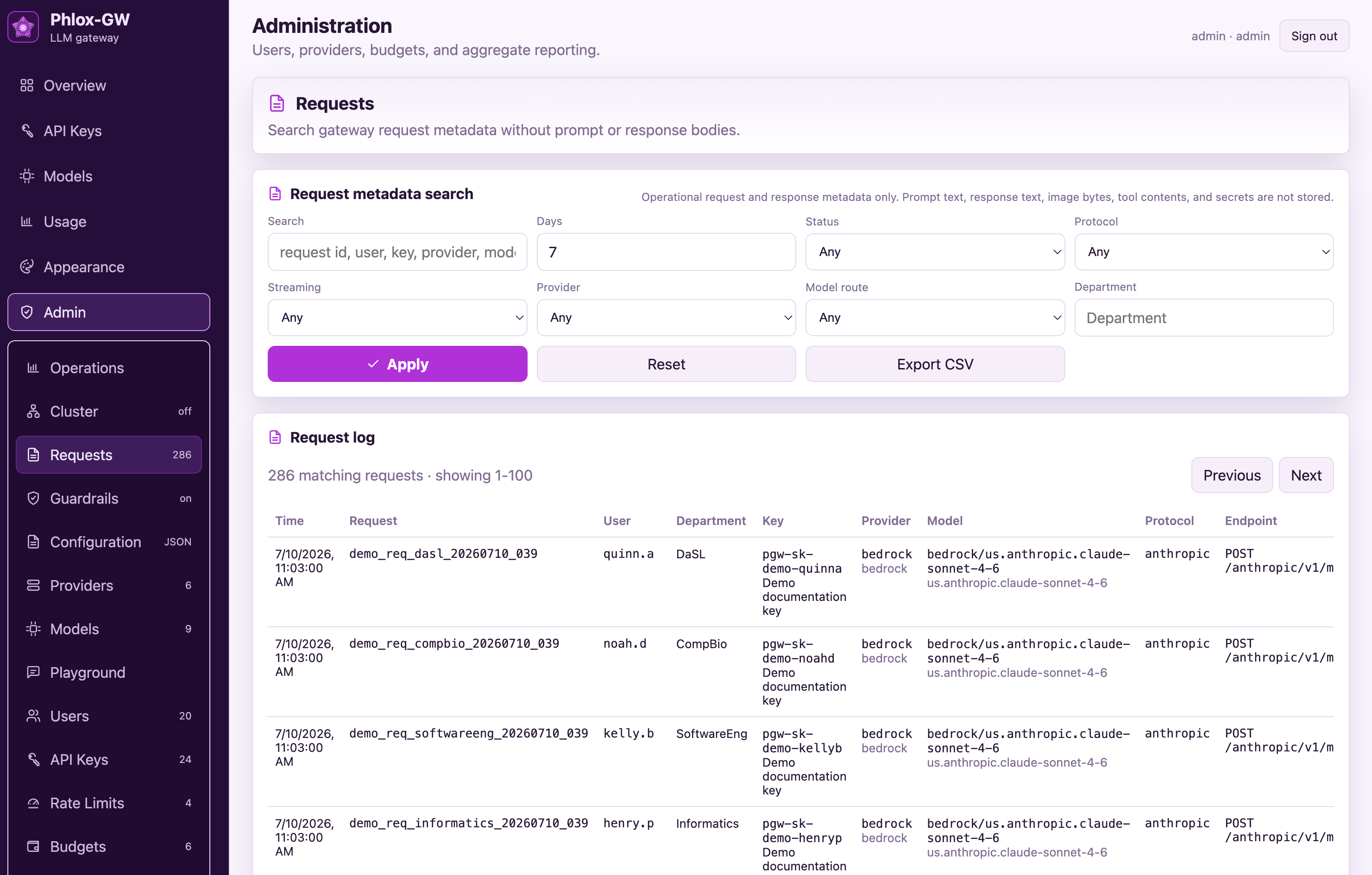
Request metadata search and CSV export without storing prompt text, response bodies, image bytes, tool contents, or secrets — by default.

🧪

Admin playground

Send test chat messages through any model route to validate providers and models end to end — no API key required.

📦

Signed config export

Ed25519-signed, sanitized configuration export for review, backup, and environment promotion — secrets and credentials never leave the box.
FinOps for LLMs

Know exactly who spent what — and stop overruns before they happen

Every request lands in an append-only ledger with user, department, model, token counts, and cost. Finance gets a monthly chargeback report; admins get budgets that actually enforce.

  • Monthly chargeback by department and user, with CSV download and a JSON API for financial-system integration.
  • Hard budget enforcement — when a user, department, or key hits its cap, requests stop. No surprise invoices.
  • Burn-down & projections — current spend, remaining budget, daily average, and projected month-end run rate per scope.
  • Accurate even for local models — when a provider omits usage data, tokens are estimated in memory so cost never silently drops to zero.
Admin → Budgets · chargeback & burn-down
Phlox-GW budgets page with monthly chargeback by department and budget burn-down with projections
Scale when you need it

A single binary that grows into a cluster

Start with one process and SQLite — zero external dependencies. When one node isn’t enough, point multiple gateways at a shared Postgres behind a load balancer and keep going.

  • Single-binary simplicity — the dashboard, API, and gateway ship in one Go executable. SQLite is the default.
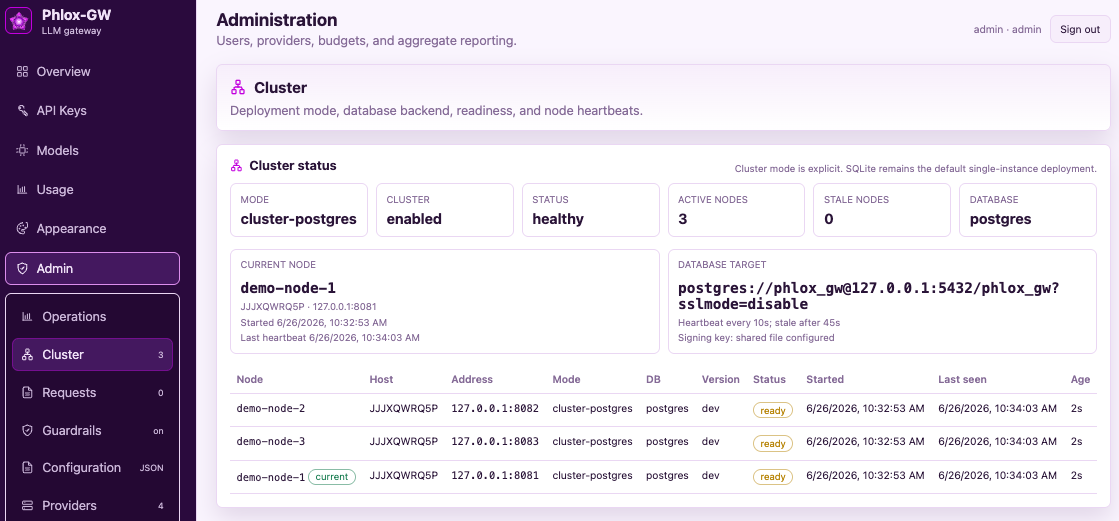
  • Explicit cluster modecluster-postgres with migration locking, node heartbeats, and readiness checks.
  • Cluster admin UI — see every node’s status, heartbeat, and database target at a glance.
  • Load-balancer friendly/health for liveness and /ready for database-and-heartbeat readiness.
  • Ops-ready — systemd, macOS, and Windows guidance, reverse-proxy patterns, and a single-host demo cluster script.
Admin → Cluster · node heartbeats & readiness
Phlox-GW cluster status page showing three healthy postgres-backed nodes with heartbeats
Protocol translation

Any client. Any provider. Phlox-GW translates.

OpenAI-protocol clients can call Claude on Bedrock. Anthropic-protocol clients — including Claude Code — can call GPT on Azure or a local model on Ollama. Streaming, tool calls, and images included.

OpenAI SDKs & apps
POST /v1/chat/completions
Anthropic SDKs & Claude Code
POST /anthropic/v1/messages
curl & anything HTTP
Bearer pgw-sk-…
Phlox-GW auth · budgets · limits · guardrails routing, translation, usage ledger, audit, metrics
OpenAI & Azure OpenAI
chat completions
Anthropic & Azure AI Foundry
Messages API
AWS Bedrock
Converse / ConverseStream
Gemini · Ollama · vLLM · …
OpenAI-compatible
Client protocol ↓  /  Provider →OpenAI-compatibleAnthropic / FoundryAWS Bedrock
/v1/chat/completionspass-throughtranslatedtranslated
/anthropic/v1/messagestranslatedpass-throughtranslated

All six paths support streaming and non-streaming requests, with tool-call and image mapping, and usage capture for accurate cost accounting. Reasoning-model quirks (like max_completion_tokens and rejected sampling parameters) are detected and retried automatically, so old clients keep working with new models.

🤖

Claude Code, governed

Point Claude Code at the gateway with one ANTHROPIC_BASE_URL — and route it to Claude, GPT, Bedrock, or a local model. Streaming and tool use are fully translated, and anthropic-beta headers are filtered per provider so strict endpoints like Azure AI Foundry don't reject requests.

🗝️

Bedrock, three ways

Authenticate to AWS Bedrock with the SDK credential chain (SSO profiles, instance and task roles), stored access keys, or a Bedrock API key — per provider. No base URL to manage; just pick a region.

🔌

Drop-in for existing SDKs

Any OpenAI or Anthropic SDK works by changing base_url and the API key. Model names are your stable route IDs, so swapping providers never touches application code.

Governance & safety

Guardrails, limits, and a paper trail

Policy is enforced in the request path — not documented in a wiki and hoped for.

Data protection

PII stops at the gateway

Built-in detectors for email addresses, phone numbers, SSNs, credit cards, and API keys — plus custom RE2 regex patterns for your organization’s identifiers (MRNs, employee IDs, internal tokens).

  • Redact or block on input before anything is sent to a provider.
  • Redact or block on output before a response reaches the client.
  • Preview before you commit — test draft patterns against sample text right in the admin panel.
  • Inspected in memory — content is scanned in-flight and never stored.
Admin → Guardrails · PII policy & custom patterns
Phlox-GW guardrails page with built-in PII patterns, a custom MRN regex, and a live redaction preview
Traffic control

Rate limits that match your org chart

Set requests-per-minute and tokens-per-minute ceilings wherever they make sense: a user, a department, a provider, a model route, or an individual API key.

  • Protect shared capacity — cap a department’s use of an expensive frontier model.
  • Contain runaways — one misbehaving script can’t exhaust the provider quota for everyone.
  • Circuit breakers — providers that keep failing are automatically taken out of rotation until they recover.
Admin → Rate Limits · RPM / TPM by scope
Phlox-GW rate limits page with RPM and TPM limits by department, model, provider, and user
Install Phlox-GW

One binary. Verified before launch.

Use the checksum-verifying shell installer on macOS, Linux, or WSL, or install with PowerShell on native Windows. The dashboard, API, and gateway are bundled together.

TerminalRecommended

macOS, Linux & WSL

The installer selects the correct release for your operating system and architecture, verifies its checksum, and installs it as phlox-gw.

macOS ARM64 Linux AMD64 Linux ARM64 WSL
$ curl --proto '=https' --tlsv1.2 -fsSL https://raw.githubusercontent.com/robert-mcdermott/phlox-gw/main/install.sh | sh
SHA-256 verifiedChecked against the published release manifest.
User-local installDefaults to ~/.local/bin.
No hidden setupNo sudo, PATH edits, data creation, or startup.
PowerShellRecommended

Native Windows

Download the latest native executable, verify it against the published SHA-256 manifest, and launch it from your current directory. This example targets x86-64; on Windows ARM64, change amd64 to arm64 in the asset name.

Windows AMD64 Windows ARM64
$Asset = "phlox-gw-windows-amd64.exe" $BaseURL = "https://github.com/robert-mcdermott/phlox-gw/releases/latest/download" Invoke-WebRequest "$BaseURL/$Asset" -OutFile $Asset Invoke-WebRequest "$BaseURL/checksums.txt" -OutFile checksums.txt $Expected = ((Select-String -Path checksums.txt -Pattern " $Asset$").Line -split '\s+')[0] $Actual = (Get-FileHash -Algorithm SHA256 $Asset).Hash.ToLowerInvariant() if ($Actual -ne $Expected) { throw "Checksum verification failed" } & ".\$Asset" --version & ".\$Asset"
Latest stable releaseUses GitHub's version-independent release URL.
SHA-256 verifiedStops before launch if the binary does not match.
Local & explicitSaves to and runs from the current directory.

Transparent by design: both installation paths verify the downloaded binary against the release checksum manifest. The shell installer is readable before execution, and the PowerShell steps are fully shown above. Release binaries are not yet code-signed or notarized.

Quick start

From install to governed LLM traffic in minutes

No Kubernetes, no sidecar fleet, no license key. One binary and a browser.

terminal
# macOS, Linux, or WSL
$ curl --proto '=https' --tlsv1.2 -fsSL \
    https://raw.githubusercontent.com/robert-mcdermott/phlox-gw/main/install.sh | sh

# run in a dedicated local data directory
$ mkdir -p "$HOME/.local/share/phlox-gw"
$ cd "$HOME/.local/share/phlox-gw"
$ "$HOME/.local/bin/phlox-gw"
# → sign in at http://127.0.0.1:8080

# call it like OpenAI…
$ curl http://127.0.0.1:8080/v1/chat/completions \
    -H "Authorization: Bearer pgw-sk-your-key" \
    -d '{"model":"chat/default","messages":
        [{"role":"user","content":"Hello"}]}'

# …or like Anthropic — same gateway, same key
$ curl http://127.0.0.1:8080/anthropic/v1/messages \
    -H "x-api-key: pgw-sk-your-key" \
    -H "anthropic-version: 2023-06-01" \
    -d '{"model":"chat/default","max_tokens":256,
        "messages":[{"role":"user","content":"Hello"}]}'
  1. Install and run

    Use the checksum-verifying shell installer on macOS, Linux, or WSL, or the PowerShell workflow on native Windows. SQLite means zero infrastructure to start.

  2. Add providers & models

    Point at OpenAI, Anthropic, Azure, Bedrock, Gemini, or your local Ollama/vLLM. Keys can live in env vars — stored secrets are write-only and never returned to the browser.

  3. Set prices, budgets & limits

    USD per million tokens per model, monthly caps per user/department/key, RPM & TPM limits at any scope.

  4. Validate in the playground

    Test every route from the admin UI before a single client connects — no API key needed.

  5. Point your apps at it

    Swap the base URL in any OpenAI or Anthropic SDK. Existing code keeps working; governance turns on.

1Go binary — UI included
2client protocols, translated to any provider
6+provider types, plus anything OpenAI-compatible
$0license cost — Apache-2.0, forever
Ready when you are

Govern your LLM traffic tonight.
Keep your budget — and your data.

Self-hosted, private by default, and free without fine print. If it’s in the product, it’s yours.