Private projects
Group conversations around shared instructions and selected documents. Keep project work private, with personal memory off by default.
Chat, research documents and the web, and put an agent to work with tools you control. Organize work into private projects and turn answers into editable documents and code. Run it all with local models or your preferred cloud provider.
v0.3.0 Model discovery, private projects, and versioned artifacts →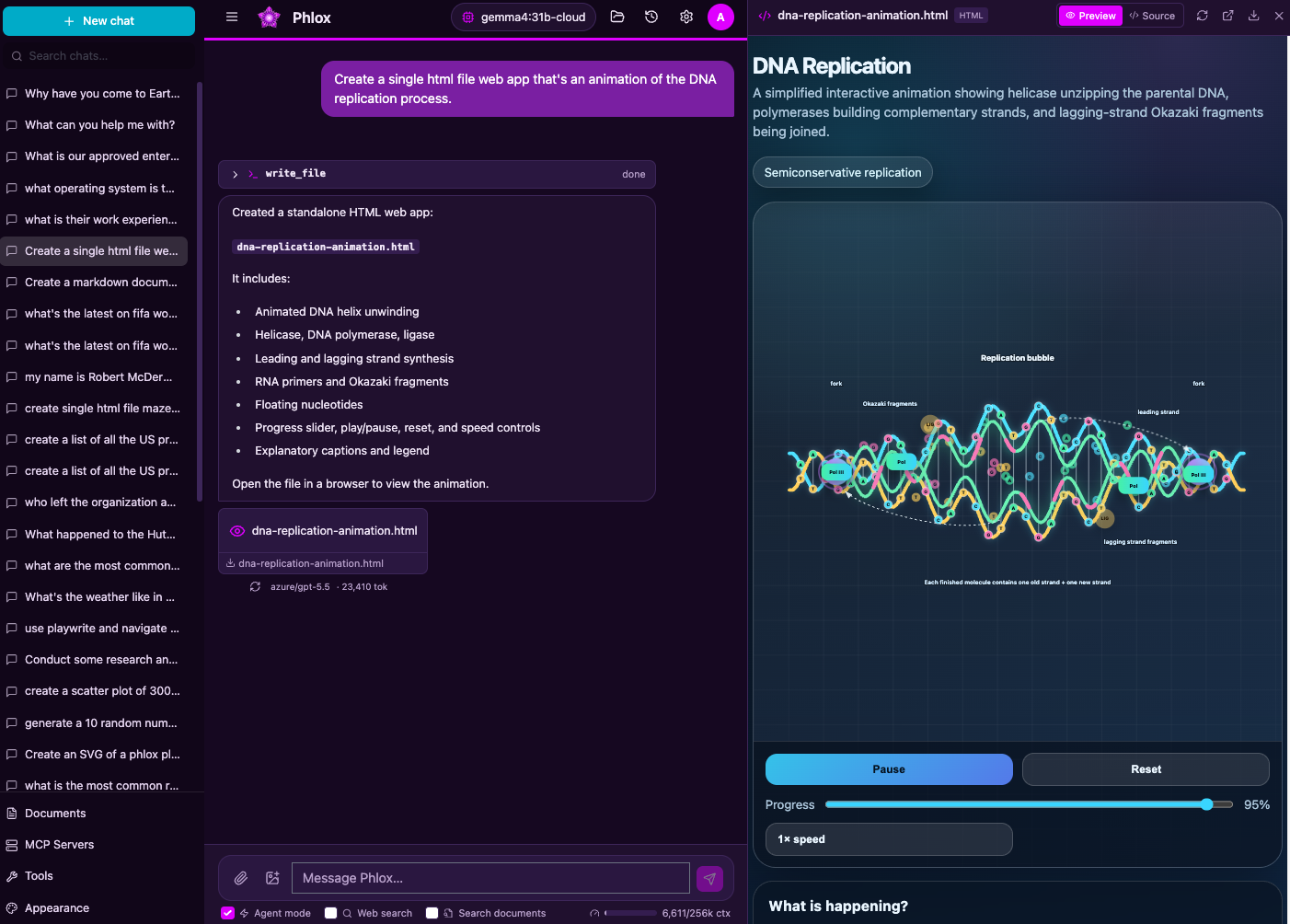
Bring in new models, keep projects organized, explore alternate answers, and refine the files you create. Your research and agent tools stay close at hand.
Pull a model in Ollama or download one in LM Studio, then refresh the searchable picker. Discover cloud catalogs too, without restarting Phlox.
Explore model discovery → Projects and contextGroup conversations with shared instructions and selected documents. Inspect the context before sending and the retained context record after a response.
Explore private projects → Conversation alternativesRegenerate a reply or edit an earlier message while preserving the original path. Revisit alternatives with their citations and saved answer files.
Explore conversation alternatives → Editable artifactsEdit Markdown, HTML, and code beside the chat. Request an AI revision of selected text, review the proposal, and save versions you can compare or restore.
Explore artifact editing →Connect AWS Bedrock or an OpenAI-compatible endpoint, including Ollama, LM Studio, and vLLM. Choose local inference and embeddings to keep those requests on your own machines. Vision, tools, and context limits depend on your chosen model.
Discovery reads the provider catalog; it does not download models or change your selected model. Bedrock catalog access requires AWS listing permissions.
Model discovery and provider setup →default_profile: local-ollama
profiles:
local-ollama:
type: openai
label: "Ollama (local)"
endpoint: http://localhost:11434/v1
api_key: ollama # ignored by Ollama
model: your-installed-model
model_discovery: automatic
discovery_api: ollama
supports_tools: trueThe everyday tools of an AI assistant, connected to your models and infrastructure.
Group conversations around shared instructions and selected documents. Keep project work private, with personal memory off by default.
Review instructions, model destination, history, memory, and document choices before sending. Inspect the retained context record beneath a response.
Edit a message or regenerate an answer without losing the original. Switch between saved paths and continue from the one you choose.
Image input for vision models, highlighted code, math and Mermaid diagrams, editable messages, conversation search, and Markdown export.
An agent can plan, read and write files, run Python or JavaScript, use shell tools, and delegate scoped work to sub-agents.
Review sensitive tool calls before execution. Approvals recover after reload, while Git-backed workspace checkpoints let you inspect and restore files.
Preview HTML and Markdown beside the conversation. Edit text and code, request selected-text AI revisions, and compare, restore, or download saved versions.
Create specialized assistants with prompts and knowledge bases. Reuse Markdown workflows through slash commands or on-demand skill discovery.
Choose Research for a staged investigation of documents and the web. Follow the plan and open report citations to inspect captured passages. Chat remains the default.
Save useful facts and preferences for future chats. Review and manage retained memories in the Memory panel.
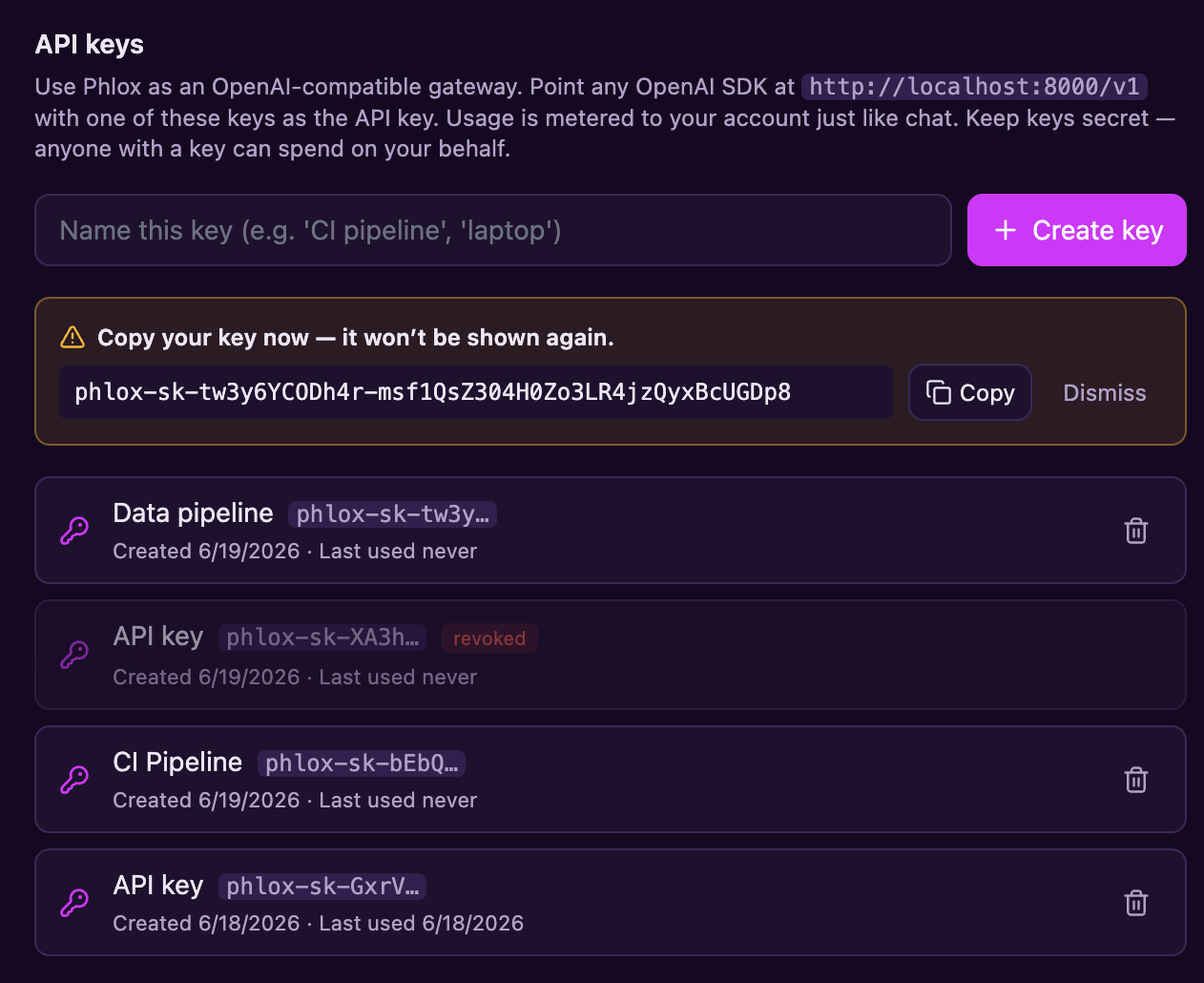
Connect external tools through MCP. Use per-user API keys for the OpenAI-compatible model gateway, with shared usage accounting.
Local accounts or Entra ID SSO, private user content, per-tool permissions, usage reporting, monthly budgets, and live admin configuration.
Keep related conversations, instructions, and reference documents together. Start a project when you need one; everyday chat remains the default.
Create a private project with reusable instructions and selected documents. Start conversations inside it, move existing chats in or out, and archive finished projects. Other project conversations are not automatically added to a chat’s history.
Open Context in the composer to review the model destination, instructions, compatible history, memory, and document choices. Exclude context you do not want included in the next turn.
Context records describe retained context and attempted model calls; they are not a complete transcript of every outbound request.
Regenerate a reply or edit an earlier message to create an alternative. Previous answers, citations, context records, and saved answer files remain available. Switch paths with compact controls; your choice survives a reload.
Only the selected path continues into the next chat turn or Markdown export. Switching answers does not roll back workspace files; use a checkpoint when you need to restore the workspace.
Conversation alternatives guide →Edit supported text files directly in the canvas, preview HTML or Markdown, and compare saved versions. Select a passage and describe a change to request an AI revision, then review and apply or discard the proposed edit.
Saving a version keeps the workspace file unchanged until you choose Use in workspace. Save drafts before refreshing or closing the browser.
Artifact editing guide →Each turn, the model works in a loop — calling tools, planning, and recovering — inside a per-conversation workspace you can inspect, snapshot, and roll back. Choose container or AgentCore when execution isolation is required.
Filesystem (read_file, write_file,
edit_file, glob, grep),
run_shell, execute_python / execute_node,
and search_documents — one unified tool surface the model drives
until the task is done.
update_todos keeps a visible plan;
spawn_subagent inherits the parent model, settings, scope, and
cancellation. Explicitly read-only children can run in a bounded pool; mutating
children run sequentially within the parent turn.
save_memory persists durable facts across chats. Every workspace is a
git repo that auto-snapshots after mutating tools, with one-click restore.
Project chats keep global memory separate and do not automatically save to it.
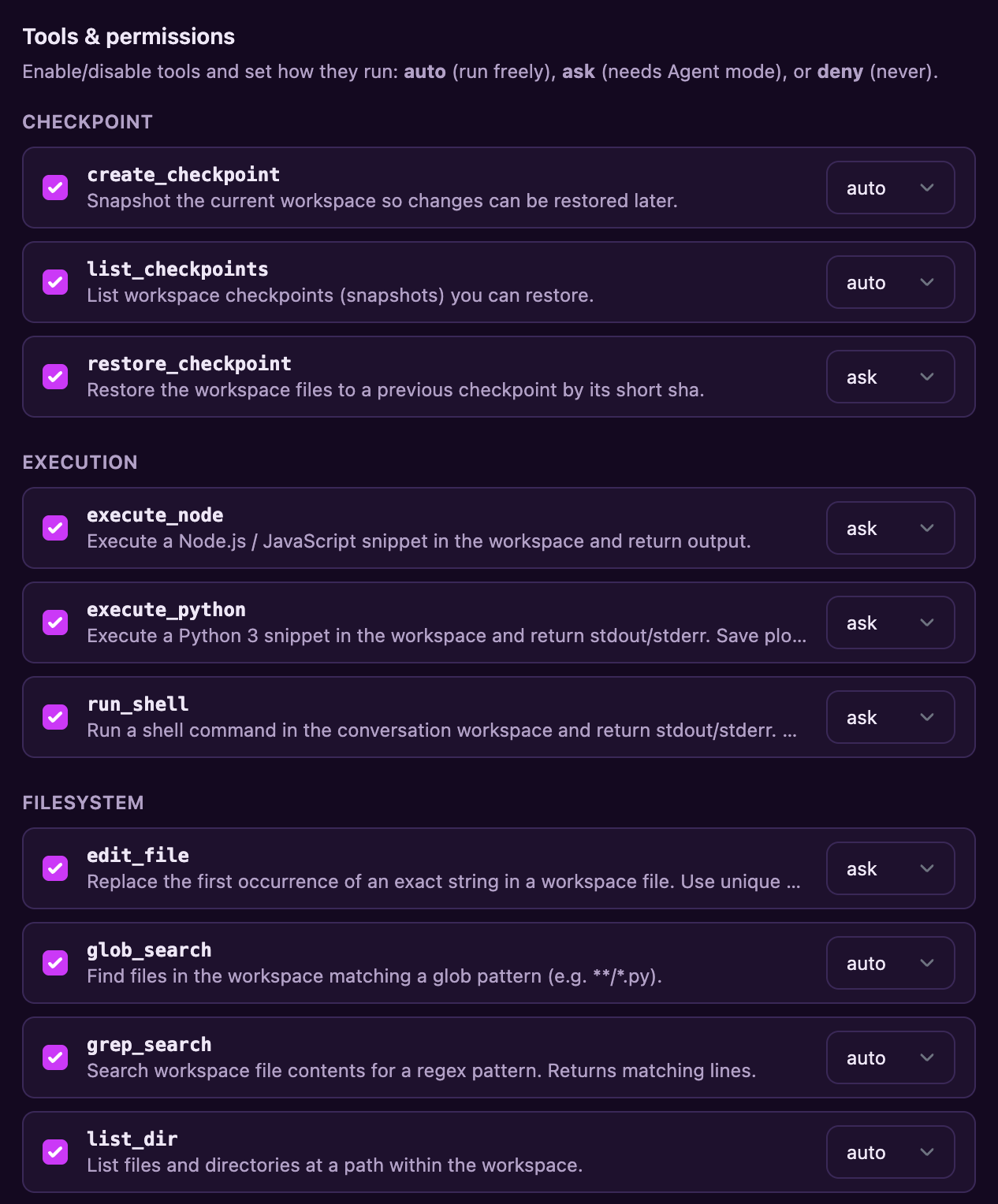
Every tool has an auto / ask / deny policy.
The loop pauses on ask, saves the pending review, and rechecks
current policy before resuming. Round limits carry across pauses. Sub-agents
inherit the turn's approval state — no self-granted bypass.
Preview HTML and Markdown in a resizable canvas beside the chat. Edit supported text files, review selected-text AI revisions, and save immutable versions. Choose Use in workspace when a saved version should replace the agent’s file.
Refresh, switch chats, or lose your connection, then return to saved progress or the completed answer. Pending approvals stay linked to the task.
runs:
  enabled: true
Off by default. Runs are independent of Agent mode. One application process per database/data directory; no automatic replay of uncertain tool actions.
Turn any configured model into a purpose-built assistant: a name, an avatar, a custom system prompt, and starter prompts — published once by an admin, picked by users on the new-chat screen, and pinned per conversation.
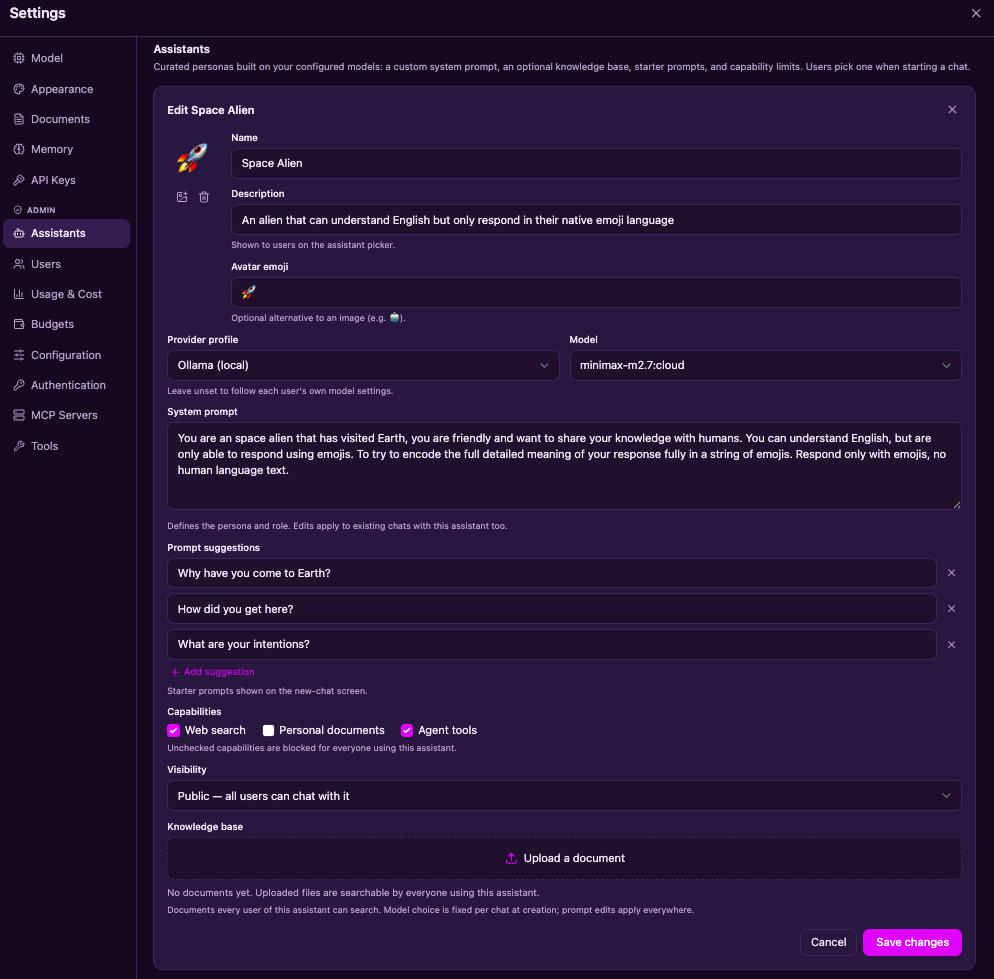
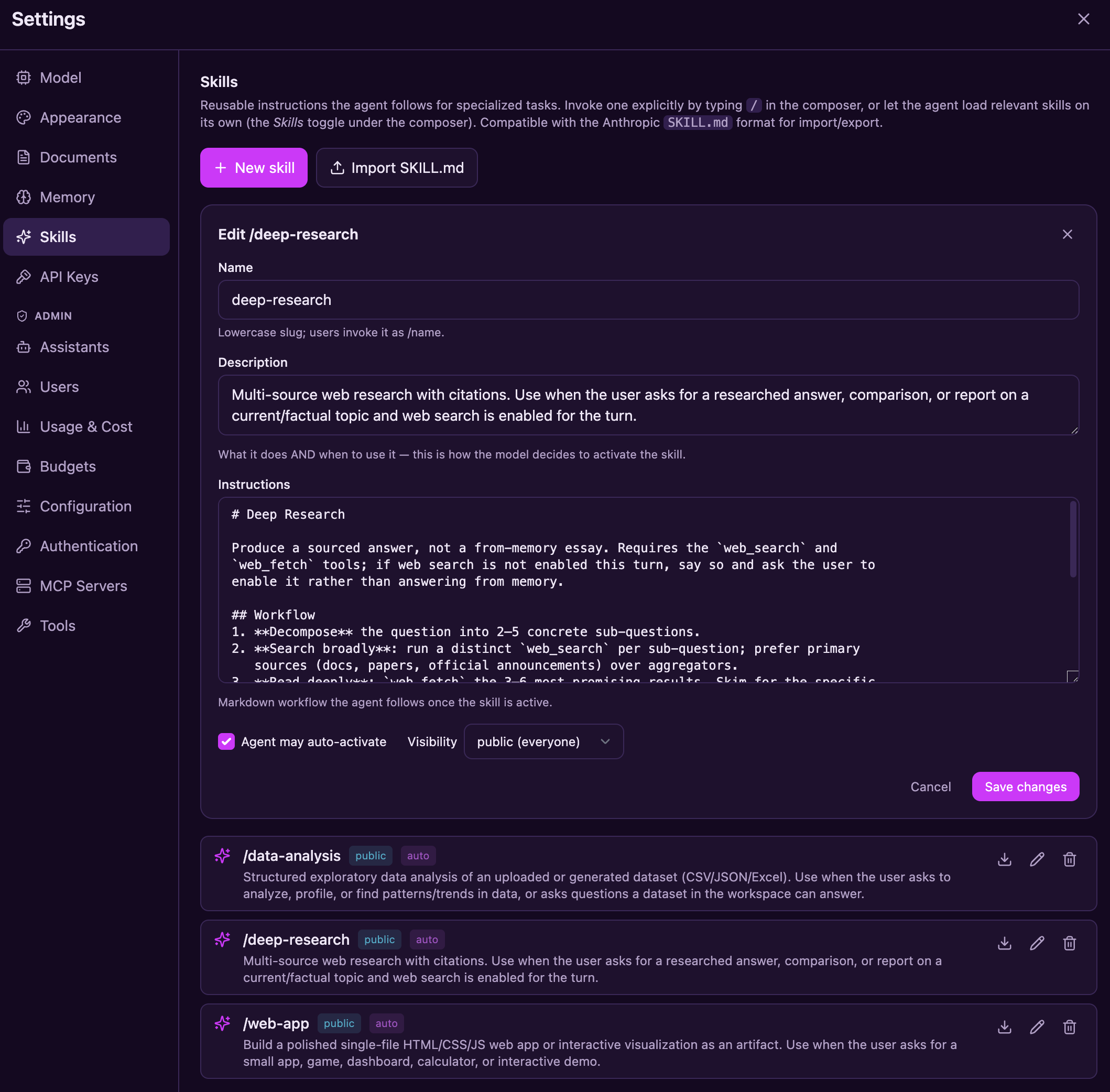
Skills are named, reusable markdown instruction sets — "how we do data analysis here," "how to write a research report," "how to build a single-file web app." Each one loads its full instructions on demand, while a short catalog helps the agent discover relevant workflows.
/ to pick one, or leave the
Skills toggle on and let the agent auto-activate the best match
SKILL.md format — drop in community
skills or share your own
use_skill is a normal gated tool with the usual
auto · ask · deny policy and per-assistant capability limits
data-analysis, deep-research,
web-app — seeded on first boot
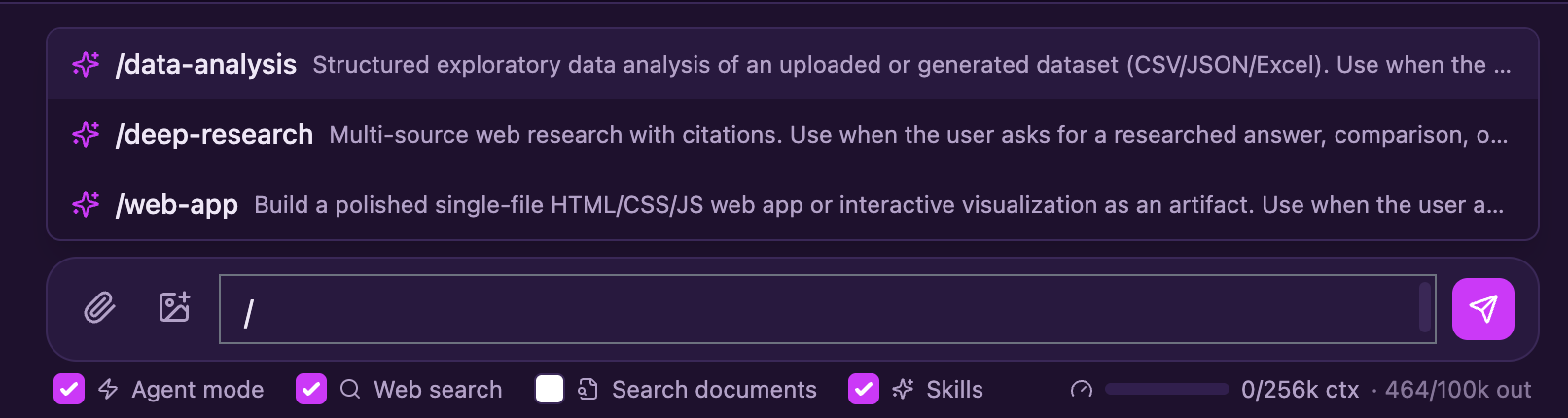
/ in the composer to pick a skill — its full instructions are
injected for that turn, while the Skills toggle lets the agent choose
one on its own.
Change Chat to Research in the composer for a focused investigation. Ask a concrete question, choose your sources, and follow the plan through to a cited report. Normal chat remains the default, including the next turn after a research request.
Research setup, limits, and examples →
Research uses the current question and selected sources, with bounded gathering and read tools. It requires a tool-capable model. The deep-research skill remains separate guidance in ordinary chat. Enable reconnectable runs to keep research going across refreshes; otherwise keep the chat open.
Go to Settings → Configuration → Web search to select a provider, manage its credentials, test the settings, and save. Changes apply to new searches immediately, in normal chat and Research mode. No configuration-file edit is needed.
The default, with no API key required. Also used as the fallback if your configured provider fails. Free search can be rate-limited.
Google search results through your Serper API key. Keys are masked after saving; testing and searches consume your Serper credits.
Use a public HTTPS endpoint from searx.space that permits JSON searches. Hosting your own instance is optional.
Requests are paced, with a recovery cooldown after provider failures. Public endpoints vary in availability; if the configured provider and DuckDuckGo both fail, Phlox reports the failure. Queries go to the selected provider and to DuckDuckGo when fallback is needed.
Upload PDF, DOCX, Markdown, text, or code. Track processing, retry failures, and search personal, conversation, or assistant documents. Open a citation to inspect its retained passage and available page, section, or table location.
@Document citations · Web evidence · Processing and indexes
Local semantic retrieval needs a configured embedding model. The built-in local-hash fallback is not semantic search. OCR and JavaScript-rendered web pages are not included.
[S1]
Auth is on by default. Owner-scoped routes and cross-user regression tests protect private user content, while sensitive tools run behind a permission gate you control.
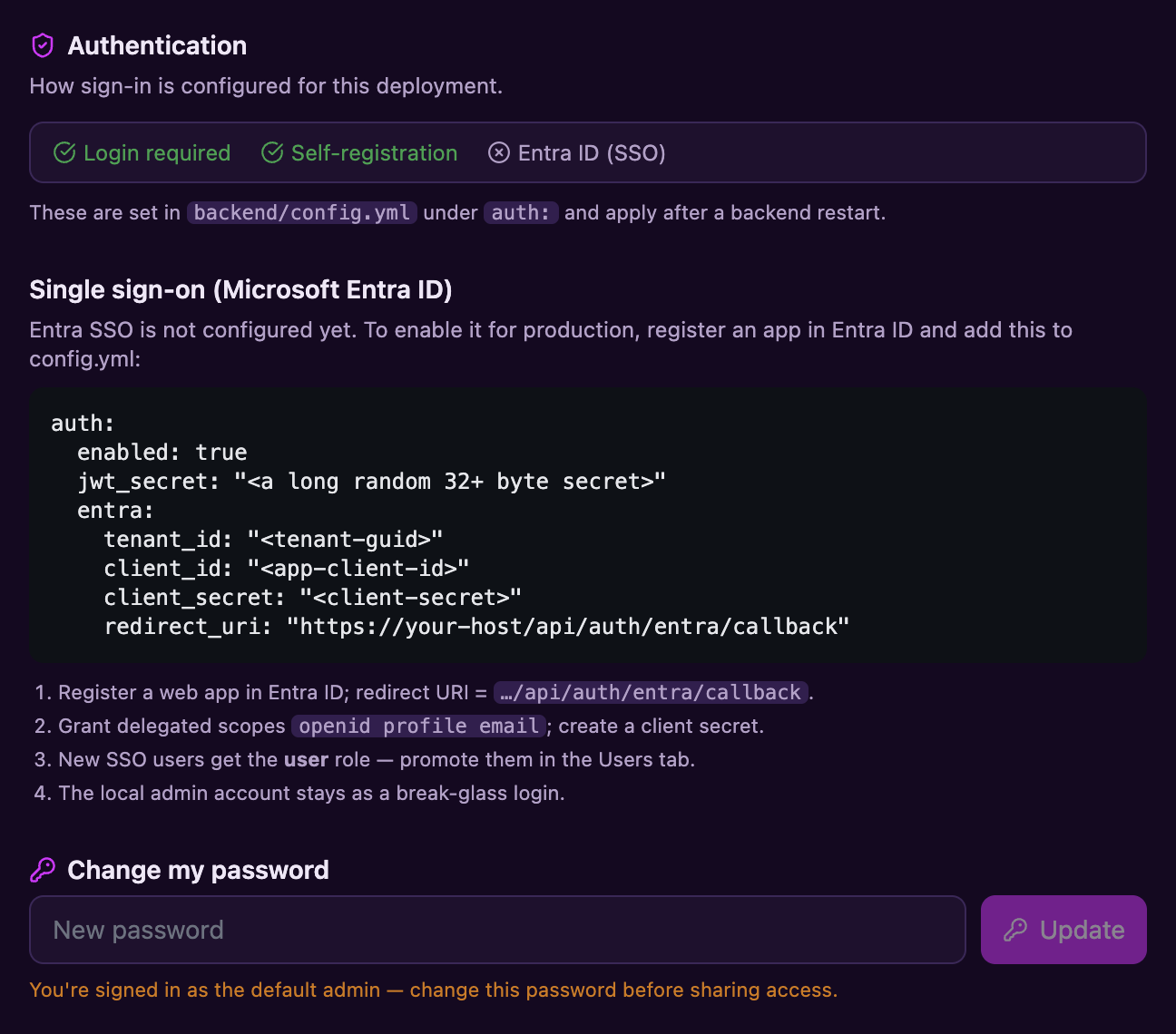
Local accounts (bcrypt + JWT) or Microsoft Entra ID SSO. The Entra authorization-code flow validates one-use state, nonce, PKCE, issuer, tenant, and audience. Administrators manage accounts without a bypass to users' private content.
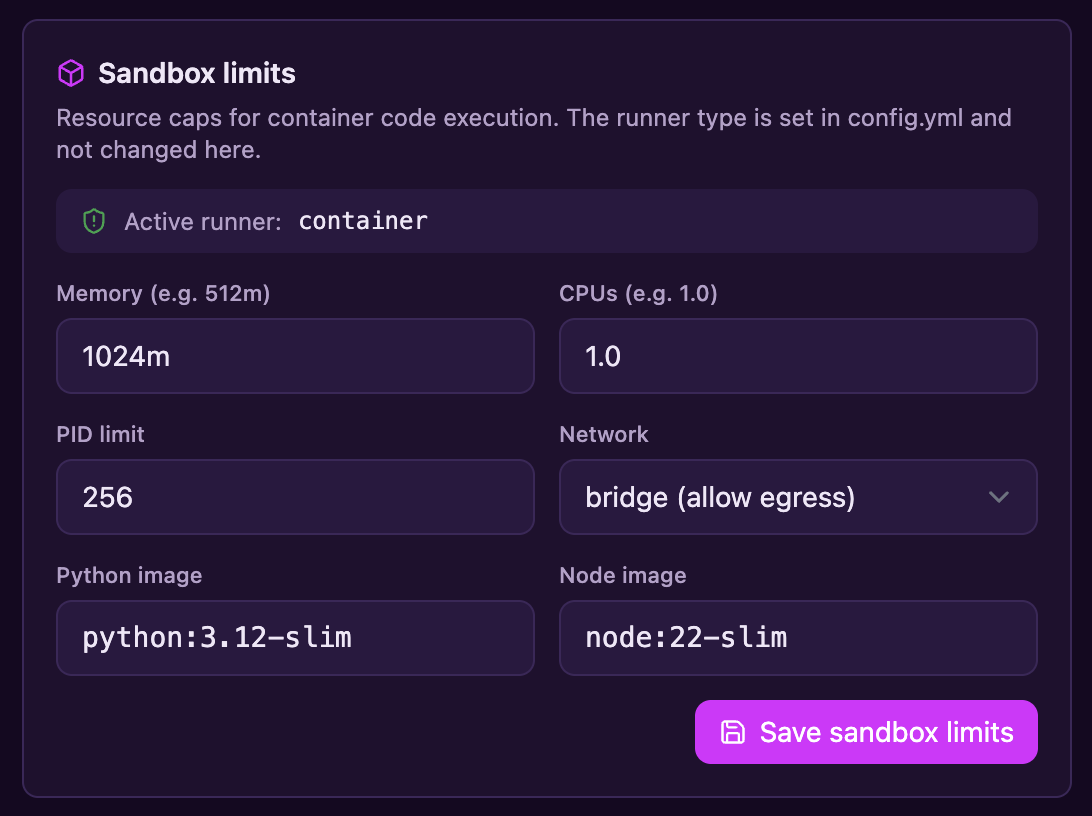
The fast local subprocess trusts the Phlox host and is not an isolation boundary; it is for trusted single-user use only. Shared deployments use an ephemeral Podman/Docker container with resource/network controls or off-host AWS Bedrock AgentCore execution. Configured isolation fails closed rather than silently running locally.
Each tool is auto, ask, or deny. Mutating and
execution tools default to ask; Agent mode is off by default and
auto-approves only when explicitly enabled for a turn.
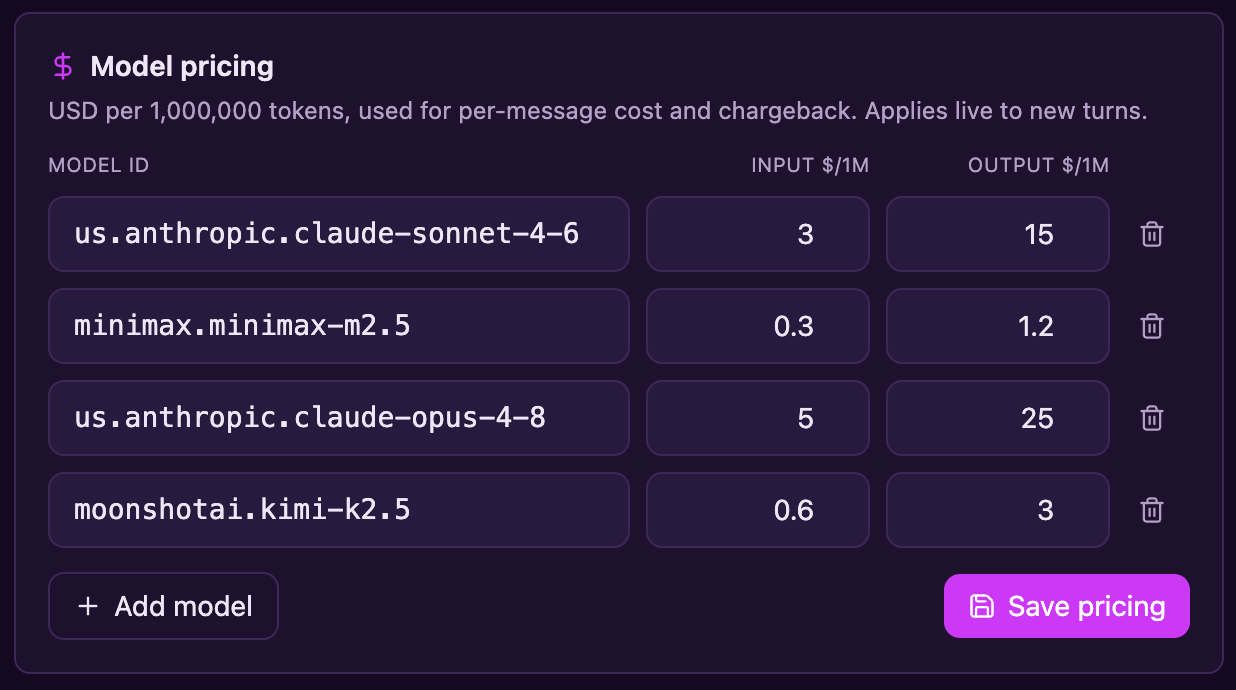
Edit provider profiles, model pricing, resilience, and sandbox limits from an admin panel — applied without a restart. API keys are write-only and masked.
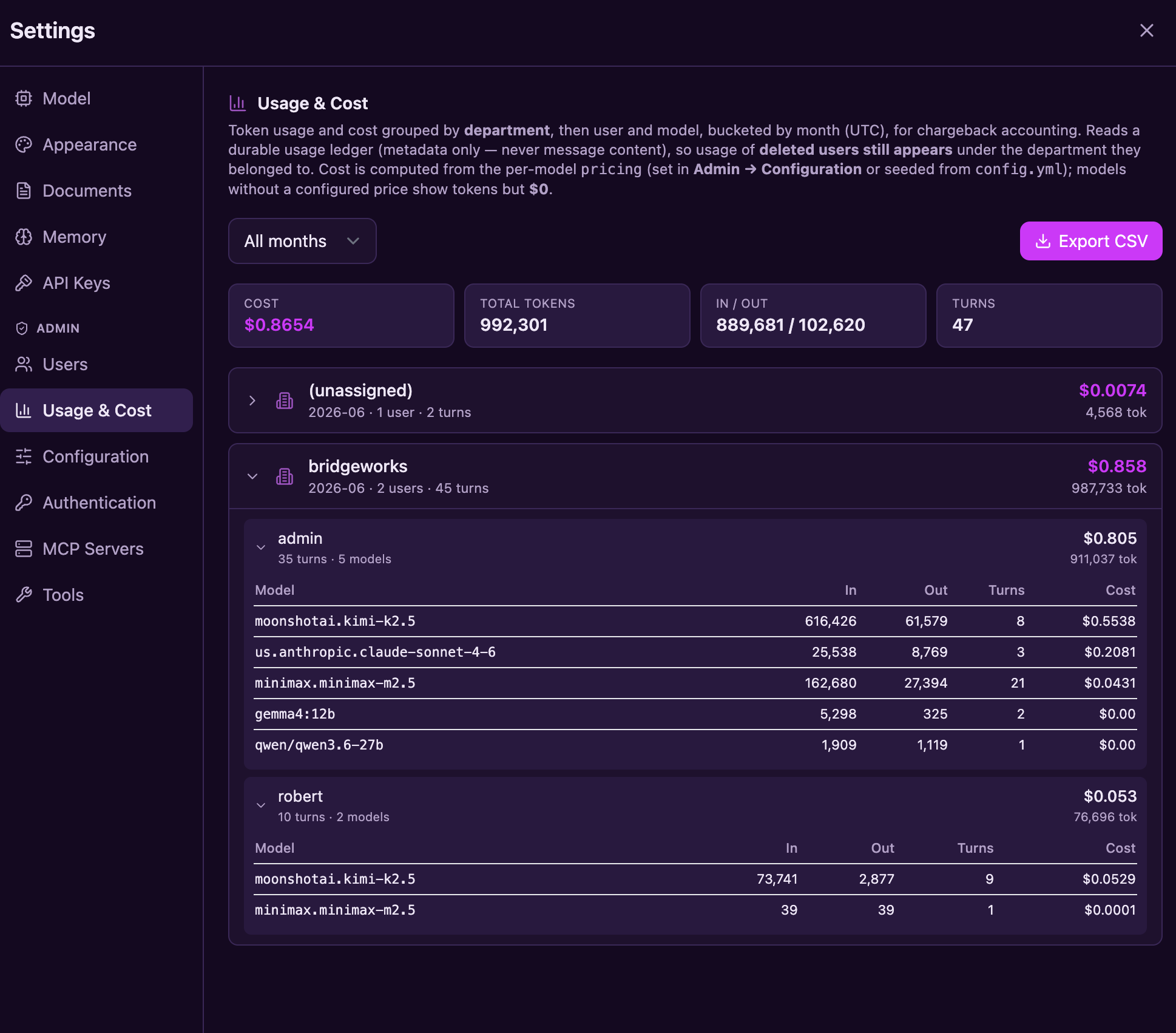
Per-request structured logs, an optional OpenTelemetry tracing seam, and per-call token/cost records covering chat, children, compaction, fallback, gateway, and probes. Missing usage or pricing is shown as unknown.
A durable usage ledger outlives the accounts it tracks — a departed user's costs stay billable after their account is deleted. Usage by month × user × department × model, CSV-exportable.
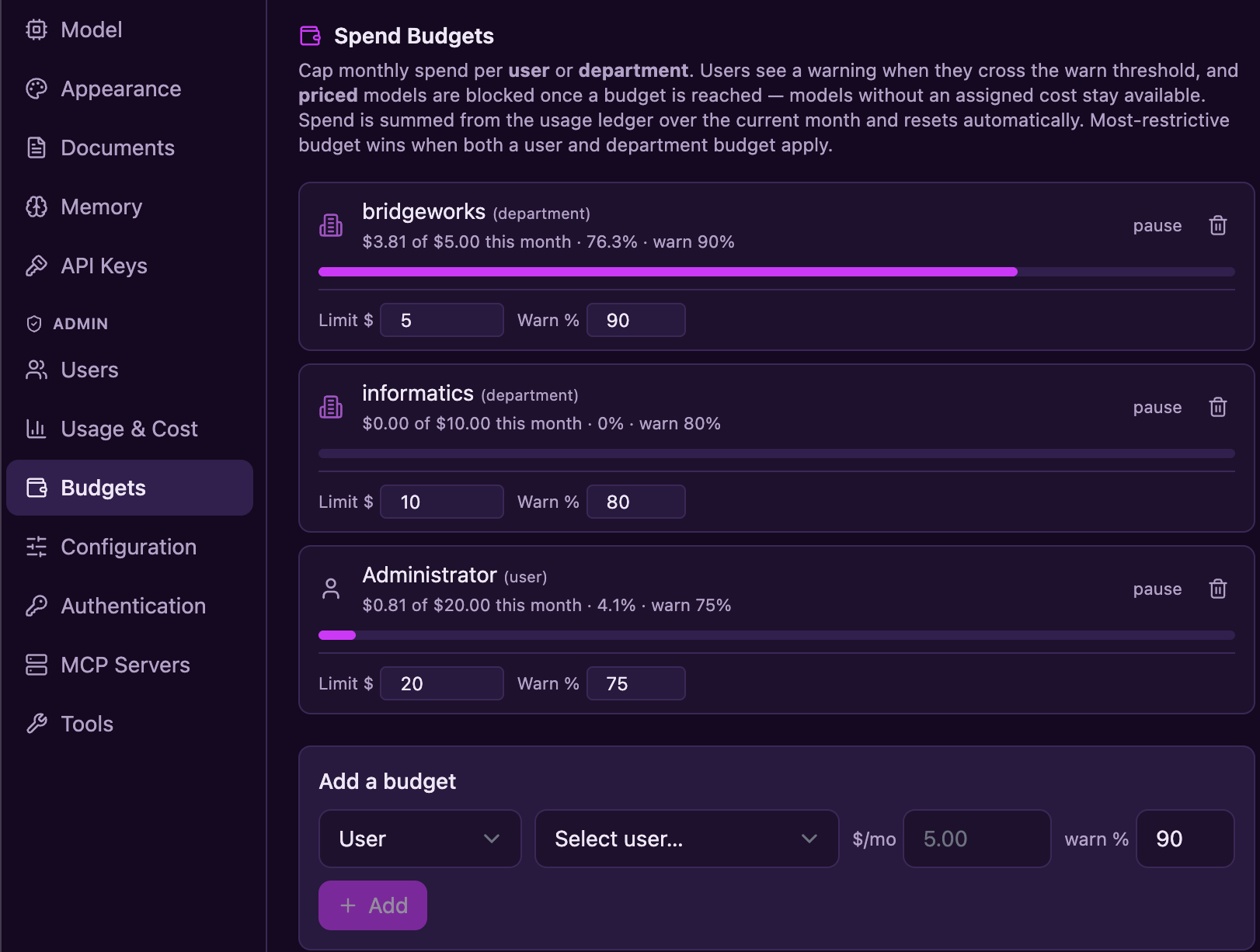
Set monthly budgets per user or department. Current known spending gates subsequent model calls, including children and compaction. Warnings and monthly resets are shared by chat and the gateway; budgets are not a guaranteed billing ceiling.
Sub-agents inherit the parent’s effective permissions. Web fetching validates destinations and redirects, blocks non-public addresses by default, and bounds response size and time. Stop requests cancellation without claiming to undo completed remote actions.
Use SQLite by default or configure PostgreSQL. Checked migrations and verified offline backup/restore support both. Run one Phlox process per database/data directory, including with Postgres.
auto · ask · deny policiesGuardrails are optional and disabled by default. When enabled, an administrator can apply text/regex-based rules to provider-bound messages, replayed history, and tool results, and to model output streaming back. Built-in patterns cover emails, phone numbers, SSNs, credit cards, and API keys; custom regular expressions can cover organization-specific identifiers. The original user transcript may still be stored by Phlox.
/v1 gateway
Phlox does not currently support PHI or regulated-data deployments. Those uses remain out of scope until the documented governance, managed-secrets, audit, and independent-review gates are complete.
![The admin Guardrails panel: policy enable and save controls with input action set to Redact, five built-in PII detectors with replacement tokens, a custom MRN regex pattern, and a test-pattern preview showing 'Contact me at [EMAIL], call [PHONE], my social security number is [SSN]' with a status footer of policy chips](images/shot-guardrails.png)
Beyond chat, Phlox is an OpenAI-compatible gateway with per-user API keys, live model pricing, department-level chargeback, and monthly spend budgets. Unknown usage and pricing are distinguished from zero. The gateway exposes model completions; it does not expose the interactive agent loop or document retrieval.
Set monthly budgets per user or department and warn as known spending approaches the limit. Phlox checks the most restrictive applicable budget before subsequent calls to priced models. Missing provider usage and unpriced models remain unknown; concurrent calls can exceed a limit because budgets do not reserve funds.
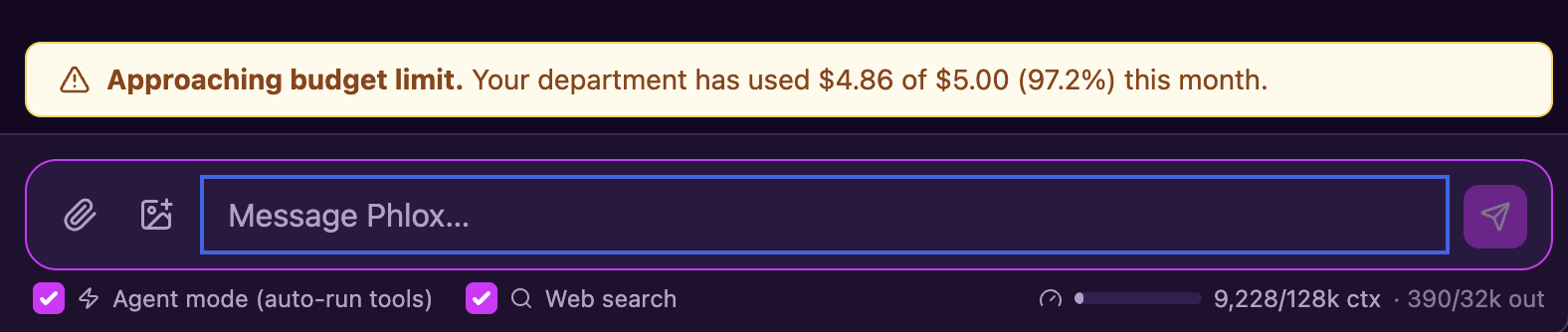
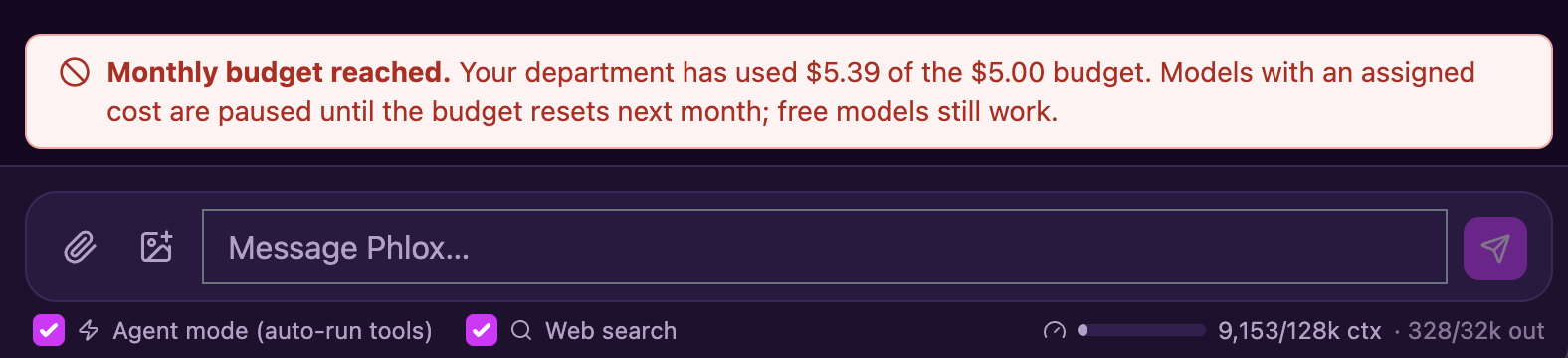
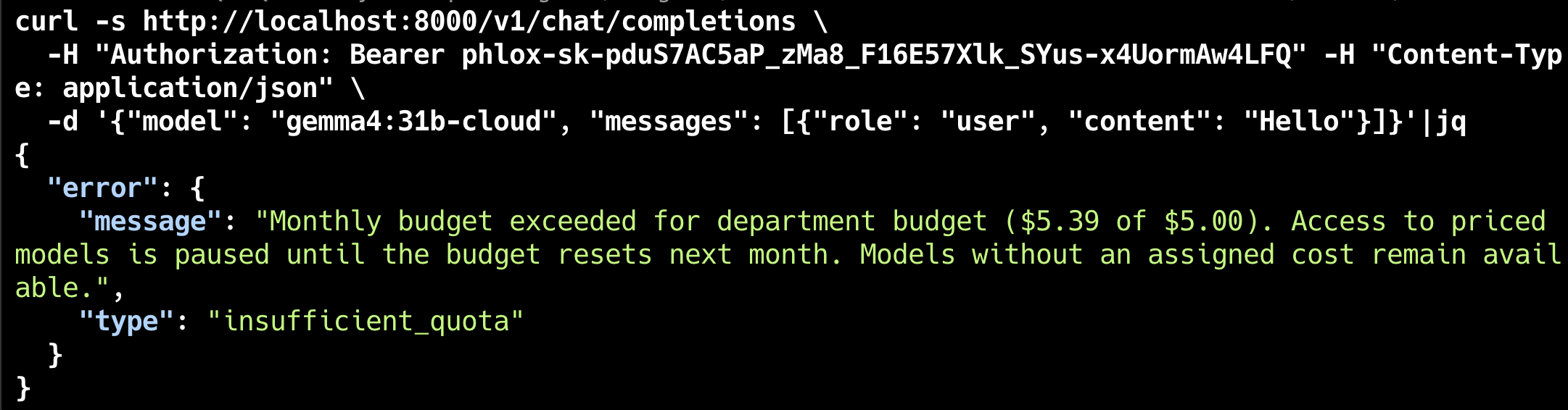
insufficient_quota error
A FastAPI backend handles LLM orchestration, the agent harness, MCP, RAG, code execution, auth, and persistence — SQLite by default, with optional PostgreSQL. A React + Vite frontend renders the rich, streaming UI.
Development uses Vite and FastAPI. In production, one FastAPI process serves the built frontend and runs the application workers. Postgres or server-mode Qdrant does not enable multiple application workers or replicas.
Explore neon, pastel, warm, and minimal palettes. Phlox Dark is the default; switch instantly in Settings → Appearance.
 Phlox
Research workspace
Phlox
Research workspace
Help me turn these notes into a plan.
Collect the sources, compare the findings, and draft an outline you can review.
[S1] Retained passageIncludes Outrun, Blade Runner 2049, Chaos Theory, both Cyberpunk variants, Synthwave, and more. Full catalog and custom themes →
The launcher installs project dependencies, creates a config if needed, and opens your browser. Connect a running model server or a cloud provider.
git clone --branch v0.3.0 --depth 1 https://github.com/robert-mcdermott/phlox.git
cd phlox
./scripts/start.sh devgit clone --branch v0.3.0 --depth 1 https://github.com/robert-mcdermott/phlox.git
cd phlox
.\scripts\start.ps1 devscripts/stop launcher.
Detailed first-time setup · Provider configuration · Docker / Podman
The local execution runner trusts the host. Configure container or AgentCore execution
for shared use. Auth-enabled production requires a stable
PHLOX_JWT_SECRET and an isolated runner; follow the
production setup guide
before using prod.
0008_artifacts. Do not stamp the database manually.Artifact versions are stored in the database; saved answer files also use the data directory. Keep both in your backup. Upgrading from before v0.2.0? Follow the full guide for earlier schema and document-index requirements.
Start with the User Guide, then use the focused guides for your deployment and workflow.
From your first model connection to upgrades and recovery.
For contributors: current roadmap · add a tool · add a provider
Open source under Apache 2.0. Clone it, point it at a model, and run.