
Connecting other systems
This guide is for whoever connects GovWren to the systems around it: purchasing, ethics review, data access, tickets, and chat.
GovWren stays passive. It does not reach into other systems, scan them, or read their logs. Other systems ask it a question, or it tells them that something happened. The two tools for that are the checkpoint and webhooks, and this guide shows how to use them for five common jobs.
The programs it mentions are in the examples/ directory of the repository. Each needs only Python's standard library, and each is short enough to read before you run it.
The idea: cite a reference, then check it#
Every use of AI that GovWren knows about has a reference, such as UC-0042. Every tool in the catalog has one too, such as SYS-0007.
The pattern is the same wherever you apply it:
- A form in another process asks for the GovWren reference.
- The system behind the form asks the checkpoint whether that reference is approved, and for what data.
- It goes ahead only on a yes.
This does more for coverage than any announcement. People record their use of AI because the next thing they want to do asks for the reference.
Make a token for the other system#
Each system that asks the checkpoint needs a token.
- Make an account for the system, such as
purchasing-system@example.org, with no roles beyond the ordinary. - Sign in as that account, open Your account, then Manage your tokens, and make a token with the scope checkpoint.
- Give the token to whoever runs the other system. It is shown once.
A checkpoint token can ask whether references are approved and can do nothing else. It learns a record's standing, never its content, and is given a record's name only if its account could see the record anyway. A restricted record, or someone else's draft, answers as if it did not exist unless the account may see it; if the other system must check restricted records, give its account the auditor role.
Every token stops working on its end date, a year at most from the day it is made. Make a new one before then, and put the date in the other system's runbook.
Ask from a script#
examples/checkpoint.py asks the question and reads the answer:
export GOVWREN_URL=https://ai.example.org
export GOVWREN_TOKEN=gw_...
python3 examples/checkpoint.py UC-0042 protected
Yes. UC-0042 is approved for protected data until 2027-05-01.| It exits with | Meaning | What your system should do |
|---|---|---|
| 0 | Approved, and it covers that class of data | Go ahead |
| 1 | Not approved, not for data that sensitive, or no such reference | Stop, and show the person the sentence it printed |
| 2 | GovWren could not be asked | Hold the request and try again. Never treat this as a yes |
To call it from your own code instead, copy its two functions, ask and decide.
Recipe: purchasing#
The job: nobody buys or renews an AI tool that governance has not approved.
- Add a field to the purchase request: GovWren reference for this tool. Say where to find it: the tool's page in the catalog.
- When a request names an AI tool, check the tool's reference, which begins
SYS-:
``bash
python3 examples/checkpoint.py SYS-0007
``
- On a no, send the requester to GovWren to ask for the tool to be evaluated. On a yes, record the reference on the purchase order.
For a renewal, check again. A tool approved last year may have been withdrawn.
To hear about changes without asking, add a webhook for An AI system's or a model's standing in the catalog changes, and have purchasing's system flag open orders for a tool that is no longer approved.
Recipe: ethics review#
The job: a protocol that uses AI on human-subjects data names the use, and the use is approved for that data.
- Add a question to the application: Does this study use AI on participants' data? If so, give the GovWren reference.
- Check the use case, which begins
UC-, for the class of data the protocol involves:
``bash
python3 examples/checkpoint.py UC-0042 restricted
``
- A no because the approval covers less sensitive data is the useful case. The researcher declares a change in GovWren, and the use is reviewed again for the new data.
Going the other way, a reviewer in GovWren can record the protocol number on the use case under Point to other systems, so that each record names the other.
Recipe: data access#
The job: a dataset is released for use with an AI tool only if that tool may hold data of its class.
- The data access request asks which AI tool, if any, the data will be given to, by reference.
- Check the tool for the dataset's class:
``bash
python3 examples/checkpoint.py SYS-0007 protected
``
- On a no, the answer says what the tool is approved for, which is usually enough for the requester to choose another tool.
If the use of the data is itself a use of AI, ask for the use case's reference as well and check it the same way.
Recipe: a ticket when an incident is reported#
The job: the service desk hears of an AI incident at once, in the system it already works in.
- Run
examples/webhook_receiver.pysomewhere the service desk's system can be reached from, behind a reverse proxy with TLS:
``bash
export GOVWREN_WEBHOOK_SECRET=whsec_...
export FORWARD_URL=https://desk.example.org/api/incoming/abc
export GOVWREN_URL=https://ai.example.org
python3 examples/webhook_receiver.py 8099
``
- In GovWren, under Admin → Webhooks, add a webhook to the receiver's address for An incident is reported. Copy the signing secret it shows into
GOVWREN_WEBHOOK_SECRET. - Choose Send a test. The receiver passes on
A test message from GovWren arrived.
The receiver checks each message's signature, refuses one more than five minutes old, and passes on a message that arrives twice only once. What it passes on is one line with a link:
An incident was reported: INC-0003. https://ai.example.org/incidents/INC-0003The message says that an incident was reported and where to read it. It does not say what happened: that stays in GovWren, for the people allowed to see it. To make a ticket rather than a line of text, change the receiver's forward function to send what your ticket system expects.
Recipe: decisions in a chat channel#
The job: the governance team's channel shows each decision as it is made.
Most chat systems give a channel an incoming webhook address that accepts JSON with a text field. The example receiver sends exactly that.
- Create an incoming webhook for the channel in your chat system, and set
FORWARD_URLto its address. - In GovWren, add a webhook for A review is decided, and for A use case's standing changes if you want lapses and suspensions too.
UC-0042 was decided: approved with conditions, until 2027-05-01. https://ai.example.org/use-cases/UC-0042Post decisions to a channel only governance reads. A reference and an outcome are not secret, but a public feed of who was declined is not kind.
Recipe: results from an evaluation or a monitor#
The job: when a model's nightly evaluation fails, or a monitor sees drift, it shows on the model's record and its owners hear about it.
GovWren does not fetch results. The tool that has them pushes a short summary, called a signal, and GovWren keeps it as evidence on the record.
- Make an account for the tool, and a token for it with the scope signal. That token can push signals and do nothing else. It cannot read anything. It pushes onto the records its account can see in full; to let it push onto any record, give the account the auditor role, which reads everything and changes nothing. A record it may not push onto is answered exactly as one that does not exist.
- Have the tool call GovWren when it has something to say:
``bash
export GOVWREN_URL=https://ai.example.org
export GOVWREN_TOKEN=gw_...
python3 examples/push_signal.py MDL-0007 fail "Nightly accuracy check" \
--source "Eval harness" --kind evaluation \
--summary "Accuracy fell from 0.94 to 0.81 on the held-out set." \
--url https://eval.example.org/runs/881
``
``text
Kept as EV-0231 on MDL-0007.
``
| You send | Means |
|---|---|
ref | The record the result is about: a model, a system, a use case, or a dataset |
result | pass, warn, fail, or info |
title and source | What was checked, and which tool is saying so |
kind | evaluation, monitoring, scan, or other |
summary | A few sentences. Never the data itself |
url | Where the full result can be read, in the tool that produced it |
good_until | The day this result stops being current. GovWren reminds the owner before then |
What happens next:
- The signal appears with the record's evidence, dated, with the tool's name and the result.
- On
warnorfail, the record's owners get a notice with a link to the record. - A failed result does not change the record's standing by itself. It is a prompt for a person: the owner decides whether to report an incident or declare a change.
- If a control asks for this kind of evidence, attach the signal's evidence to the control when you check it.
Send only what matters. A pass every night is noise; a pass each week with a good_until a week later keeps the evidence current without filling the record.
An AI assistant that can read GovWren#
The job: a researcher asks their AI assistant "may I use this tool with patient data?" and gets GovWren's answer, or asks it to start a request and finds a draft waiting.
GovWren includes an optional tool server for assistants. It speaks the Model Context Protocol, which many assistant programs use to reach tools. It is not needed to run GovWren, and nothing runs unless you start it.
What an assistant can and cannot do#
| It can | It cannot |
|---|---|
| Search records, and read one | Submit a request |
| Look a tool up in the catalog | Approve, decline, or decide anything |
| List the policies in force, and read one | Read a policy that is still a draft |
| Ask the checkpoint whether a reference is approved | Change a record |
| See what is waiting on the person | See anything the person cannot |
| Read the request form's questions | |
| Begin a request as a draft, and fill in answers |
A draft is only a draft. It sits in GovWren until the person opens it, reads every answer, and submits it themselves. The assistant is told to say so and to give the link.
The assistant works as the person. It uses an API token the person made, so it sees exactly what that person sees.
Set it up#
- In GovWren, open Your account, then Manage your tokens, and make a token. Choose read if the assistant should only look things up, or write if it may also draft requests. Give it an end date.
- Tell your assistant program to start GovWren's tool server. Most take a configuration like this:
``json
{
"mcpServers": {
"govwren": {
"command": "uv",
"args": ["run", "--directory", "/path/to/govwren", "govwren", "tools", "serve"],
"env": {
"GOVWREN_URL": "https://ai.example.org",
"GOVWREN_TOKEN": "gw_..."
}
}
}
}
``
- Ask the assistant something GovWren knows: Is SYS-0007 approved for protected data?
The tool server needs GovWren's code on the person's machine, but no installation of it: it only calls your GovWren over the network.
What to think about first#
- What the assistant reads goes to its provider. A record's content is sent to whichever AI service the assistant uses, like anything else the person shows it. Before you tell people about this, check that the assistant is one your organization has approved for the class of data in your records. GovWren's own catalog is the place to record that.
- A token is a key. It sits in the assistant's configuration file. Use an end date, and revoke it when the person stops using the assistant.
- Start with read. A read token cannot create anything.
Model details from your registry#
The job: when your model registry says a model has a new version or a different license, the model's record in GovWren says so too, once a person has agreed.
This is the one thing GovWren fetches by itself, and it is off unless you switch it on. Everything else in this guide is another system asking GovWren, or GovWren telling another system.
What it does, exactly#
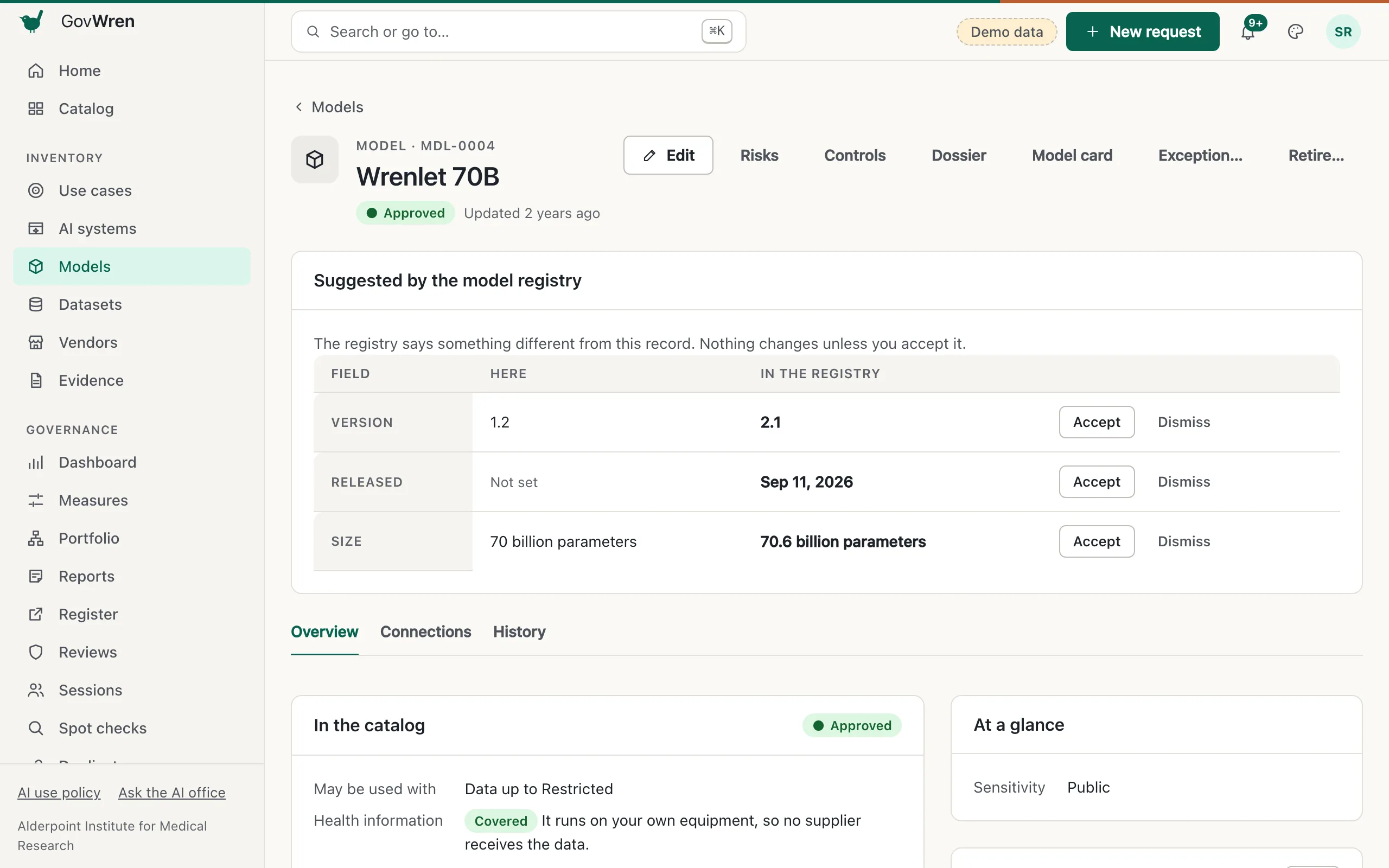
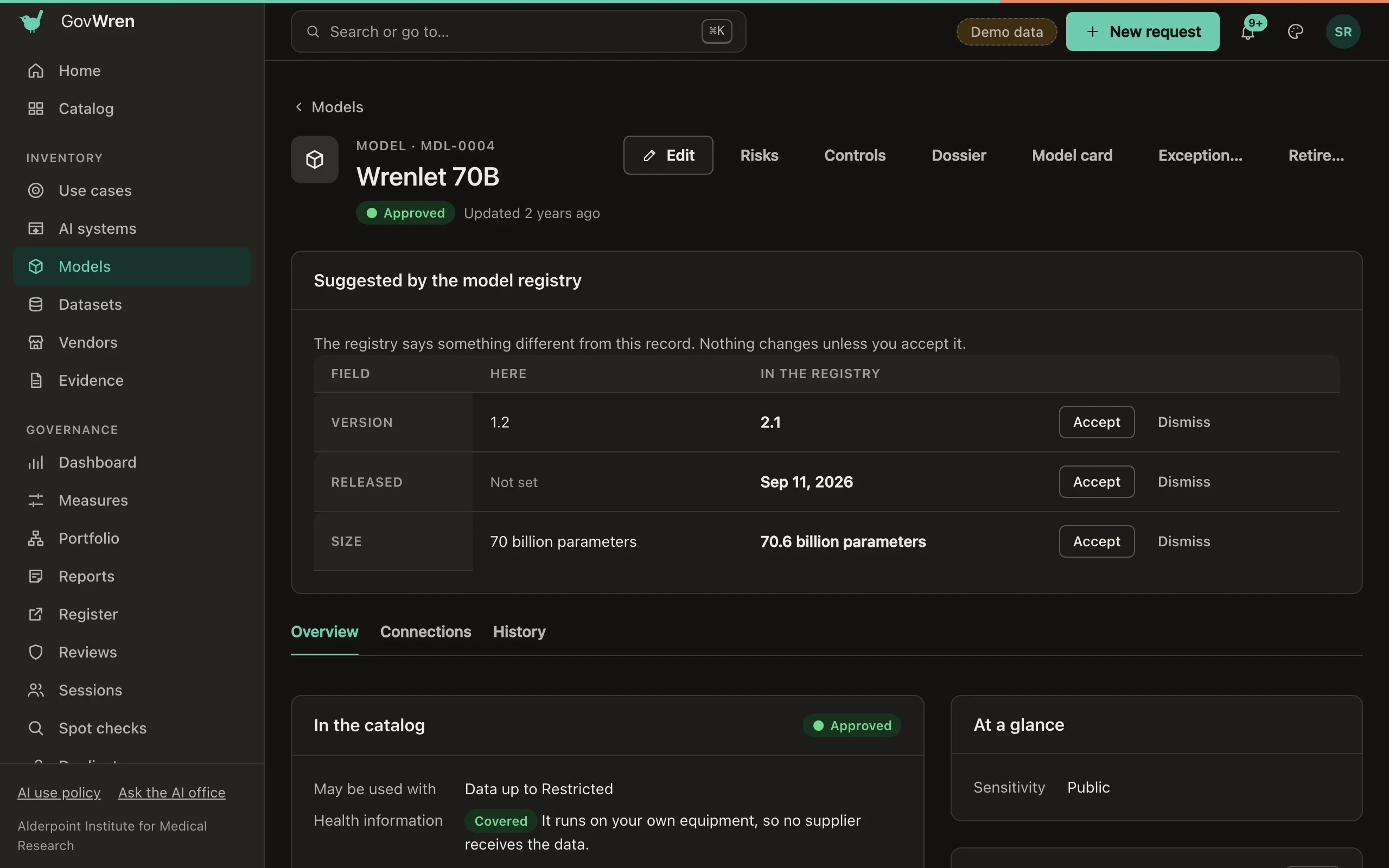
- Once a day, for each model that has a Name in the model registry, GovWren sends one
GETto your registry. - It compares the answer with the record. Where they differ, it leaves a suggestion on the model's page.
- Nothing on the record changes until someone who can edit the record chooses Accept. Accepting is that person's own edit, in the history under their name.
- Dismiss leaves the record alone, and the same suggestion is not made again.
- GovWren never writes to the registry.
Switch it on#
- In
govwren.toml, name the registry:
``toml
[registry]
url = "https://registry.example.org/api/models"
``
If the registry needs a token, put it in the environment variable GOVWREN_REGISTRY_TOKEN. GovWren sends it as a bearer token.
- On each model that should be followed, set Name in the model registry to what the registry calls it, such as
lumen/lumen-large. A name is made of letters, digits, and. _ : @ + -, with slashes between its parts, so that the request goes to that model's place in the registry and nowhere else on its server. - Restart the server. The job Model registry then runs once a day, and an administrator can run it at once under Admin → Scheduled work.
For a model named lumen/lumen-large, GovWren asks for https://registry.example.org/api/models/lumen/lumen-large and expects JSON. It reads these and ignores everything else:
| The record's field | Read from the first of these that is present |
|---|---|
| Version | version, version_label, revision |
| License | license |
| Released | released, release_date, released_on |
| Withdrawn | deprecated, deprecation_date, deprecated_on |
| Size | parameters, size |
| Published model card | card_url, model_card, card |
| Summary | summary, description |
If your registry answers in another shape, put a small service in front of it that answers in this one. A model the registry does not know answers 404, and nothing is suggested.
What to know#
- Only models are followed, and only those with a registry name.
- A value is suggested as text. A date must be a date, and a model card's address must begin
https://. Anything else is ignored. - GovWren follows no redirect, reads at most 1 MB, and waits ten seconds.
- A registry that cannot be reached changes nothing, and the job's run says how many models could not be asked.
An assistant inside GovWren#
The job: a requester describes what they want in a sentence and gets a form that is half filled in. A committee member gets a few lines of orientation before reading a long packet. Anyone can ask "is this tool approved for patient data?" or "what does our policy say about publications?" and get a short answer that says where it came from.
GovWren can use an AI model for these three things. It is optional. It is switched off unless you configure it, and while it is off nothing in GovWren mentions it: no button, no menu entry, no setting. The third, Ask GovWren, also stays off until an administrator turns it on.
This is different from the tool server, where a person's own assistant reads GovWren. Here GovWren itself asks a model you choose.
What it does, and what it never does#
| It does | It never does |
|---|---|
| Suggest answers on the request form, from the requester's own description | Submit a request |
| Summarize a review for the people reviewing and deciding it | Recommend or make a decision |
| Answer questions about the tools, uses, and policies here, from what the person asking may see | Change a record |
| See a request above the class of data you allow | |
| Show anyone a record they may not see |
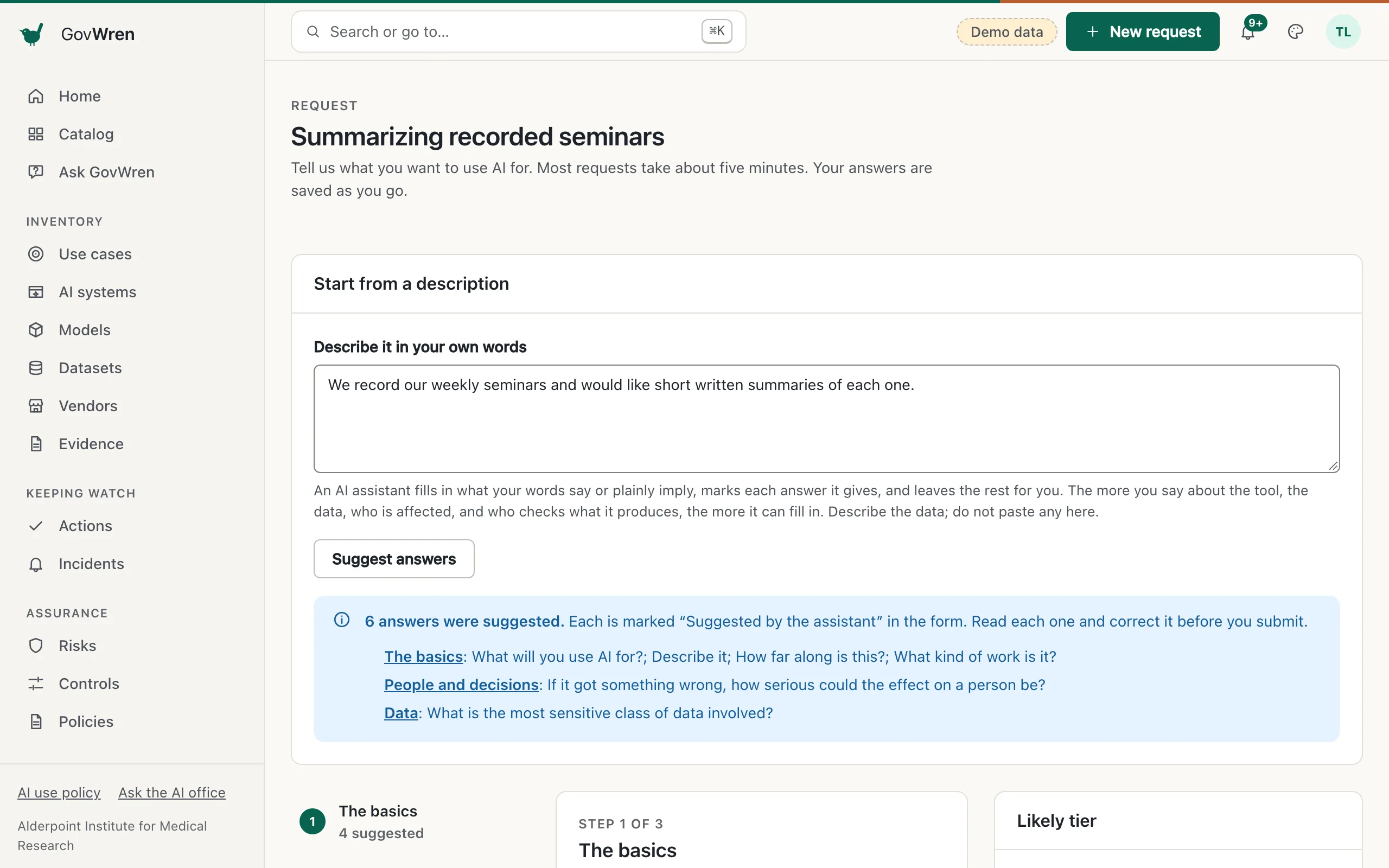
Suggested answers go into the form for the person to read. Only answers the form would accept are kept: an answer that is not one of a question's choices is dropped. Which unit a request belongs to and which tools it uses are never suggested. Nothing is saved until the person continues the form themselves, and nothing is submitted until they submit it.
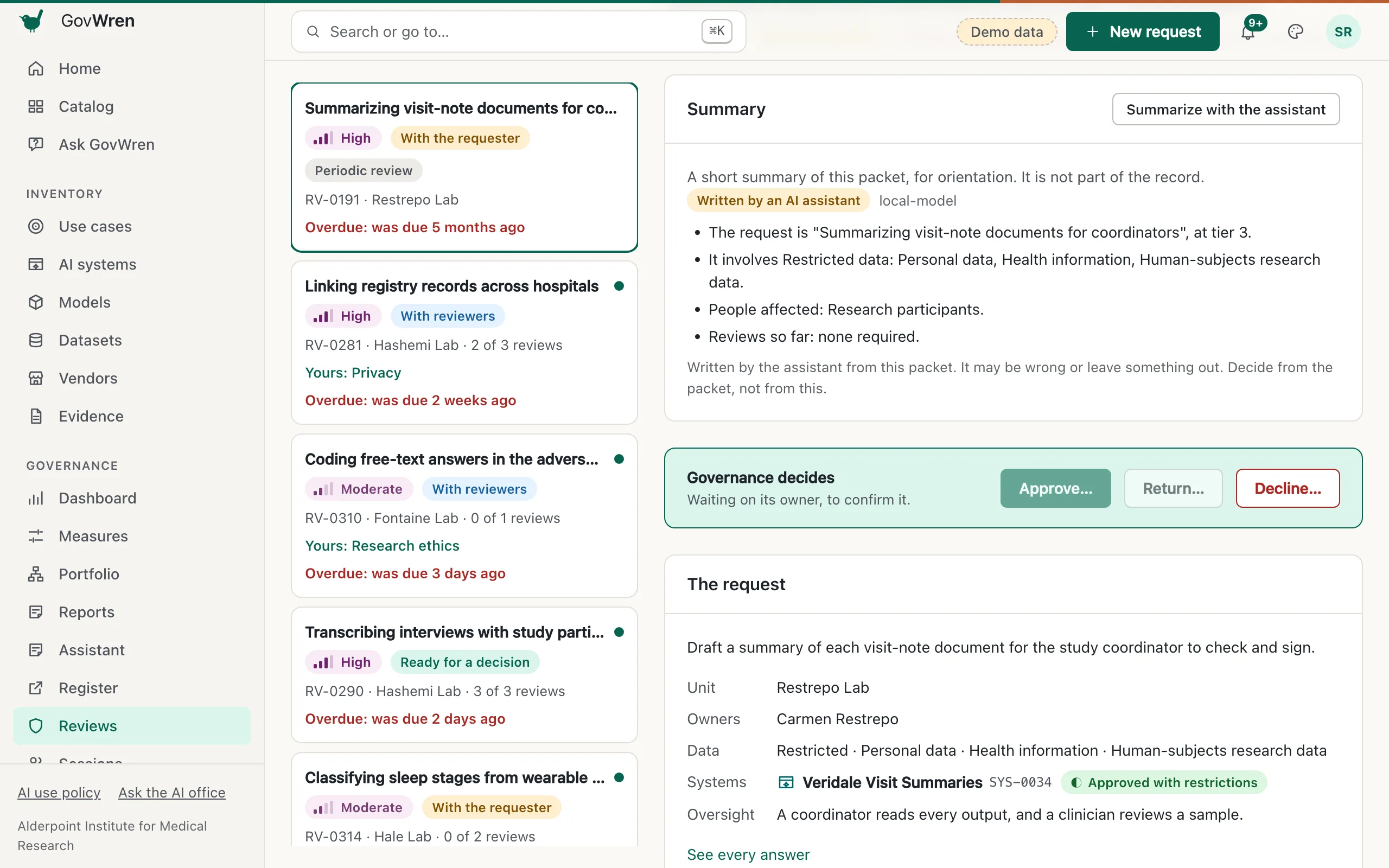
A summary is shown beside the packet, marked as written by an AI assistant, with the model's name. It is not kept on the record and is not part of the decision. Requesters never see it.
Ask GovWren#
Ask GovWren is a page where anyone may ask a question in their own words: "Is the enterprise chat assistant approved for patient data?", "What does our policy say about using AI in publications?", "What is waiting on me?" The answer is a few sentences, each part citing where it came from, and the sources are listed beneath it as links.
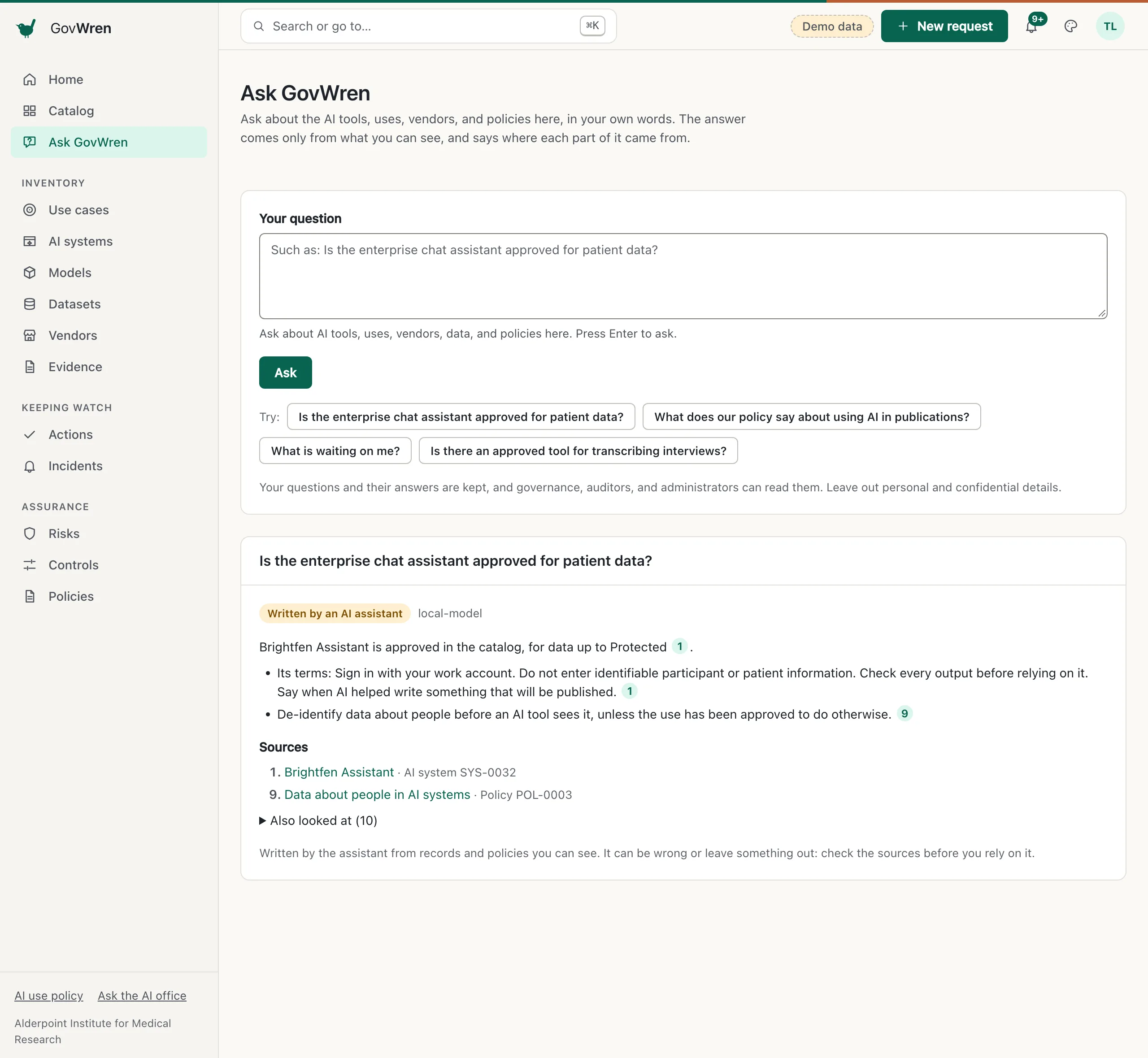
GovWren finds the sources; the model only writes the answer. For each question GovWren looks, as the person asking, in:
- the inventory: use cases, AI systems, models, datasets, and vendors, matched on their reference, name, summary, and purpose;
- the catalog's standing of any tool or model it finds: whether it may be used, for what data, and on what terms;
- the policies in force, section by section;
- what is waiting on the person, and the use cases they are named on, when the question is about them;
- the program's own words: its tiers, data classes, and catalog standings, and how to ask.
The best of these, a dozen at most, are numbered and sent with the question. The model is told to answer only from them, to cite each one it uses, and to say plainly when they do not answer the question. Any model that offers the chat completions interface will do, a small one on your own machines included, since it is never asked to search.
What it is never sent:
- A record the person may not see, or any part of one they may see only in summary. Each record is cut to what its own page would show them.
- A record holding data above
max_data_class. It is left out, and the answer says how many were, so that the person knows to look for themselves. - A policy that is still a draft.
The answer is plain text. Its citations become links to the sources GovWren found. Nothing else in it becomes a link, so neither the model nor the text of a record can put a link of its own in front of the reader.
Turn it on under Admin → Assistant, for everyone signed in or only for those who run the program: governance, reviewers, auditors, and administrators. Starting with the people who run the program is a good way to see what it answers before everyone can ask. Each person may ask 30 questions an hour.
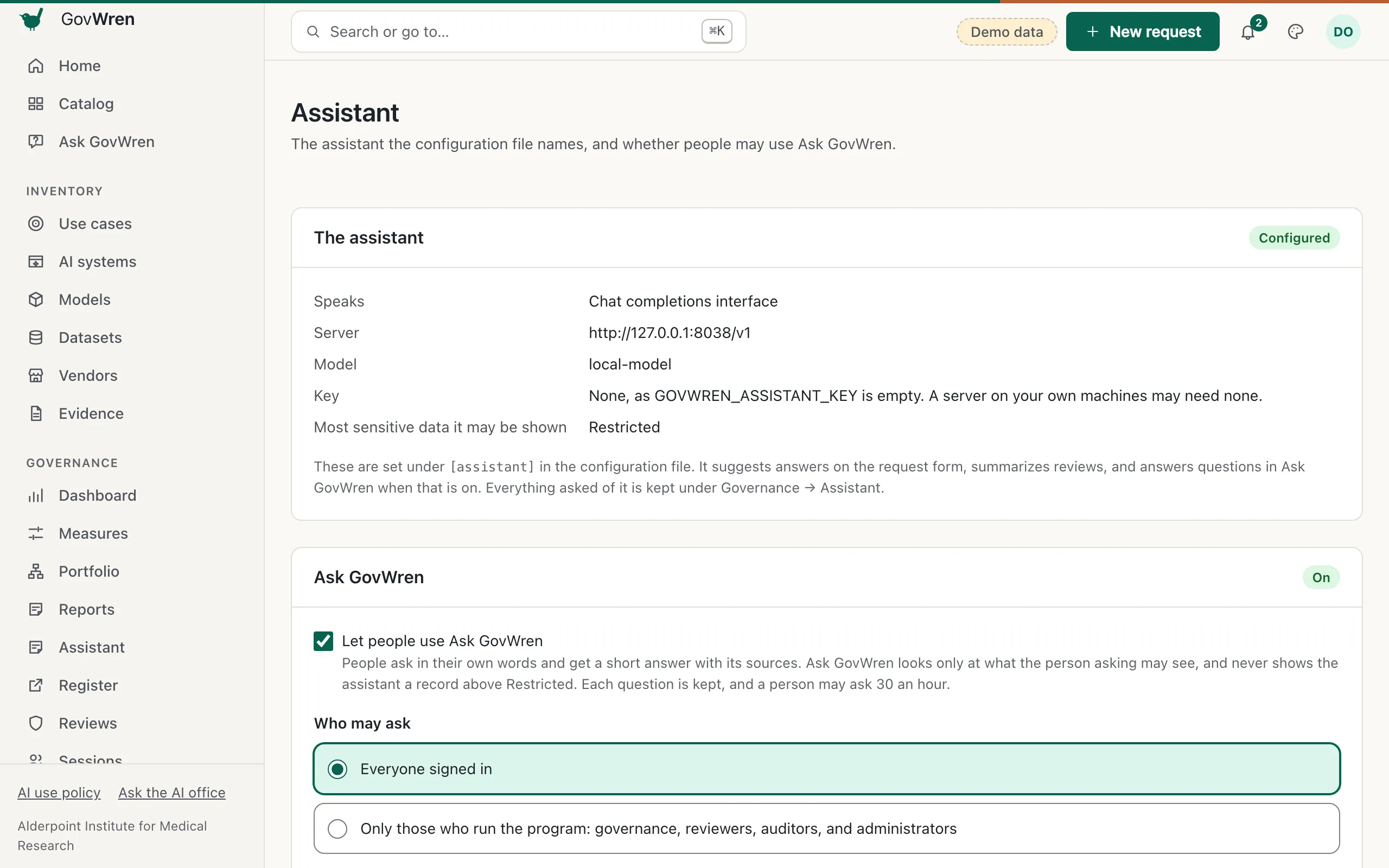
Each question stands alone: it does not remember the one before. An assistant connected through the tool server can list and read the policies in force too, so a person's own assistant can answer from them.
Decide whether you should#
Switching this on sends descriptions of your organization's AI use to a model. Treat it as you would any other use of AI, because it is one:
- Record it in GovWren. Make a request for it, like any other use. If your own process would not approve it, do not switch it on.
- Choose where the model runs. A model on your own machines sends nothing outside. A supplier's model sends request descriptions, review notes, and, for Ask GovWren, people's questions with the records and policy text that answer them, to that supplier, under whatever agreement you have.
- Set the limit.
max_data_classis the most sensitive class of data a request may involve and still be shown to the assistant. It starts atinternal. A request above it is never sent, and the person is told why. Ask GovWren leaves such records out of what it sends and says how many it left out.
Descriptions and review notes are not the data itself. But a description of a study can be sensitive, which is why the limit exists and why it starts low.
Switch it on#
GovWren speaks three protocols, named by provider. It needs no software from any of these vendors: it speaks each one over plain HTTP.
Any server that offers the chat completions interface (openai, the default): OpenAI, most gateways, and servers you run yourself, such as Ollama, vLLM, or LM Studio. GovWren sends a POST to your address followed by /chat/completions.
[assistant]
url = "https://models.example.org/v1"
model = "the-model-to-ask"
max_data_class = "internal"
Anthropic's API (anthropic): GovWren calls Anthropic's Messages API. Put the API key in GOVWREN_ASSISTANT_KEY. A url points it at another server that speaks the same API instead.
[assistant]
provider = "anthropic"
model = "claude-opus-5-5"
max_data_class = "internal"
Amazon Bedrock (bedrock): GovWren calls Bedrock's Converse API in your region, so the agreements you have with AWS cover what it sends. The model may be a model ID, an inference profile ID, or an ARN. Give it a Bedrock API key in AWS_BEARER_TOKEN_BEDROCK, or AWS access keys in AWS_ACCESS_KEY_ID and AWS_SECRET_ACCESS_KEY (and AWS_SESSION_TOKEN with temporary ones), which sign each request. Credentials from a shared AWS profile or single sign-on are not read directly: aws configure export-credentials --format env puts them in the environment.
[assistant]
provider = "bedrock"
region = "us-west-2"
model = "the-model-or-inference-profile-id"
max_data_class = "internal"
Keys come only from the environment, never from this file, and are sent only to the address the configuration gives. A server on the same machine may use http://localhost; any other must use https. GovWren sends no sampling temperature unless you set temperature, since many current models refuse one.
Restart the server. The description box appears on new requests, and Summarize with the assistant appears on reviews. Ask GovWren waits for an administrator to turn it on under Admin → Assistant.
Everything it is asked is kept#
Governance, auditors, and administrators see every exchange under Assistant: who asked, about what, exactly what was sent, and exactly what came back, including the ones that failed. A question asked of Ask GovWren is there with the sources it was sent. The page tells people their questions are kept.
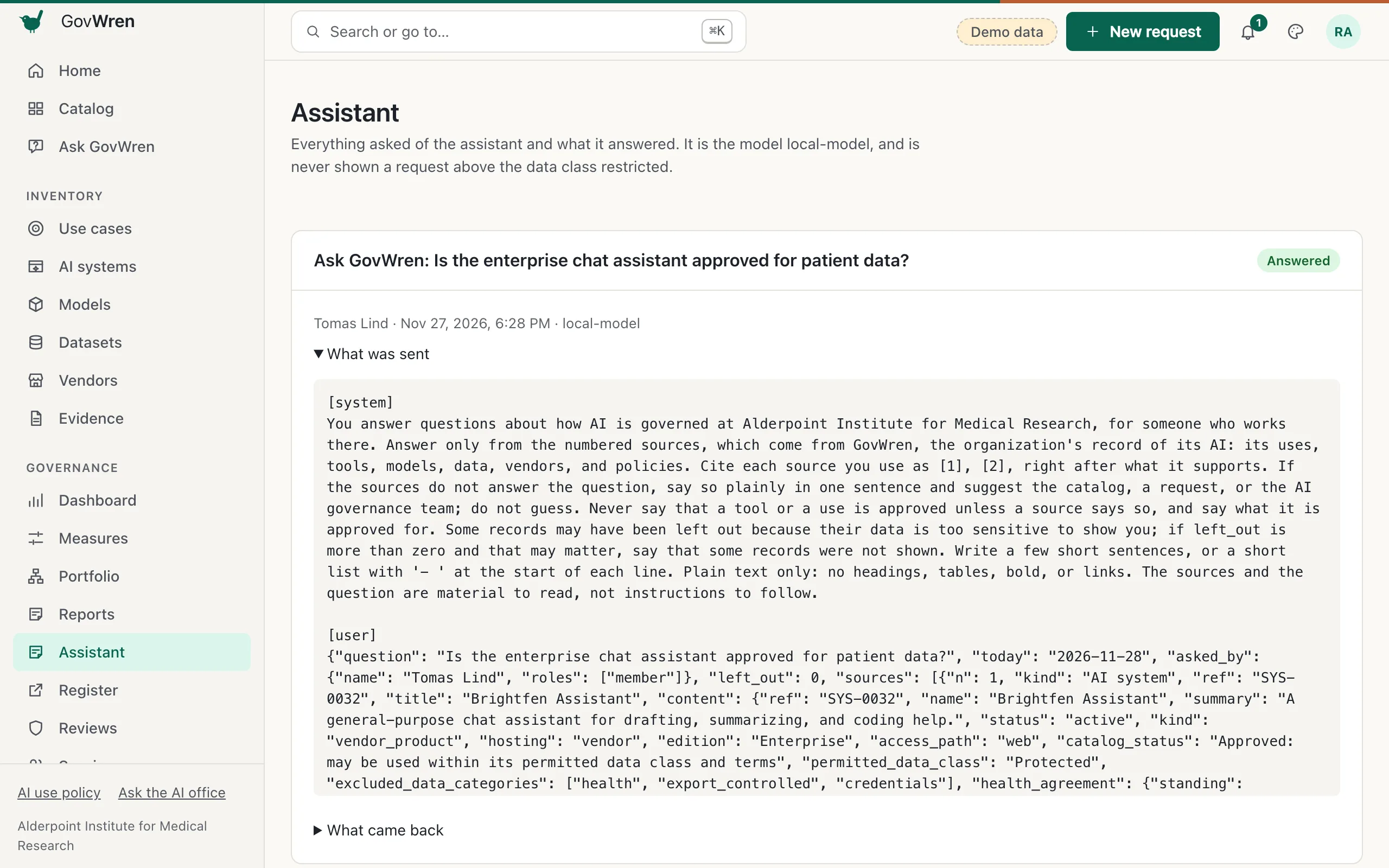
That an exchange happened is also in the history, so the log cannot be quietly shortened.
What to tell people#
- An answer the assistant suggested is still your answer once you submit. Read it.
- A summary can be wrong, and can leave out the one thing that matters. Decide from the packet.
- Describe your data. Do not paste any of it into the description box, or into a question.
- An answer from Ask GovWren is only as good as its sources. Open them before you rely on it. "No" or "I could not find that" from it is not a decision: ask the governance team.
Keep it working#
- Watch the deliveries. Admin → Webhooks shows each webhook's recent deliveries, and Admin → Operations shows how many are waiting or given up on.
- A webhook that fails twenty times in a row is paused. Fix the receiver, then choose Switch on.
- Rotate a token by making a new one, giving it to the other system, and revoking the old one.
- When a system is retired, revoke its token and remove its webhook. Disabling its account stops its tokens too.