 Proteoscope
Predictions and AlphaFold
Open AlphaFold DB models and the output of structure predictors, rank the models of a run or a whole campaign, and use pLDDT, the predicted aligned error and interface scores to decide which parts and which interactions to believe.
AlphaFold DB models
To open the AlphaFold DB model of a protein, type its UniProt accession (for example P04637) in Open structure, where you would type a PDB ID. The current AlphaFold DB model and its predicted aligned error (PAE) matrix are downloaded.
- Finding structures lists a protein's models from 3D-Beacons, AlphaFold DB first, next to its experimental structures.
- Compare with AlphaFold superposes the AlphaFold DB model on an experimental entry by UniProt numbering. See Comparing structures.
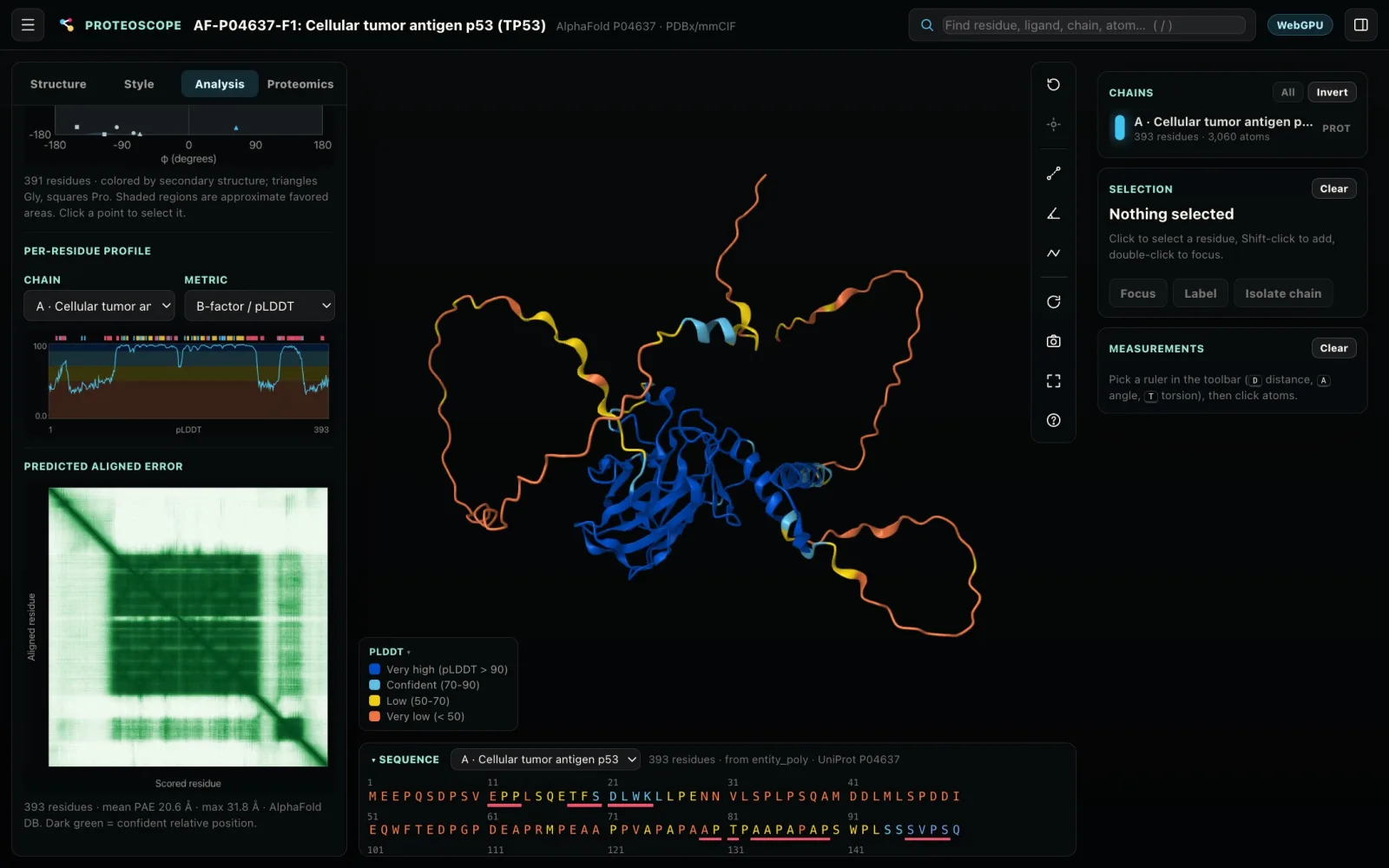
- The bundled example AF-P04637-F1 is the AlphaFold model of p53 with its PAE, so you can try pLDDT coloring and the PAE offline.
Confidence per residue (pLDDT)
The AlphaFold confidence (pLDDT) color scheme uses the AlphaFold DB colors. It is applied automatically to predicted models, and the ligands of AlphaFold 3, Boltz and Chai-1 models are colored per atom.
| pLDDT | Color |
|---|---|
| Above 90 | Dark blue |
| 70–90 | Light blue |
| 50–70 | Yellow |
| Below 50 | Orange |
- The selection card shows each residue's pLDDT, and the per-residue profile in the Analysis tab plots it along the sequence.
- Select low-confidence residues with a value such as
plddt < 70.
Proteoscope recognizes a predicted model from its ModelCIF records, the method and software names (AlphaFold, ColabFold, ESMFold, Boltz, Chai-1, OpenFold), or Protenix's data block name, and every model opened from a prediction folder is one. For these models the B-factor column is read as pLDDT, rescaled when a predictor writes it on a 0–1 scale. ModelCIF confidences on a 0–1 scale (SWISS-MODEL) are rescaled too.
Predicted aligned error
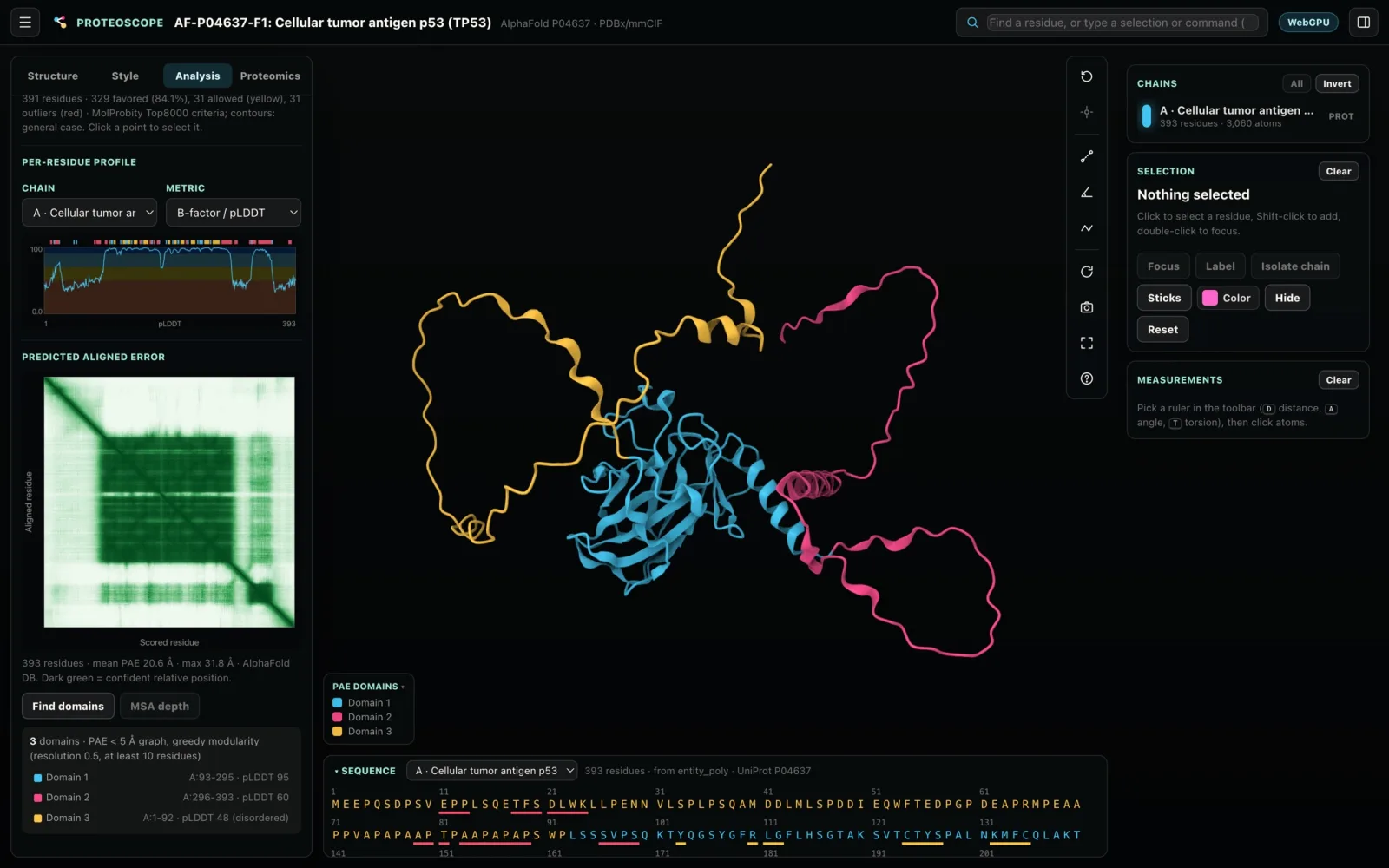
The Analysis tab shows the PAE heatmap for AlphaFold models and predictions. Drag a rectangle on the heatmap to select the residues of both ranges in 3D.
- Contact probability switches the heatmap to AlphaFold 3's contact probabilities.
- Find domains clusters the PAE into rigid domains. This follows ChimeraX's
alphafold pae colorDomains: residue pairs under 5 Å PAE are weighted by 1/PAE and grouped by greedy modularity. It lists each domain's residues and mean pLDDT, and the PAE domains color scheme colors by domain. - MSA depth colors each residue by the number of sequences aligned to it, on a log scale from red (1) to blue (≥ 1,000). It works for AlphaFold DB models, prediction folders, or a dropped
.a3m. Shallow alignments are the most common cause of low confidence. Select shallow regions with a value such asmsa < 30.
The PAE is also used by part-sphere exposure (pPSE): a neighbor counts only when its distance plus the PAE is within the radius. See Analysis.
Adding PAE and alignments to a model
You can also drop these files onto a loaded model:
- PAE: AlphaFold DB, AlphaFold 3 and ColabFold
.json, or Boltz.npz. - Alignments:
.a3m, aligned.fasta, Stockholm.stoor Clustal.aln. An alignment gives MSA depth and conservation.
Opening prediction output
Structure predictors write a folder of ranked models with their confidence data. Proteoscope reads the whole folder, ranks the models, and scores every interface, so you can decide which predicted interactions to believe without uploading anything. To open one:
- Drop the folder onto the window, or choose it with Open prediction folder….
- Drop the AlphaFold Server
.zip. - Name the folder on the command line:
$ proteoscope af3_output/my_job/Tip. Open the whole output folder, or the AlphaFold Server .zip, rather than a single model file, so the confidence files come along.
Try it first. Two bundled examples are real prediction output and open like a dropped folder: 8C3U-COFOLDING (interleukin-1β with a ligand given as SMILES, five models each from Boltz-1 and Protenix, from Runs N' Poses) and UL144-MOTSC (the five best ColabFold models of a viral protein with a peptide). Choose them under Bundled examples, or type example 8c3u-cofolding.
What is read from each tool
| Tool | Models | Confidence |
|---|---|---|
| AlphaFold 3 | seed-*_sample-*/…model.cif | summary_confidences.json (ranking score, pTM, ipTM, chain-pair ipTM), confidences.json (PAE, contact probabilities, per-atom pLDDT), MSAs from …_data.json |
| AlphaFold Server | fold_*_model_N.cif in the downloaded .zip | summary_confidences_N.json, full_data_N.json |
| Boltz-1 / Boltz-2 | …_model_N.cif | confidence_…json, pae_…npz (written with --write_full_pae), plddt_…npz, Boltz-2 affinity_…json, MSAs from msa/ |
| Chai-1 | pred.model_idx_N.cif | scores.model_idx_N.npz (aggregate score, pTM, ipTM, chain-pair ipTM, clashes) |
| ColabFold | …_relaxed_rank_…pdb (else unrelaxed) | …_scores_rank_…json (pLDDT, PAE, pTM, ipTM), .a3m |
| Protenix | seed_*/predictions/…_sample_N.cif | …_summary_confidence_sample_N.json (ranking score, pTM, ipTM, chain-pair ipTM), …_full_data_sample_N.json (PAE and contact probabilities, written with --need_atom_confidence) |
| OpenFold3 | …_seed_S_sample_N_model.cif or .pdb | …_confidences_aggregated.json (sample ranking score, pTM, ipTM, chain-pair ipTM), …_confidences.json or .npz (PAE) |
- AlphaFold 3 runs saved with
--compress_large_output_files(.zstmodels and confidences) open as they are. - Samples from several seeds form one ranked set, including Protenix runs that put the seed in their file names.
- Other files in a prediction folder (logs, settings, templates) are left alone; a job's input is read for the SMILES of its ligands (see Ligands given as SMILES).
- Chai-1 does not write PAE to disk, so its models get the scores Chai reports but not the PAE-based ones.
Ranking models
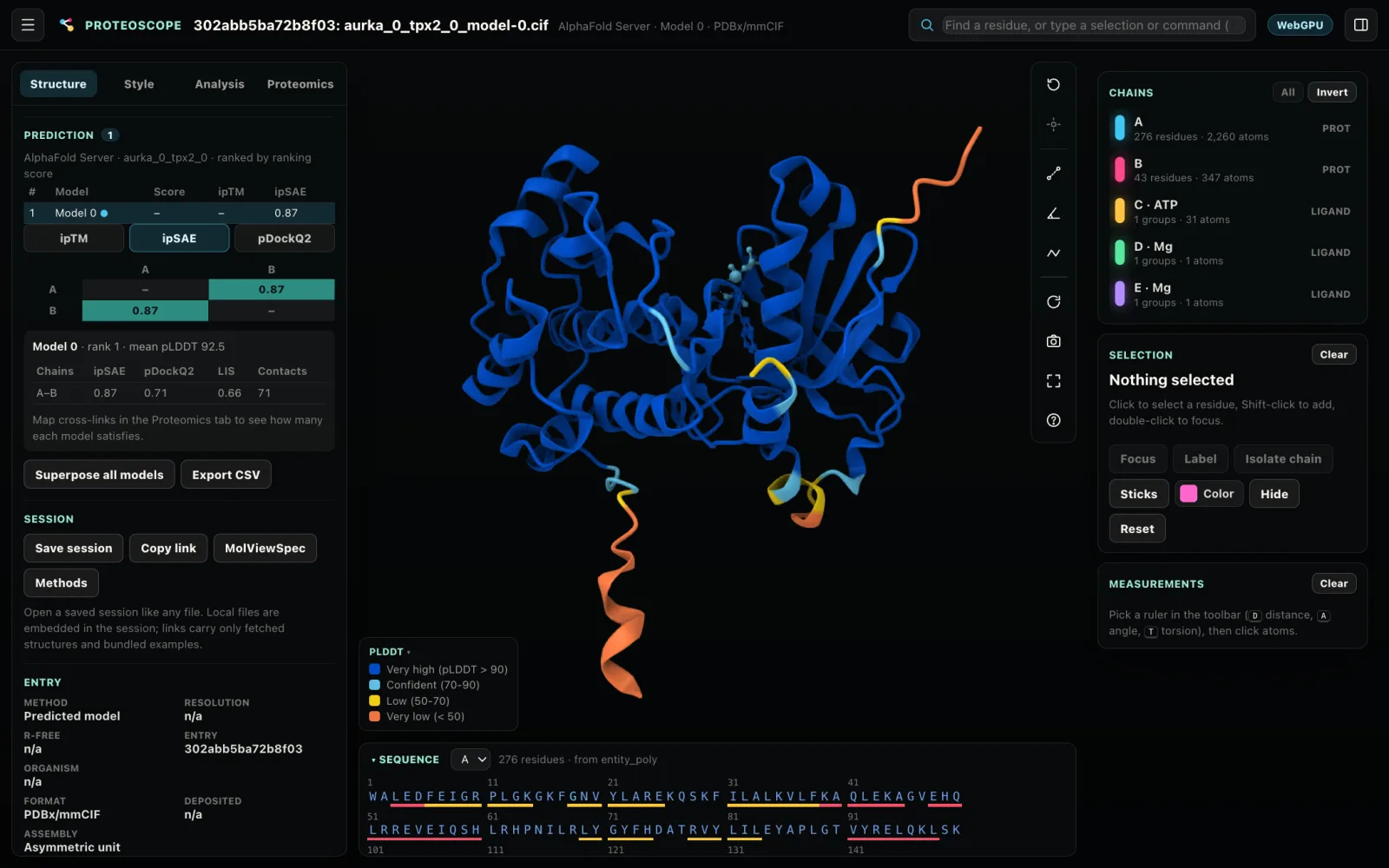
The Prediction group in the Structure tab lists the models by the tool's own ranking score.
- Click a model to show it in place of the current one.
- Superpose all models opens them all, superposed on the top-ranked model, so you can see where they disagree.
- Export CSV saves every model and chain pair with the interface scores.
- The
rankingcommand lists them from the command line.
Interface scores
For each chain pair, Proteoscope computes interface scores from the model's PAE, pLDDT and coordinates, with the definitions of Dunbrack's ipsae.py.
| Score | What it is |
|---|---|
| ipTM | As the predictor reports it; for ColabFold, recomputed from the PAE. |
| ipSAE (Dunbrack 2025) | pTM-style scores averaged only over residue pairs whose PAE is below 10 Å (15 Å for AlphaFold 2 / ColabFold), so disordered tails and extra domains do not drag the score down the way they do ipTM. |
| pDockQ (Bryant et al. 2022) | From the interface pLDDT and the number of Cβ contacts within 8 Å. |
| pDockQ2 (Zhu et al. 2023) | From the interface pLDDT, the number of Cβ contacts within 8 Å, and the PAE of the contacting pairs. |
| LIS (Kim et al. 2024) | The mean of (12 − PAE)/12 over inter-chain pairs with PAE below 12 Å. |
The matrix under the score table shows ipTM for every chain pair, with chain pTM on the diagonal. Switch it to ipSAE or pDockQ2, and click a cell to select that interface.
Without a PAE. Chai-1, and Boltz or Protenix run without their PAE options, write no PAE, so ipSAE, pDockQ2 and LIS cannot be computed. pDockQ needs only pLDDT and contacts: those models are scored and ranked by it.
Ligands. Each model's ligands get PoseBusters' checks (see Pose checks), shown in a Pose column and in the model's details.
Ligands given as SMILES
Predictors write a ligand given as SMILES without its bond orders, but with its atoms in the order of the SMILES. When the job's input is at hand, Proteoscope reads the SMILES as RDKit reads it (including @, @@, / and \), pairs its atoms with the model's (by that order, else by their bonds), and gives the ligand the SMILES's bond orders, charges and hydrogens. The ligand is then drawn and its interactions typed like a dictionary ligand, and it gets every pose check, its stereocenters and double bonds compared with the SMILES: a model that inverted a stereocenter fails.
| Tool | Where the SMILES comes from |
|---|---|
| AlphaFold 3 | <job>_data.json in the output folder, read with it |
| Boltz | the job's input, <name>.yaml or <name>.fasta, opened with the results (for example the folder that holds both) |
| Chai-1 | the input FASTA, put in the output folder |
| Protenix | the input JSON, <name>.json, opened with the results; Protenix does not copy it there |
| OpenFold3 | none needed: its model files list the ligand's bond orders |
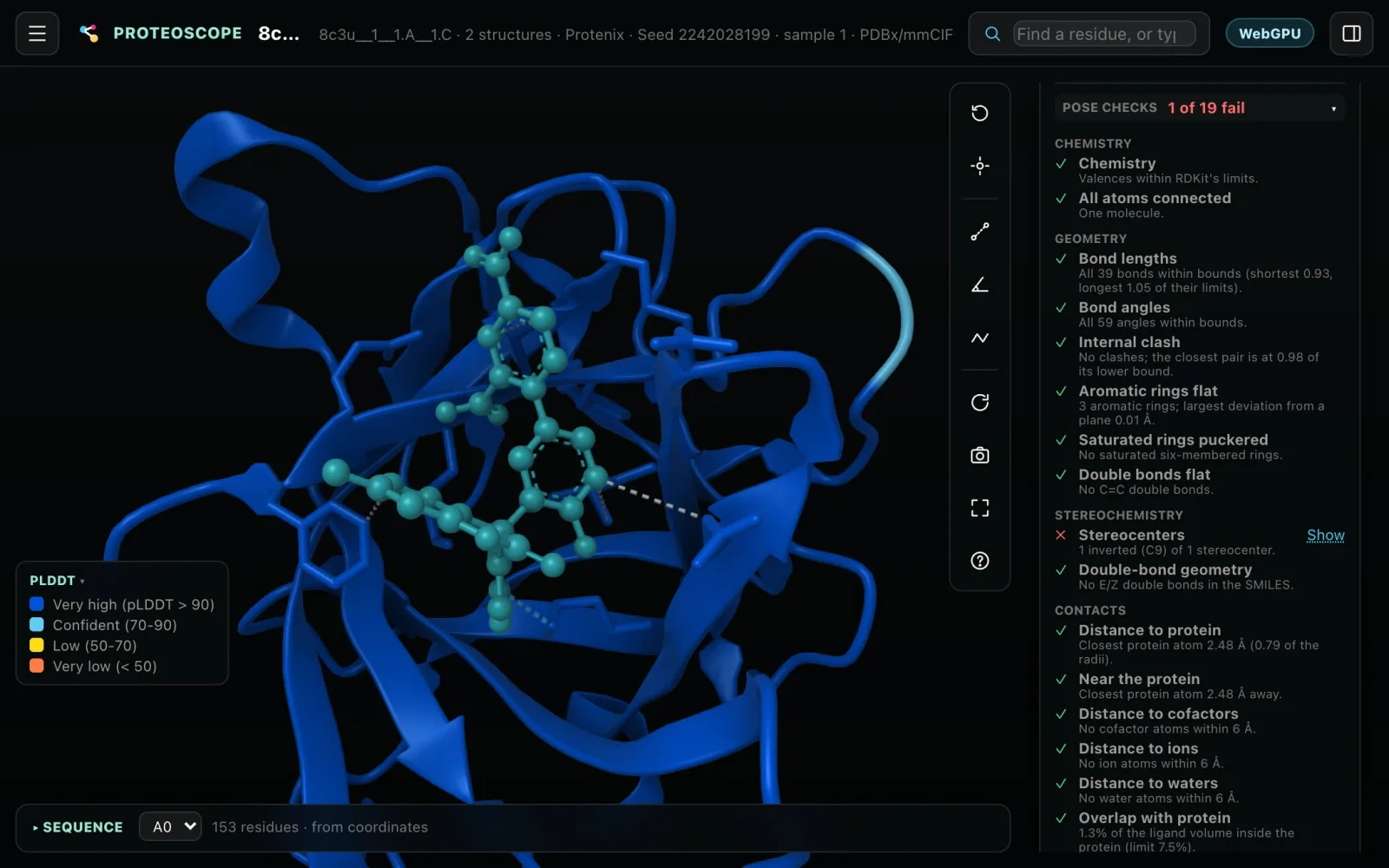
Only the stereo marks RDKit keeps count (not those of a center with two equivalent neighbors, say), and a symmetric molecule such as a meso compound is compared under its best pairing. Without its input, a ligand given as SMILES gets the contact checks only.
Checked against ipsae.py
These scores reproduce ipsae.py (version 4) to its printed precision on the AlphaFold 3 (Aurora A–TPX2) and AlphaFold 2 multimer (RAF1–KSR1–MEK1) examples of the IPSAE repository, and on a Boltz-2 prediction. A unit test pins them to ipsae.py output at both PAE cutoffs. The example outputs in that repository predate version 4 and count PAE = 12 Å in LIS, so their LIS differs in the fourth decimal.
Batch triage
A design campaign or a screen of interaction partners produces many jobs, more than anyone opens one by one. Drop or choose several prediction folders at once, or a folder that holds them, or name it on the command line. Proteoscope scores every model of every job, opens the best, and shows the Triage table (Structure tab, Open table).
$ proteoscope campaign/- One row per job (its best model under the chosen score) or one per model, ranked by ipSAE, pDockQ2, pDockQ, LIS, ipTM, pTM, the tool's own score, mean pLDDT, the share of your cross-links each model satisfies, the share of pose checks its ligands pass, or Boltz-2's predicted affinity (lowest first) and binder probability. Click a column header to rank by it. A campaign without PAEs is ranked by pDockQ.
- The interface is each model's best chain pair by ipSAE, or the chains you name (for example
A B, the target and the binder). - Across tools. ipSAE, pDockQ, pDockQ2 and LIS are computed from each model's PAE and coordinates the same way for every predictor, so they compare jobs from different tools. ipTM, pTM and the score are each tool's own.
- Click a row (or press Enter on it) to show that model. Gallery renders the 12 best, each superposed on the first so they share a view. Export CSV saves every model and interface of every job.
- Scale. A folder named on the command line or opened by path can hold up to 20,000 files. Alignments are read only when a model opens, so scoring stays fast.
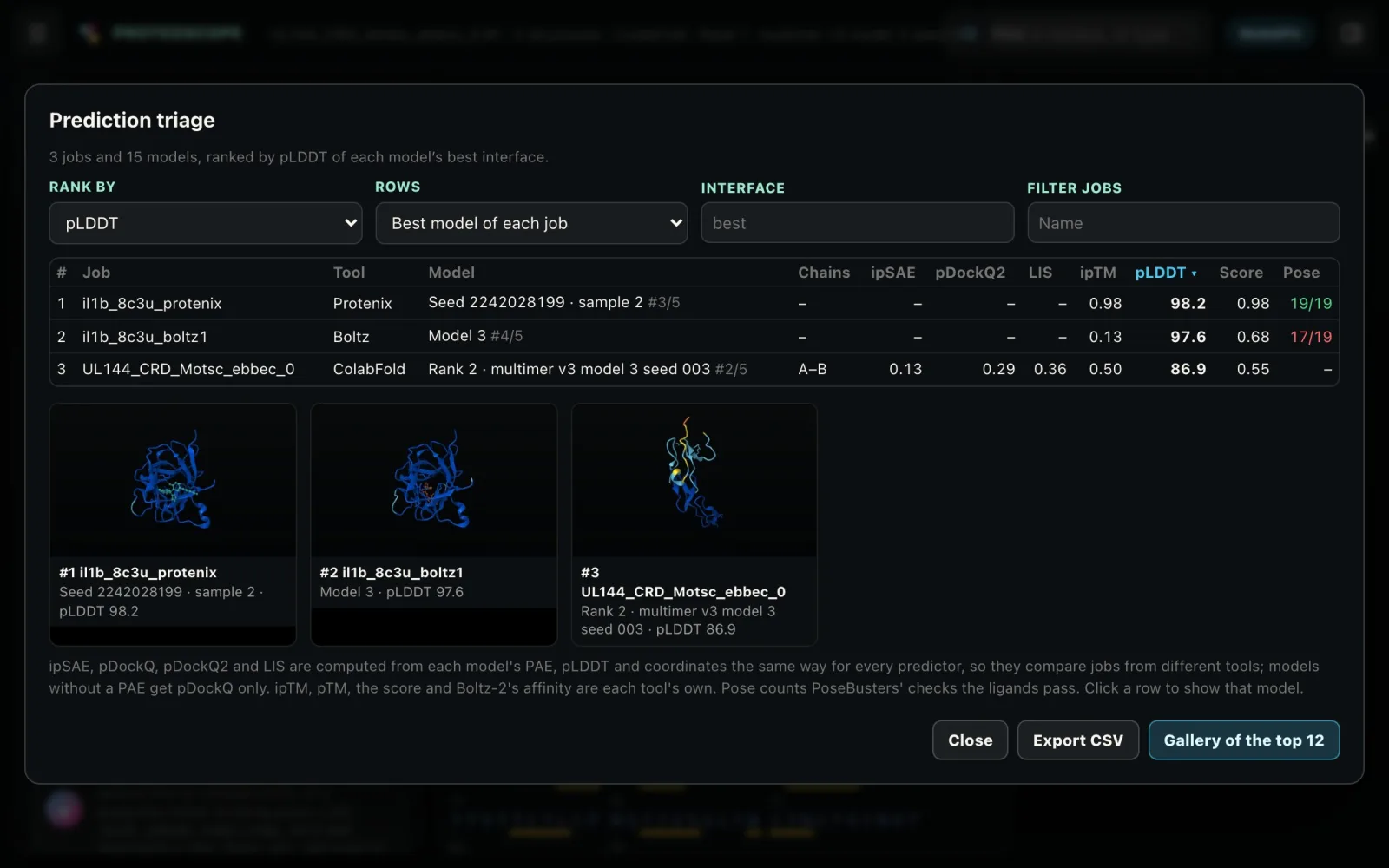
From the command line: triage ranks the jobs (for example triage by pdockq2 top 10 pair A B), triage show 3 shows a row, triage gallery 12 renders the gallery and triage export saves the CSV (triage by pose and triage by affinity rank by the ligands). The table ranks the jobs of the current scene: opening a structure in place of the scene clears it, and adding jobs extends it. An AI agent can do all of this too; see AI agents (MCP).
Triage without a window
On a cluster or in a pipeline, proteoscope triage ranks the jobs without a window: it prints the ranking and writes the table as CSV, the ranked rows as JSON and images of the best models.
$ proteoscope triage campaign/ --by ipsae --csv ranking.csv --json ranking.json --gallery best/--by,--top,--modelsand--pair A,Bset the ranking as thetriagecommand does;--gallery-countand--gallery-width(up to 1,600 pixels) size the gallery.- It runs Proteoscope's page in a hidden Chrome, Chromium, Edge or Brave, so the scores are exactly the window's.
--browserorPROTEOSCOPE_BROWSERnames the browser. - Ctrl-C, SIGTERM and a closed output pipe stop the browser and remove its temporary profile. On Linux it runs in containers (with
--no-sandboxas root).proteoscope triage -hlists every option.
More confidence data
- Contact probability (AlphaFold 3) sits next to the PAE in the Analysis tab.
- Find domains clusters the PAE into rigid domains as ChimeraX does; see Predicted aligned error.
- MSA depth colors each residue by how many sequences were aligned to it. Shallow alignments are the most common cause of low confidence.
- Cross-links mapped in the Proteomics tab add a column with how many links each model satisfies. See Proteomics.
Predictions in sessions
Sessions keep the model, its PAE, contact probabilities, scores, pose checks and the SMILES of its ligands:
- PAE matrices and contact probabilities you opened are saved (at 0.125 Å and 1/255 steps), with the prediction scores and MSA depth.
- PAE domains are recomputed when the session opens, and AlphaFold DB PAE matrices are fetched again.
See Sessions, figures and methods. The related commands are alphafold, ranking, triage, domains and msa; the help dialog (?) lists the syntax of each.