 Proteoscope
Sessions, figures and methods
Export images, videos and tables, save the whole workspace as a session, share a view as a link or in Mol*, and draft a methods paragraph for what you did.
Images and spin videos
Export image (the camera button in the toolbar, or P) renders the current view off screen as a PNG. You can choose:
- Resolution: 1× to 4× of the viewport, optionally supersampled for smooth edges.
- What to include: optionally a transparent background, the color legend, labels and measurements.
Copy puts the image on the clipboard. Spin video records one full rotation of the view as WebM. The png command exports an image from the search box; see Scripting and command line for exporting from a script.
Tables as CSV
Interaction tables, docking scores and fingerprints, prediction rankings, and proteomics sites with their statistics export as CSV, for a spreadsheet or your own analysis.
| Table | What the CSV holds | More |
|---|---|---|
| Interactions | The interaction table | Viewing and interactions |
| Docking poses | The scores and interaction fingerprints of every pose | Ligands and docking |
| Prediction ranking | Every model and chain pair with its scores | Predictions and AlphaFold |
| Proteomics sites | Every localized site with its probability, value, part-sphere exposure and whether it lies in a disordered region; after a differential test, also each site's fold change, p, q and degrees of freedom, and for adjusted sites the protein's change | Proteomics |
Sessions
A session saves the whole workspace so you can reopen it later. Save session (Structure tab, or the save command) writes a .proteoscope.json file. To reopen it, open it like any file, or drop it on the window.
What a session records
- Where each structure came from: a fetched PDB ID or UniProt accession, a bundled example, or the local file itself, embedded and compressed.
- How it looks: styles, per-residue styling and colors, surfaces, superpositions (refitted when the session opens), ensemble overlays and trimming.
- What you marked: selections, focus, labels, proteomics overlays and measurements.
- The view: the camera, lighting, background, clipping and secondary-structure source.
- Prediction data: PAE matrices and contact probabilities you opened (stored at 0.125 Å and 1/255 steps), prediction scores, and MSA depth.
- Docking and maps: docking poses, with their files embedded, and the density map's settings.
What is fetched or computed again
Some results are not stored in the file. When the session opens:
- solvent accessibility, PAE domains, validation reports and AlphaMissense are recomputed or fetched again;
- AlphaFold DB PAE matrices are fetched again;
- maps from the server are fetched again.
Map files. A map you opened from a file on your computer is not stored in the session. Open the map file again after opening the session.
Share a link
Copy link (or the link command) puts the whole session in the URL, as #session=…. This works when every structure was fetched or is a bundled example; when a structure came from a local file, save a session instead.
The link opens in Proteoscope at the same address and port. To open a structure from a link without a session, use a #fetch= link; see Links that open structures.
Open the view in Mol*
MolViewSpec (or the mvs command) exports the view for the Mol* viewer. Drop the exported file onto the Mol* viewer to open it.
| File | When | Contents |
|---|---|---|
.mvsj | No structure is a local file | The view; the structures are downloaded from RCSB PDB and AlphaFold DB |
.mvsx | Some structures are local files | An archive with the view and the files inside |
The export carries representations, per-residue colors, sticks, surfaces, labels, superposition transforms, the camera and the background. Proteoscope's lighting effects are not part of the format.
Methods paragraph
Methods (Structure tab, next to Save session) drafts a methods paragraph from what the session used:
- each structure's source with its ID, experimental method, resolution and revision date, or the model's database version;
- each analysis with its method and parameters: superposition, interactions, surfaces, density fit, conservation, statistics and others;
- the Proteoscope version.
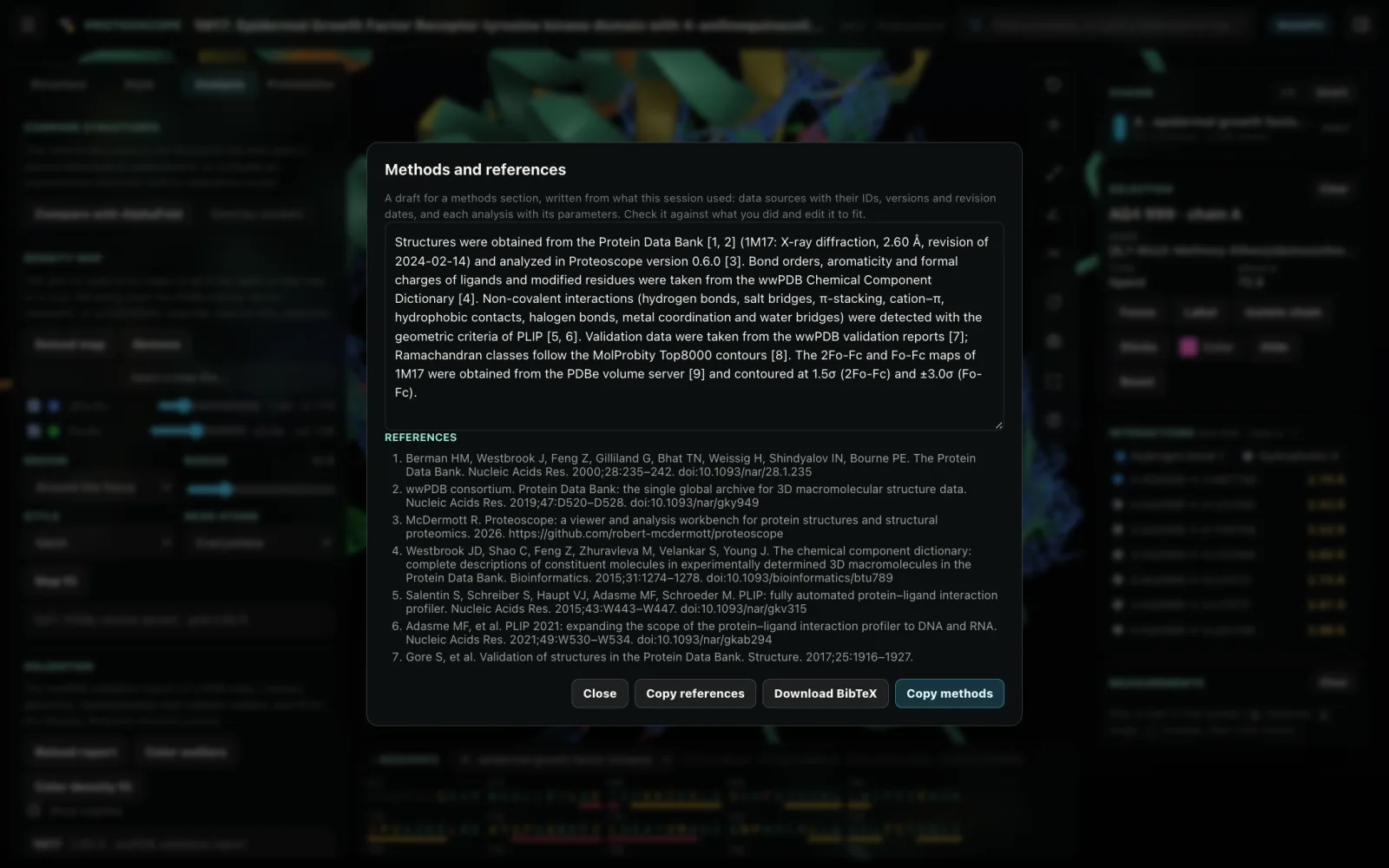
Citations are numbered, with DOIs checked against Crossref. Copy references or Download BibTeX takes them to your manuscript.
Check the draft. The paragraph is a starting point. Check the text against what you did before using it.
Citing Proteoscope
To cite Proteoscope itself, use its CITATION.cff file; GitHub offers it under Cite this repository on the repository page. See Cite Proteoscope for details.