
FlowJo, FACSDiva and Gating-ML
Bring an analysis over from FlowJo or FACSDiva and see, population by population, that it gives the same counts; send one back to FlowJo; exchange gates with other tools through Gating-ML.
Importing a FlowJo workspace
CytoWeave reads FlowJo 10 workspaces (.wsp, also written by FlowJo 11), FlowJo 11 workbenches (.flowjo, below) and FACSDiva experiments (below): their samples, gates, compensation matrices and scales. FlowJo 9 workspaces are not read.
- Open the
.wspor.flowjofile: drop it on the window, or use Import a FlowJo workspace or Gating-ML… in the sample list's + menu. - The import dialog lists every population as exact, approximated or not imported, and says why: a curly quadrant, for example, imports with straight dividers. Gates FlowJo drew on uncompensated data keep uncompensated values, time and linear axes with a gain are converted from FlowJo's units, and ellipses are read from FlowJo's display space.
- Match the FCS files: CytoWeave finds the workspace's files among the samples already open; Add the FCS files… or Add a folder… adds the rest.
- Choose the Options:
- Axis scales: use FlowJo's scales, only for channels without one, or keep the current scales. Each gate keeps the scale it was drawn on either way; this only sets how plots draw the axes.
- Apply FlowJo's compensation to the matched samples.
- Then load the matched samples and compare every population count with FlowJo's.
- Click Import (or Import gates only when no FCS file is matched).
The Moving from FlowJo example opens straight into this dialog, with the FlowJo 10 workspace made for its four samples.
The migration report
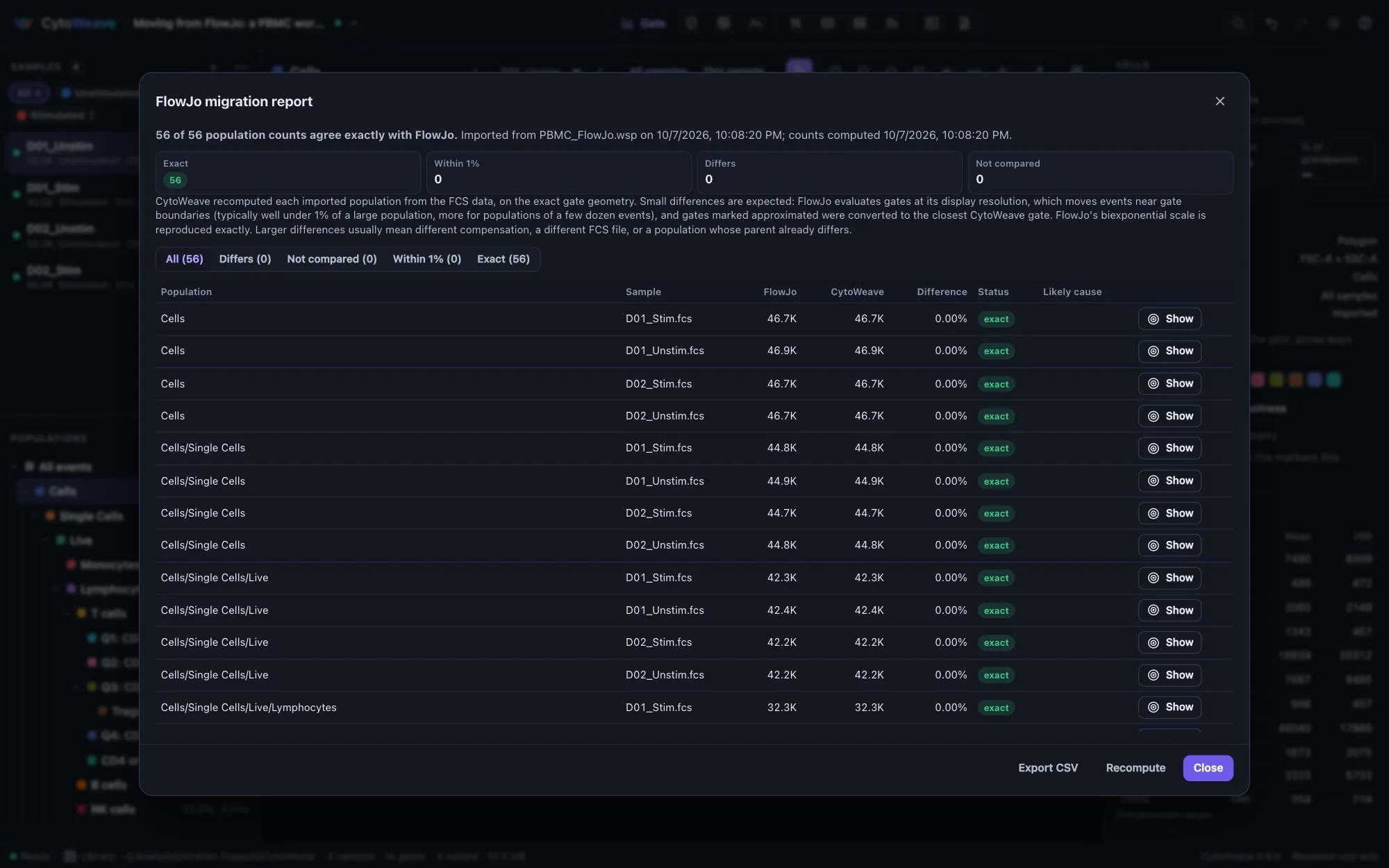
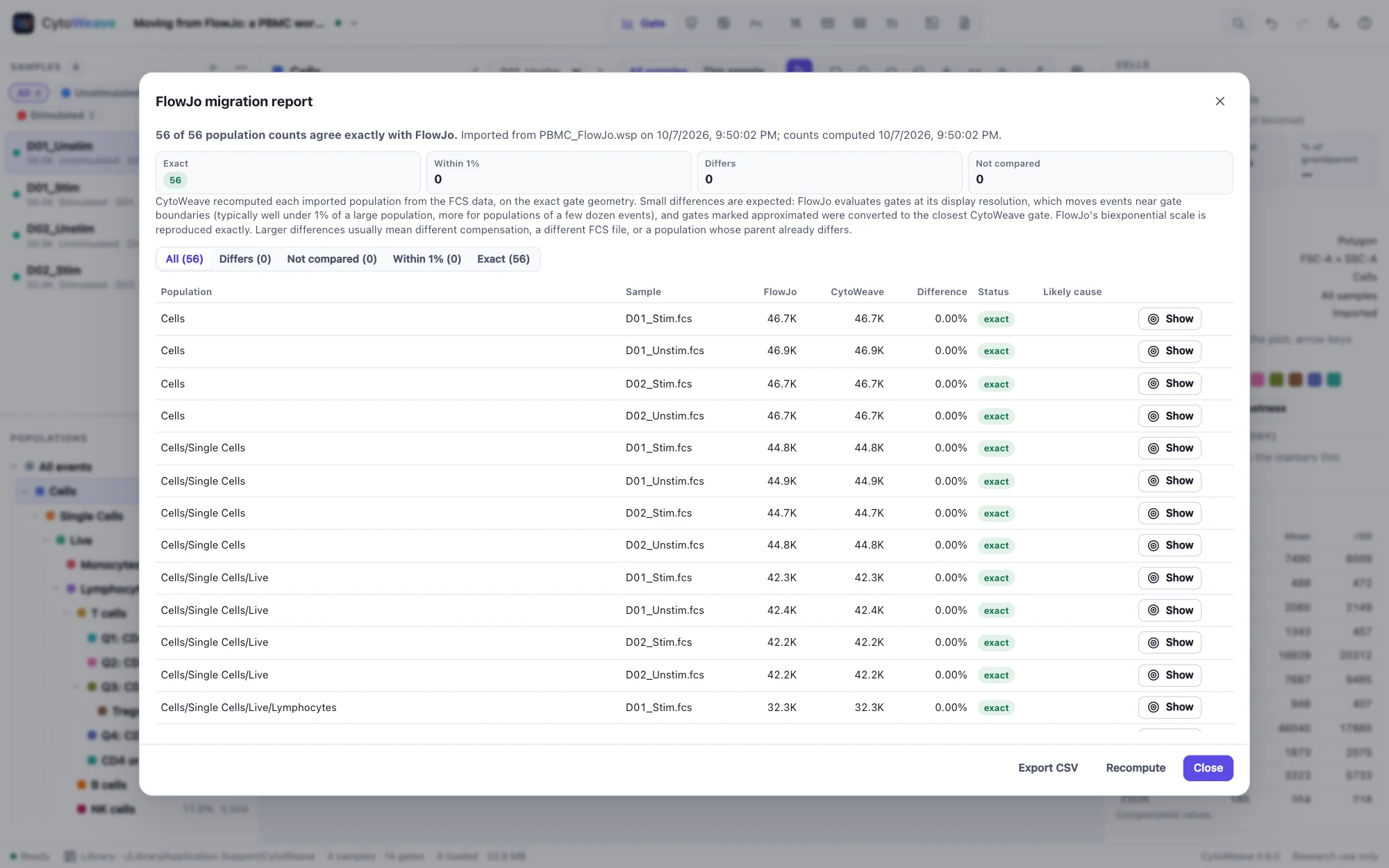
After an import with the comparison, the FlowJo migration report recomputes every imported population from the FCS data and lists, for each population and sample, FlowJo's count, CytoWeave's count, the difference, a status (exact, within 1%, differs or not compared) and the likely cause of a difference. Show opens that population on that sample; Export CSV saves the table for your records; Recompute runs the comparison again. The report stays available from the workspace menu.
Small differences are expected. FlowJo evaluates gates at its display resolution, which moves events near gate boundaries: typically well under 1% of a large population, more for populations of a few dozen events. CytoWeave evaluates gates exactly. Larger differences usually mean different compensation, a different FCS file, or a population whose parent already differs.
FlowJo's biexponential scale is reproduced exactly, from FlowJo's own table algorithm, and checked against BD's published lookup tables. On FlowJo's own test workspaces CytoWeave reproduces the counts FlowJo saved; on real workspaces it matches them exactly at least as often as FlowKit does, and within 0.1–0.3% for large populations.
Limits. Curly quadrants import with straight dividers. Template group gates import as per-sample copies, merged where samples agree.
FlowJo 11 workbenches
A FlowJo 11 workbench (.flowjo) imports like a .wsp file, with the same dialog and report. CytoWeave reads its polygons, rectangles, ellipses, ranges and quadrant gates (including a quadrant whose arm was moved off center, which becomes the rectangles each quadrant covers), Boolean populations, gates adjusted for one sample, compensation matrices and linear, log and biexponential scales. FlowJo stores its count of every population in the workbench, so the report compares with FlowJo's own counts. The FlowJo example comes with a workbench to try (Files that came with this example… in the workspace menu).
FlowJo 11 counts events on its display grid: an event is in a polygon when the grid point it falls on is, and in an ellipse when the center of its grid cell is. Evaluated that way, CytoWeave's reading of the gates gives FlowJo 11's own count for every population of twelve workbenches saved by FlowJo 11.2 (quadrants drawn in FlowJo 11 within 3 events); the validation suite checks this. CytoWeave itself evaluates the exact gate geometry, so its counts differ slightly near gate edges: well under 1% of large populations, a few percent for a small gate drawn on a dense population.
Limits. FlowJo 11 logicle and arcsinh axes are read but not yet checked against FlowJo 11's counts (they are marked approximated). Spectral unmixing matrices in a workbench are not applied. When FlowJo 11.2 opens a FlowJo 10 workspace it leaves out its Boolean populations, so a workbench made that way has none.
FACSDiva experiments
Export the experiment from FACSDiva as XML (FACSDiva's experiment export) and open the .xml file in CytoWeave with the experiment's FCS files. Each tube is a sample (named after its specimen and tube, matched to its FCS file by the file name Diva recorded) and each specimen a group; Diva's count of every population is compared in the report. The index-sort example comes with its sort's FACSDiva experiment to try.
- Rectangles, polygons, intervals and quadrant gates import, with "rest of" populations and Boolean gates. Each tube keeps its own gates: tubes of a specimen with the same gate (the same kind on the same parameters) share it, each with its own position.
- Gates keep the axes they were drawn on: linear, log, or Diva's biexponential, read as the logicle it approximates (as CytoML reads it), from the axis' scale value.
- Compensation comes from the experiment, where Diva records it.
- When some tubes have FCS files in the workspace, the gates of the others are left out (the dialog says how many), since they would apply to no sample.
On the FACSDiva experiment CytoML is tested with, CytoWeave's counts equal CytoML's for every population. FACSDiva counts events on a 256-step display grid; evaluated that way, gates on linear axes give Diva's own counts exactly, and gates on biexponential axes are within 0.3%.
FACSChorus gates (FACSDiscover S8 and A8)
FACSChorus records the gates of a recording in every FCS file it writes, and has no other way to export them. When such files open, CytoWeave offers Import the gates (also in the workspace menu: Import → Gates FACSChorus recorded in the files…). The same import dialog lists every population; files with the same gates share them, each with its own position.
- Polygons and rectangles on linear and log axes import exactly; rectangles are exact on any axis.
- A polygon on a biexponential axis is approximated: FACSChorus chooses the axis' width automatically and does not record it, so the outline is straight in data values, and events near its edges may differ (GateLab measured such gates within 2.4% of FACSChorus's counts).
- FACSChorus's automatic Saturated and Unsaturated gates are not imported; populations under them are kept under their parent, and CytoWeave's QC flags saturated events.
- FACSChorus does not store population counts in its files, so there are none to compare. Its experiment files (
.cef) are not read.
Exporting to FlowJo
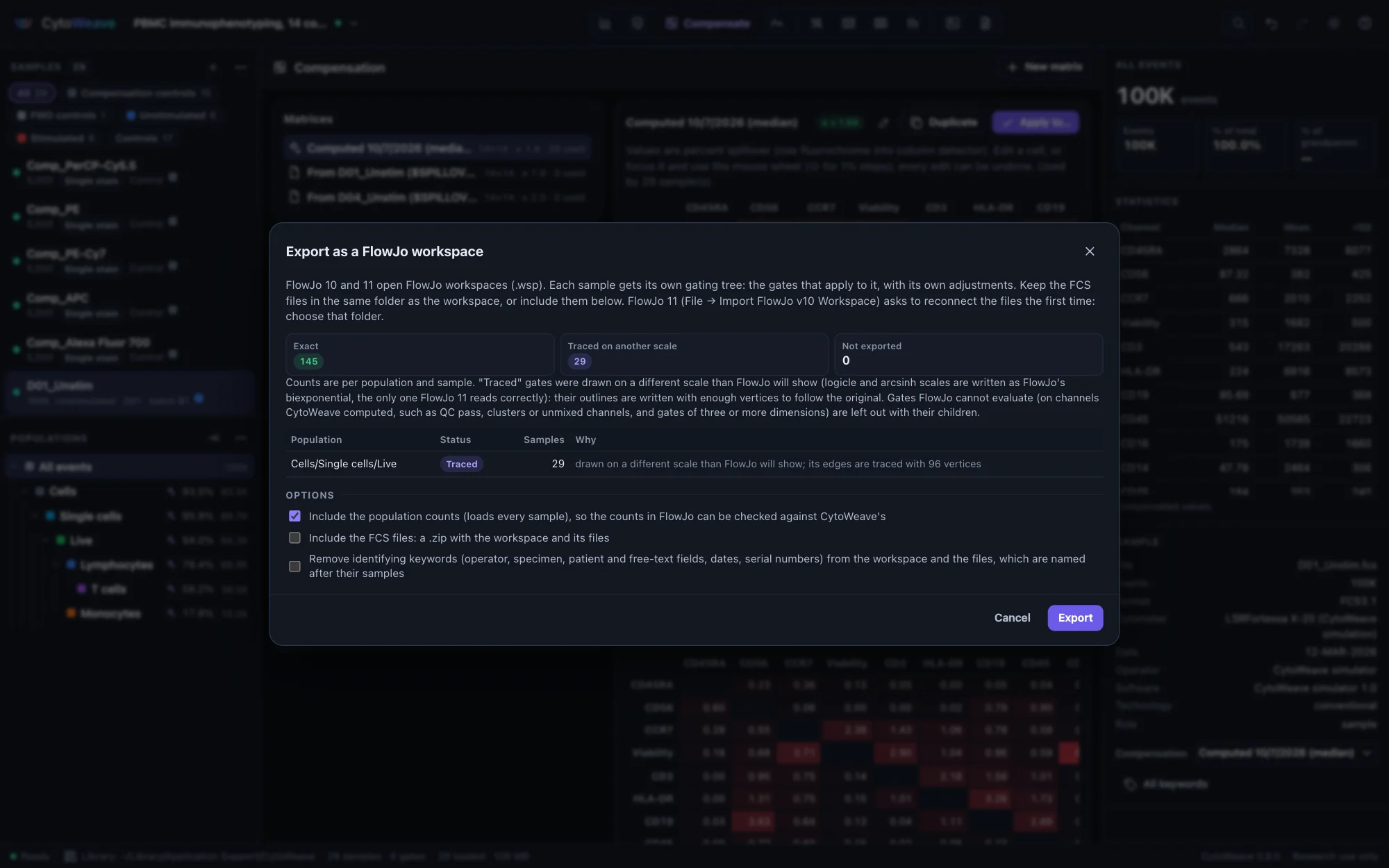
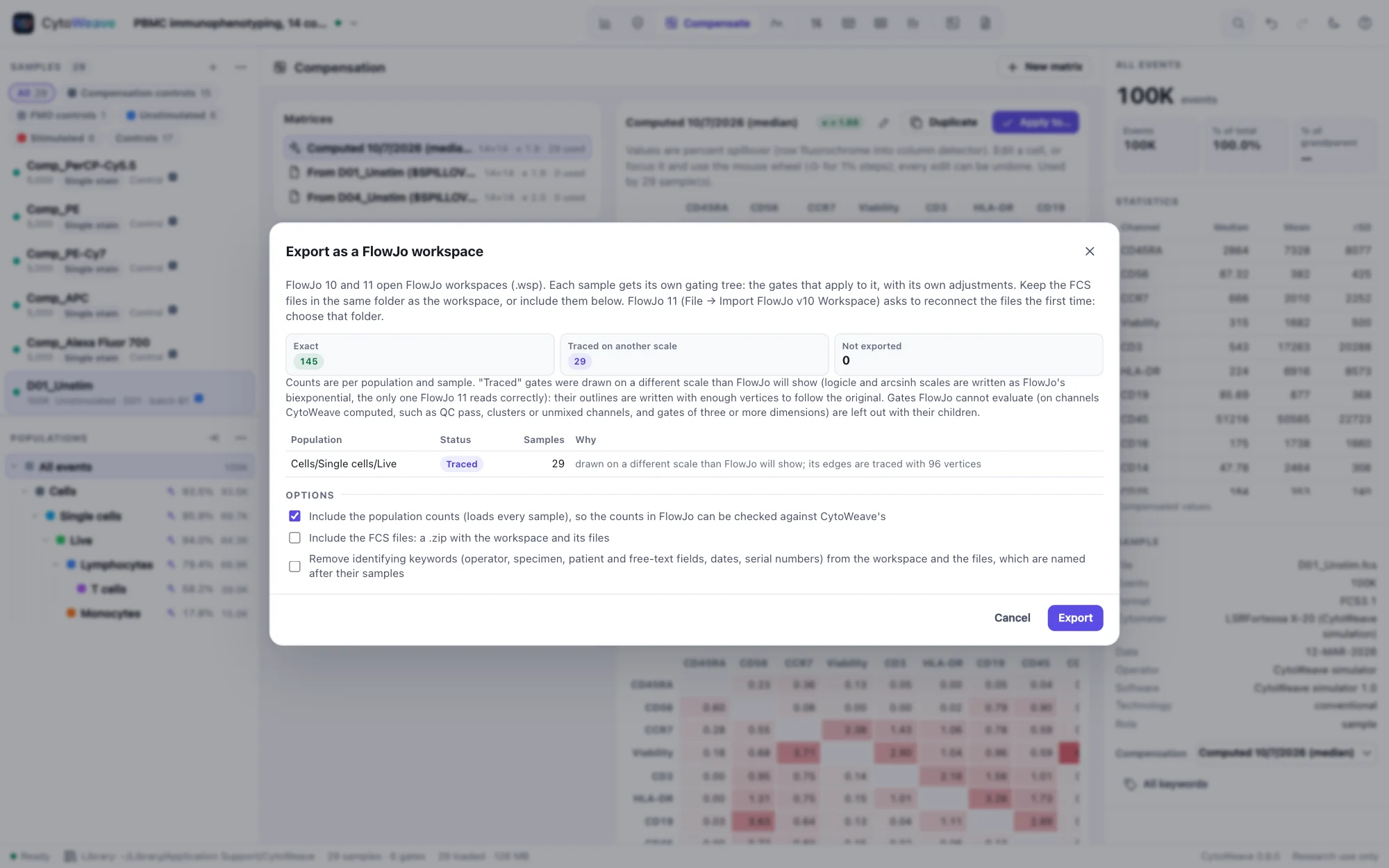
To hand an analysis to a FlowJo user, or to keep a copy in FlowJo's format, choose Workspace → Export → FlowJo workspace (.wsp)…. CytoWeave writes a FlowJo 10 workspace, which FlowJo 11 also opens:
- One gating tree per sample, as FlowJo keeps them: the gates that apply to that sample, with its own adjustments, and gates limited to a group only in that group's samples.
- Each sample's compensation, the scales of its channels, and the workspace's sample groups. Logicle and arcsinh scales are written as FlowJo's biexponential, the closest FlowJo scale and the only one of the three that FlowJo 11 reads correctly.
- Optionally, CytoWeave's count of every population, so the counts FlowJo shows can be checked against CytoWeave's.
- Optionally, the FCS files, in a ZIP with the workspace, and optionally de-identified.
Before exporting, the dialog lists every population as one of:
| Status | Meaning |
|---|---|
| Exact | FlowJo evaluates the same gate. Rectangles, ranges, quadrants and splits are always exact; polygons and ellipses are when they were drawn on the scale written for their channels (linear, logarithmic or biexponential). |
| Traced | A polygon or ellipse drawn on another scale than the one written, which includes every polygon and ellipse on a logicle or arcsinh channel. FlowJo draws gate edges straight on its own axes, so the outline is written with enough vertices to follow the original; counts stay within 0.5% of CytoWeave's. |
| Not exported | Gates FlowJo cannot evaluate: category gates (QC pass, barcodes, clusters), gates on channels CytoWeave computed (unmixed, normalized, ratios), and gates of three or more dimensions. Their children are left out too. |
How the export is checked
- Round trip: the bundled example, ten FlowKit test workspaces and a workspace built in CytoWeave (with splits, quadrants on mixed scales, Boolean populations, per-sample adjustments and group scopes) each import back into CytoWeave with every count unchanged (traced outlines within 0.5%).
- FlowKit 1.3 reads every export and counts what CytoWeave counts (ellipse boundaries aside).
- CytoML 2.24 (Bioconductor's FlowJo reader) reads every export; 306 of 313 counts equal CytoWeave's. The seven others are ellipses, which CytoML reads differently from FlowJo, on FlowJo's own workspaces too.
- FlowJo 11.2.0 (build 11.2.0.210156, macOS) was used for compatibility testing. Three exports were opened in it: the bundled example, the workspace built in CytoWeave and FlowKit's 8-color workspace. Every population is within 0.6 percentage points of CytoWeave's, most within 0.1 (FlowJo evaluates gates at its display resolution, which moves a few events near a boundary in a dense region).
Opening an export in FlowJo 11:
- Choose File → Import FlowJo v10 Workspace. FlowJo 11 opens the samples, groups, compensation and gates.
- FlowJo 11 reports the FCS files as missing: click its link to reconnect them and choose the folder that holds them (the ZIP's folder, when the files were exported with the workspace).
- FlowJo 11 does not import Boolean populations, from workspaces written by FlowJo 10 either; recreate them in FlowJo if needed.
FlowJo 10 has not been tried. It reads the same format, and the biexponential is its own default scale; please report how it goes if you open an export in it.
Gating-ML 2.0
Gating-ML is ISAC's standard for gates, transformations and compensation. Open a Gating-ML .xml file like any other file, and export with Workspace → Export → Gates as Gating-ML 2.0. Import and export cover:
- rectangle, polygon, ellipsoid, quadrant and Boolean gates, including gates of three or more dimensions (evaluated in all of them, though a plot shows two);
- the flin, flog, fasinh, logicle, hyperlog and ratio transformations, with their bounds;
- spectrum matrices, including spectral unmixing matrices, and the compensation each gate dimension names.
All 190 gates of ISAC's Gating-ML 2.0 compliance suite select exactly the expected events. Re-importing a CytoWeave export restores names, colors and scales exactly. Gating-ML has no biexponential, so biexponential axes are written as their closest logicle, with the gate coordinates converted; the export warns when it does this.
Classification results (CLR)
Population memberships (CLR)… exports, for every event of a sample, a column per population or cluster saying whether the event belongs to it, for tools that read memberships. Choose the populations and the column names (population names, or paths when names repeat).