
Workspaces and large files
Where your analysis lives, how to send it to someone, and how CytoWeave stays fast with very large samples.
What a workspace holds
- the samples, their roles and annotations, and the groups;
- gates, compensation matrices and channel scales;
- derived results: QC masks, unmixed and normalized channels, clusters and maps, model fits;
- figures, tables, saved comparisons, checkpoints, notes and the change log.
Every edit can be undone (⌘Z) and redone (⇧⌘Z), including what an AI agent did.
The library
Workspaces save themselves as you work, to the library, a folder in your user configuration directory:
| System | Library |
|---|---|
| macOS | ~/Library/Application Support/CytoWeave |
| Linux | ~/.config/CytoWeave (or $XDG_CONFIG_HOME/CytoWeave) |
| Windows | %AppData%\CytoWeave |
The dot beside the workspace name shows its state: green when saved, amber while changes wait to be saved, red if saving failed (point at it for the reason). ⌘S saves at once. The status bar shows where the library is; --data-dir moves it.
The library keeps each FCS file once, under its SHA-256 checksum, and workspaces refer to files by checksum. A workspace therefore keeps working when the original files are moved, renamed or deleted, and adding the same file twice stores it once.
The workspace menu (click the workspace name) has New workspace, Open… (⇧⌘O, every saved workspace with its sample count and date), Rename… and Save now. Deleted workspaces go to the library's trash folder rather than disappearing.
CytoWeave opens on the start page with a new, empty workspace. Its recent workspaces list the ones saved, the one you had open last marked Last opened: click it to go on where you left off. Files named on the command line (cytoweave *.fcs) open in that new workspace rather than in the last one.
With --no-library, workspaces are kept in the browser's own storage instead.
Exporting and sharing
Workspace → Export writes:
| Export | For |
|---|---|
| Workspace file (.cwz) | The analysis without the data, for a colleague who has the same FCS files |
| Workspace with FCS files (ACS archive) | Everything, in an Archival Cytometry Standard container: to send to a colleague, or to archive with a paper |
| Gates as Gating-ML 2.0 | Other tools that read Gating-ML 2.0, such as FlowKit. See Gating-ML. |
| Population memberships (CLR)… | Classification results: a column per population or cluster for every event |
| FlowJo workspace (.wsp)… | FlowJo users, with or without the FCS files; see Exporting to FlowJo |
| De-identified FCS files… | Sharing data outside your institution: the files without identifying keywords, as a ZIP or with the workspace in an ACS archive (below) |
| Events: concatenated FCS, downsampled, AnnData… | A population's events in several samples, for tools that analyze them together: one concatenated FCS file, one FCS file per sample, or an AnnData file for scanpy and R (below) |
| Tables as an Excel workbook | Every table, with sheets describing the columns, samples and gating; see Excel and Prism |
Events for other tools
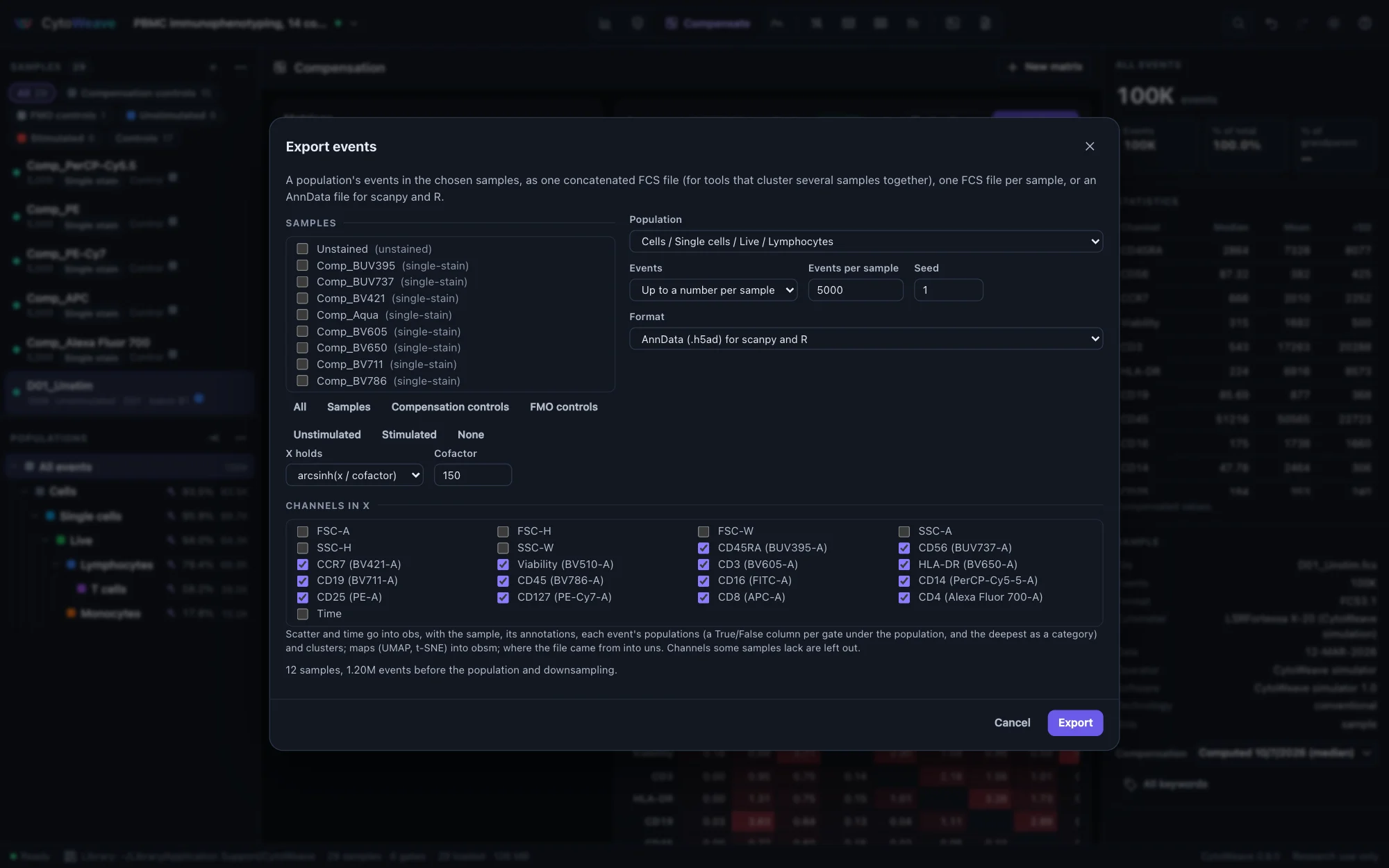
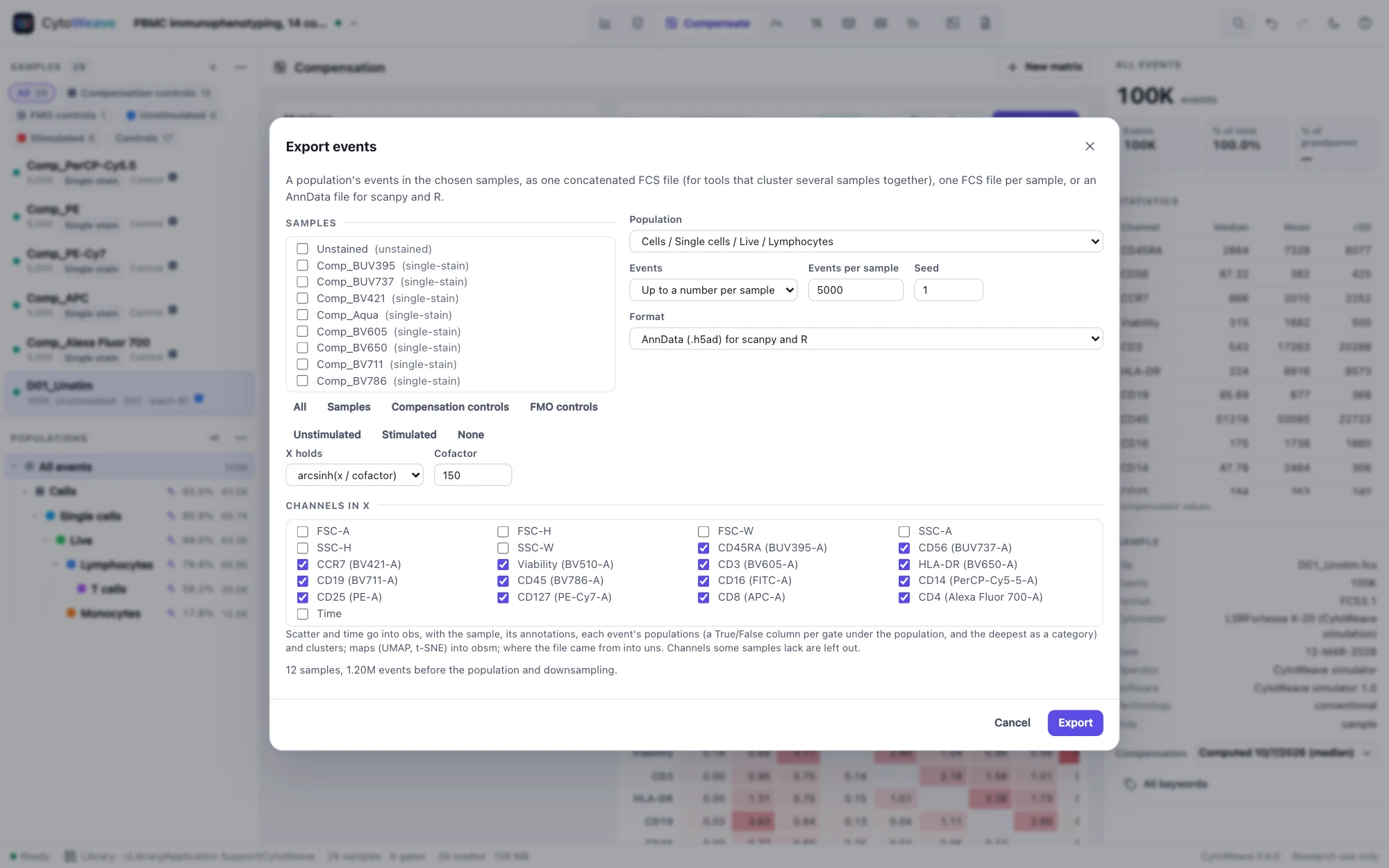
Workspace → Export → Events… (or Export events of several samples… in a population's menu) writes a population's events in the samples you choose:
- Downsampling keeps every event, up to a number per sample (all of a smaller population), or a share of each sample's events, chosen at random without replacement. The seed makes it reproducible: the same seed picks the same events, and each sample is drawn on its own (with a seed derived from its file's checksum), so a sample's events do not depend on which other samples are exported. The seed is written into the files.
- One FCS file, the samples concatenated, for tools that cluster several samples at once. It holds the channels every sample has (others are left out and named), raw values with the spillover matrix when the samples share one (otherwise, or by choice, compensated values), and two more channels:
SampleIDnumbers the samples in order (the keywordsCYTOWEAVE_SAMPLE_1, … name them,CYTOWEAVE_SHA256_1, … give their files' checksums) andSourceEventgives each event's index in its own file. - One FCS file per sample (a ZIP): each sample's chosen events, raw, with its keywords and spillover matrix.
- AnnData (.h5ad), the format of scanpy, muon and most single-cell tools in Python, and of R through zellkonverter.
Xholds the channels you choose (the fluorescence or mass channels by default) for every event, as arcsinh(x / cofactor) of the compensated values (cofactor 150, or 5 for mass cytometry) or the compensated values themselves.obsholds the sample, the samples' annotations, each event's index in its file, its populations (a True/False column per gate under the exported population, and the deepest of them as a category), clusters from Explore (named, missing where an event was not clustered), QC results, and the scatter and time channels.varnames the channels by marker, with the detector and kind;obsmholds maps such asX_umap(NaN where an event was not mapped);uns["cytoweave"]says where the file came from. The file is written by CytoWeave's own HDF5 writer, uncompressed;adata.write_h5ad(path, compression="gzip")compresses it.
The validation suite reads the files back: every event of a concatenated file is its source's, each population counts the same per SampleID as in its sample, and anndata (0.10 and 0.13), h5py and pyfive read the AnnData files' values exactly as CytoWeave computes them.
De-identified files
FCS files carry more than events: operator and specimen fields, patient identifiers some instruments record, free-text comments, the original file name, acquisition dates, instrument serial numbers and many vendor keywords. Workspace → Export → De-identified FCS files… writes copies that keep only the keywords needed to read and analyze the data: parameter names, markers, ranges, voltages and amplification, compensation, the instrument model, the time step and index-sort wells. Everything else is removed, and the dialog shows what it removes from the current sample.
- Only the keyword text is rewritten. The events are copied byte for byte, whatever their data type; the validation suite checks this on every example and corpus file.
- Acquisition dates and times are removed unless you tick Keep acquisition dates and times.
- Files are named after their samples. Sample names are kept, so rename any sample whose name identifies a person before exporting.
- As an ACS archive, the workspace goes with the files, refers to the new copies, and keeps none of the removed keywords; records of FlowJo imports, which hold file paths, are left out. The change log is kept: it names samples and gates.
The population menu's Export events as de-identified FCS… does the same for one population, and the FlowJo export can de-identify the workspace and its files.
The population menu exports one population's events as FCS (raw values and the original keywords) or CSV, and tables export as CSV. Opening a .cwz or ACS file restores the workspace.
Large files
Samples of ten million events open in seconds and stay responsive:
- Files are read in parts, as they arrive, and never held whole: only the columns of event values are kept.
- Compensated channels are computed when first used, not when the file opens.
- Populations are kept as bitsets, one bit per event, so a gating tree of a ten-million-event sample takes a few megabytes.
- QC, unmixing, clustering and maps run in background workers that share the events with the window rather than copying them. PeacoQC splits its channels among up to four workers, about three times faster on large samples, with exactly the same result.
- Moving a gate re-evaluates every population below it in a fraction of a second.
Memory is the limit. Plan on about 4 bytes per event per parameter of every loaded sample, plus as much again for the compensated channels in use: ten million events with 21 parameters is 0.8 GB, about 1.5 GB in use. Samples load when first shown (Load every sample in the sample list loads them all), and the least recently used are dropped beyond 1.6 GB, or 3 GB on computers with 8 GB of memory or more. The status bar shows how much is loaded.
Measured. On a ten-million-event, 801 MB file, reading takes 0.75 s, moving the top gate 0.43 s, and a statistics table of 14 channels of 6.7 million events 0.78 s; acquisition QC runs in about 70 s with the window responsive throughout. See performance.