

Themes
Keep your terminal's own colors, pick one of the built-in themes with a live preview, or make a theme of your own.
Your terminal's own colors
Out of the box Astrum uses the theme called terminal: your terminal app's own colors, for the tab bar, the status bar and the agent panel, and for everything programs draw. So starting Astrum changes nothing about how your terminal looks, and if you change your terminal's color scheme, Astrum changes with it. Its highlights are your terminal's own standard colors, and a chosen row is shown in reverse.
In the list of themes it is called Terminal (follow host colors).
Choosing a theme
Open the list of themes with ≡ menu → Choose a theme, or from ≡ menu → Settings → Theme. From the keyboard, press Ctrl+B then s, or type /theme in the agent panel.
The list is a live preview. The theme you are on is put on the whole screen at once, the session behind the list included, so you see it on your own work before you choose it.
- Turn the mouse wheel over the list, or press the arrow keys ↑ and ↓, to move from theme to theme.
- Click a theme, or press Enter, to keep it.
- Click outside the list, or press Esc, to go back to the theme you had.
- Type to narrow the list to the themes whose names hold what you typed.
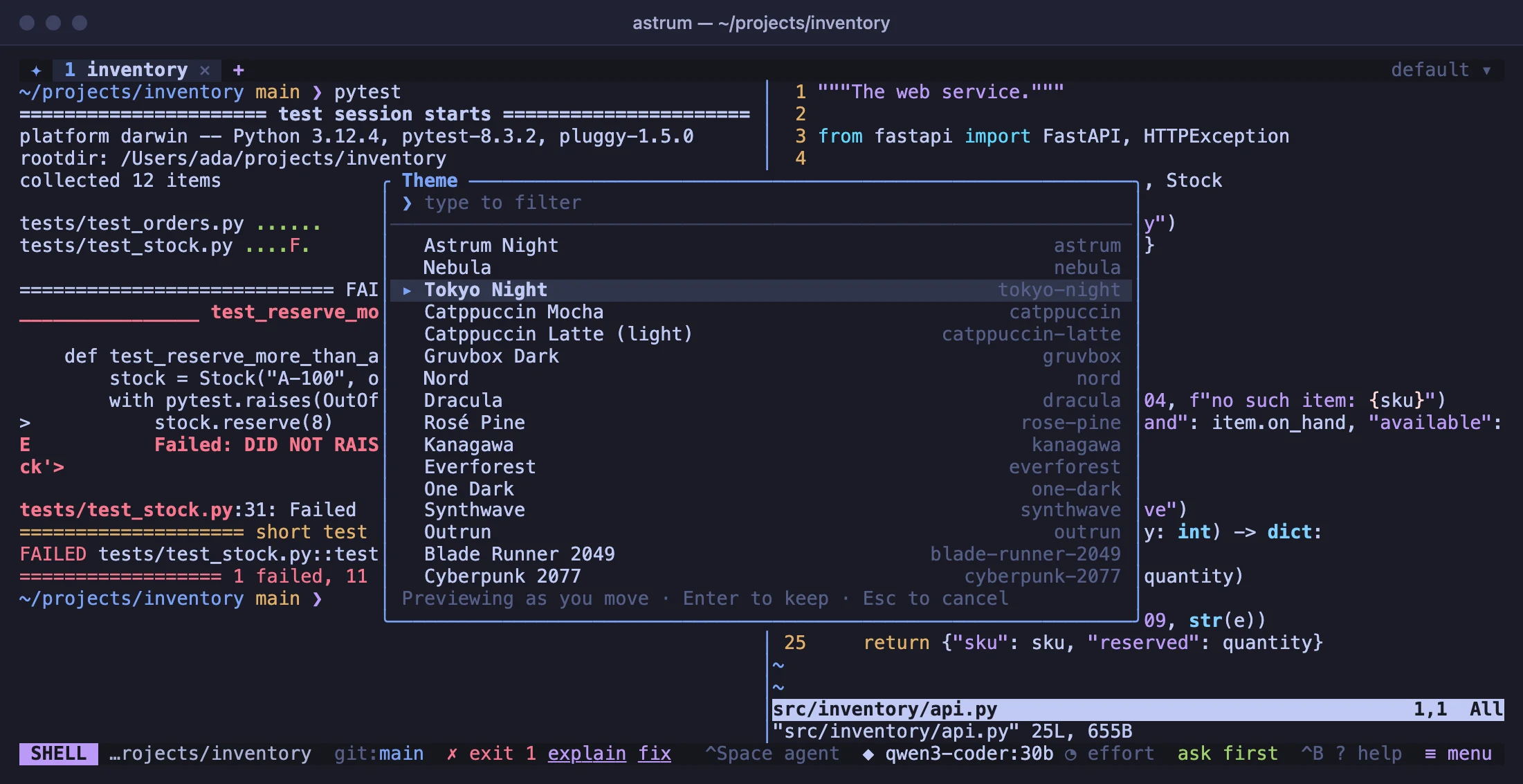
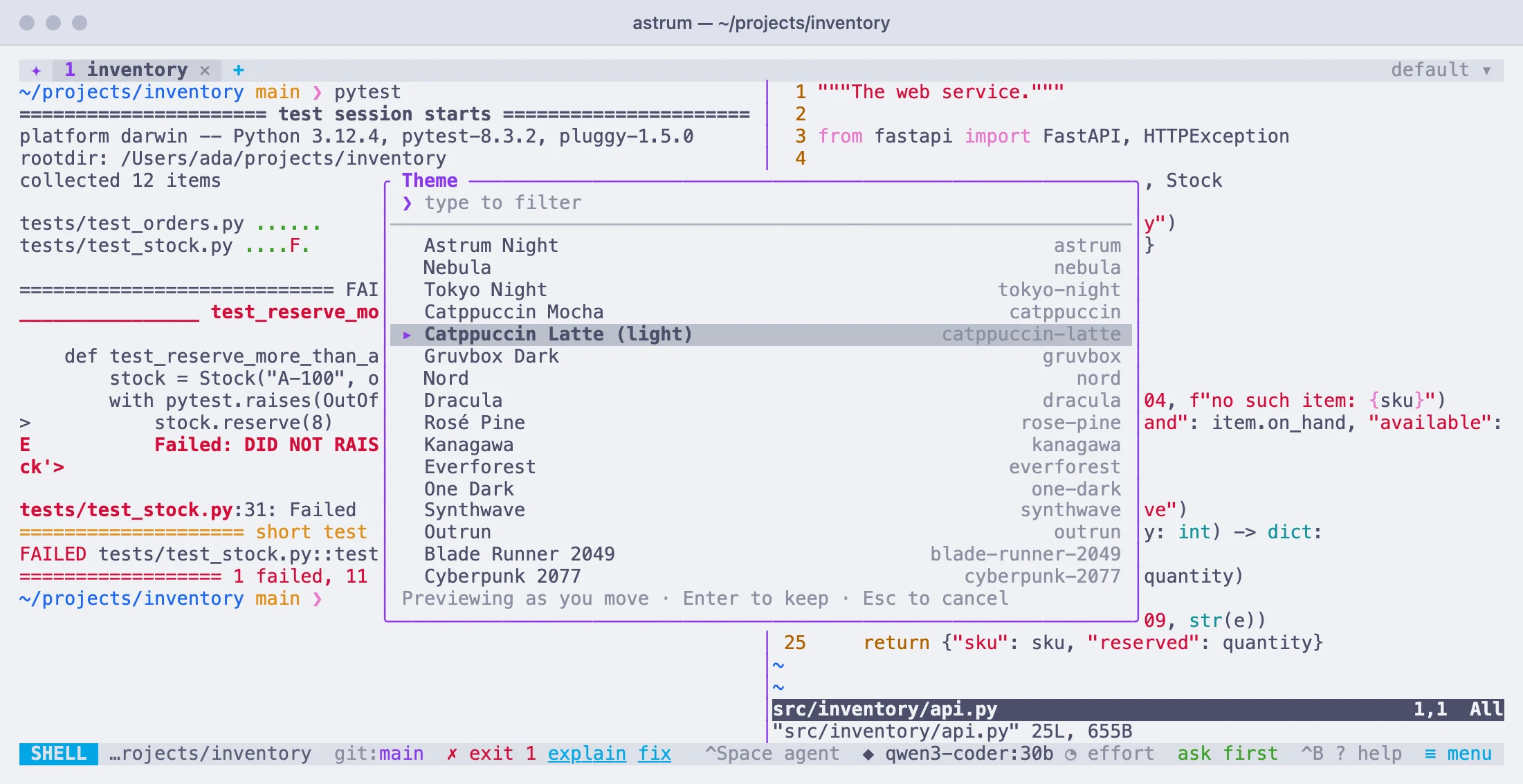
To choose one by name, give it to /theme: /theme nord. Capitals do not matter and spaces count as dashes, so /theme Blade Runner 2049 works too.
A theme chosen inside Astrum is remembered for every session, in state.toml. To set it in the config file instead, put theme at the top of the file:
theme = "nord"A theme chosen inside Astrum takes the place of the config file's until it is forgotten: see Choices made inside Astrum. astrum themes lists the name of every theme there is, yours included.
Colors for programs too
A chosen theme colors Astrum's own bars and panel, and with them what programs draw: their sixteen standard colors, and the plain text and background, are taken from the theme. So a theme is one look, rather than Astrum's bars in one set of colors around a shell in another. A program that asks the terminal for its colors, to tell a dark screen from a light one, is told the theme's.
Colors a program gives exactly, as 24-bit colors or from the 256-color palette beyond its first sixteen, are drawn as the program gave them.
To keep a theme to Astrum's bars and panel and leave programs in your terminal's own colors, turn off Programs use the theme's colors too on the settings screen, or set:
theme_terminal = falseWith the terminal theme this makes no difference: there is nothing to recolor programs with.
A light theme for a light terminal
A terminal that is light by day and dark by night can have a theme for each. theme is the one for a dark background and theme_light the one for a light background:
theme = "tokyo-night"
theme_light = "catppuccin-latte"
Which of the two applies is read from the terminal each time one attaches: Astrum asks it what color its background is. A terminal that does not answer counts as dark. While theme_light is set, a theme chosen in /theme goes to whichever the terminal is now, so one chosen on a light background becomes the light theme.
With the default terminal theme there is nothing to set: it is your terminal's own colors either way. Among the built-in themes, Catppuccin Latte is the light one.
24-bit color
A terminal that supports 24-bit color is sent each theme's exact colors. Others are sent the nearest match from the 256-color palette. Astrum tells which a terminal is from what it says about itself (COLORTERM, TERM and TERM_PROGRAM), each time one attaches.
Over SSH, where terminals often cannot say that they have 24-bit color, colors can look reduced. Then set:
truecolor = trueIf a terminal claims 24-bit color and shows it wrongly, truecolor = false sends it the 256-color palette instead. Either applies to terminals that attach after it is set: detach and run astrum again. Programs inside Astrum are always told that 24-bit color is there (COLORTERM=truecolor), and Astrum turns what it draws into what your terminal can show.
A theme of your own
A theme of your own is a table in the config file. Every color in it is optional: what you leave out comes from the theme named in based_on. It then appears in /theme and astrum themes with the built-in ones, and is used like them.
theme = "mine"

[themes.mine]
label = "Mine"
based_on = "matrix"
bg = "#000000"
text = "#33ff66"
accent = "#33ff66"- The name is the table's:
[themes.mine]ismine. It can have letters, digits and dashes; capitals are taken as small letters, and spaces and underscores as dashes. labelis what the list of themes shows. Without one, it shows the name.based_onnames the theme to start from: any built-in one exceptterminal, or another of your own. Without it, the theme starts from Astrum Night (astrum). A name that is not a theme starts it from Astrum Night as well, with a note saying so.- Colors are written
"#rrggbb", or in short as"#rgb". - A theme of yours with a built-in theme's name takes the built-in one's place in the list. To change a few colors of a built-in theme and keep it as well, give yours another name and base it on that one.
Changes to the table take effect as soon as the file is saved, on the theme in use too. Something that cannot be read, such as a color that is not a color, is left as the theme it is based on had it, and Astrum says what was wrong; astrum themes prints the same.
These are the colors a theme has:
| Color | What it paints |
|---|---|
bar | The tab bar and the status bar. |
bg | The agent panel, menus and lists. |
surface | Raised parts: the tab in front, the input box, cards. |
overlay | The row under the pointer, and the chosen row in a list. |
border | Frames, and the dividers between panes. |
text | Ordinary text. |
subtext | Quieter text, such as the labels on the bars. |
muted | Hints, and the faintest labels. |
accent | The main highlight: chips, headings, a lit divider. |
accent2 | The second highlight: the + in the tab bar, the spinner of an agent at work, the values on the settings screen. |
green, yellow, red, blue | What is going on: green for a finished agent and for ask first, yellow for an agent that is asking, red for one that stopped, blue for auto read-only. |
selection | The background of text selected in a pane. |
on_accent | Text on an accent-colored chip. Unless given, it is your bar color, if you set one. |
term_fg, term_bg | The plain text and the background programs draw in. Unless given, they are your text and bg, if you set those. |
ansi | The sixteen standard colors programs use, in their usual order: black, red, green, yellow, blue, magenta, cyan and white, then the bright version of each. It takes all sixteen or none. |
term_fg, term_bg and ansi are used only while programs take the theme's colors (theme_terminal).
A light theme of your own, with programs' colors of its own as well:
theme_light = "paper"

[themes.paper]
label = "Paper"
based_on = "catppuccin-latte"
bg = "#fbf8f1"
bar = "#ece6d8"
ansi = [
  "#3b3b3b", "#b3261e", "#2e7d32", "#9a6700", "#1e5fa8", "#8e44ad", "#00838f", "#c8c8c8",
  "#6b6b6b", "#d93025", "#43a047", "#b7791f", "#3182ce", "#9b59b6", "#00acc1", "#ffffff",
]
The built-in themes
Twenty-one themes come with Astrum besides terminal, from calm to neon. Each is drawn here in its own colors, with the name that theme and /theme take:
astrumnebulatokyo-nightcatppuccincatppuccin-lattegruvboxnorddracularose-pinekanagawaeverforestone-darksynthwaveoutrunblade-runner-2049cyberpunk-2077chaos-theorymatrixmcdermottmonokaisolarizedterminal