
Cohort study design
Start with the biological units. A study with twelve samples from six subjects has six subjects, not twelve independent replicates. The Cohort view makes the selected groups, pairing, exclusions and sample membership explicit before statistical comparisons.
Choose the comparison
Open the study's files together as one dataset and annotate its samples in Data. Subject identifiers must identify the same individual consistently across the whole dataset. Choose Cohort, the group field (condition, time point, tissue or cell subset), a reference level and a comparison level. The contrast is comparison minus reference. Labels match exactly after surrounding whitespace is removed: day 28 and week 4 remain different labels here.
- Independent subjects: each subject belongs to one selected group and contributes exactly one selected sample. At least two subjects are required in each group.
- Paired within subjects: each subject contributes exactly one sample at each selected level. At least two complete subject pairs are required.
These are structural minimums, not recommendations for statistical power. The checks cannot establish randomization or biological independence: for example, individuals sharing an experimental cage may require a different model. Cells, chains, sequencing libraries and repeated samples do not add independent subjects.
Inspect every sample
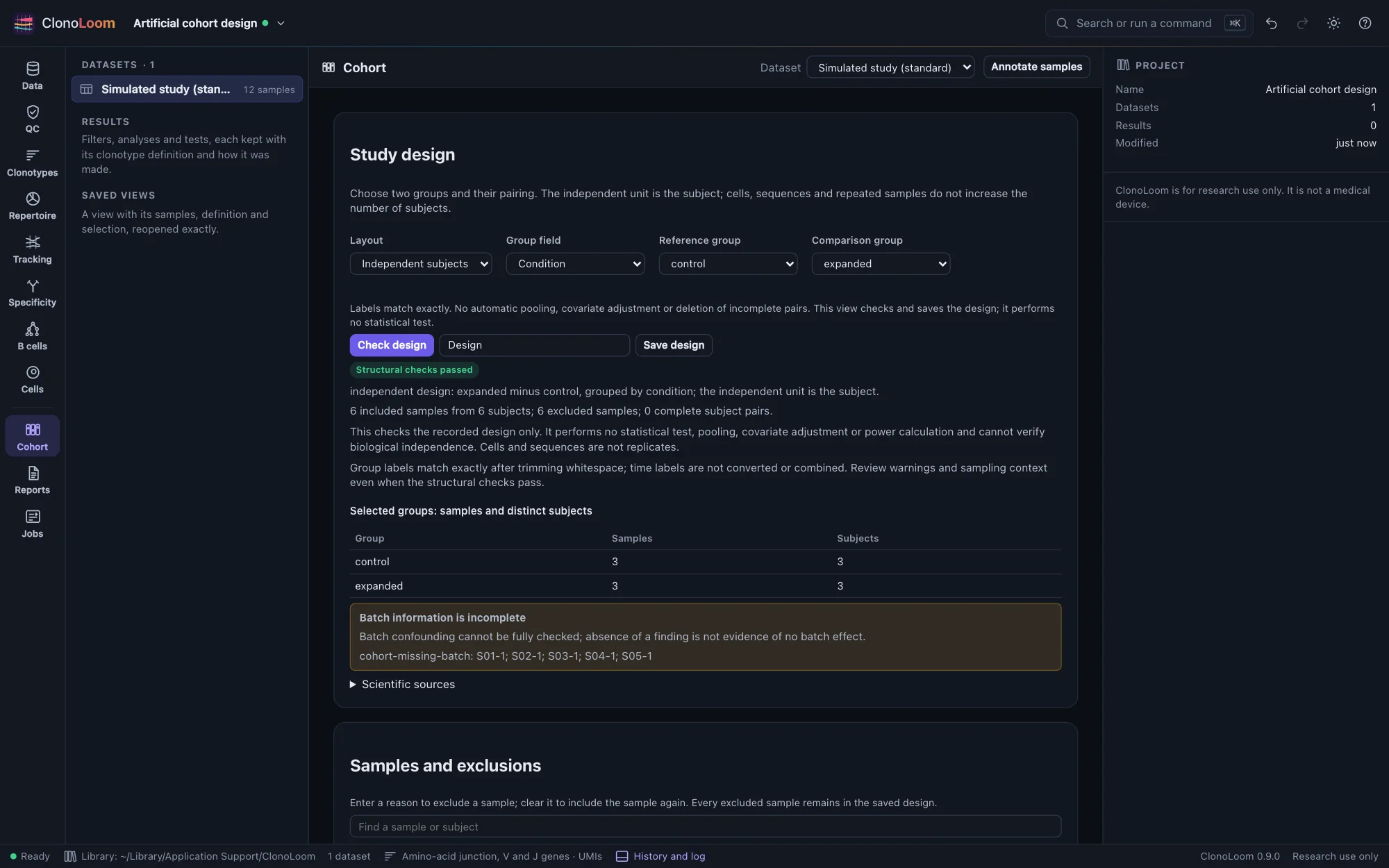
Check design reports sample and distinct-subject counts in a table. Repeated samples within one subject/group block use. Enter explicit exclusion reasons to select scientifically justified observations; there is no automatic pooling or choice of the first sample. Missing group or subject annotations block use unless the sample is explicitly excluded. Samples with other group labels remain in the report as outside the selected contrast.
Paired designs refuse incomplete pairs instead of silently dropping subjects. Group and batch are inseparable when every recorded batch contains only one group; this also blocks use. Missing batch information and mixed time, tissue or cell-subset annotations produce warnings. Passing checks does not rule out confounding, and no adjustment is performed.
All population counts come from the Go host. The tables show membership rather than distributions or uncertainty: no p-values, effect sizes or expression tests are computed in this first cohort slice.
Try the artificial study
- Open A simulated TRB study with known truth from Example data.
- Choose Cohort, independent subjects, condition, reference
controland comparisonexpanded. Check the design. Twelve samples belong to six subjects, and the repeated samples block use. - For this teaching example, exclude
S01-2throughS06-2, each with the reason Teaching selection: first simulated observation per subject. Check again: six included samples, three subjects in each group, six exclusions. Batch is not supplied, so that limitation remains visible. - Name and save the design. Change a subject annotation in Data: the saved version reports that annotations changed. Its original record stays intact.
The simulated condition called expanded is an input label, not a statistical finding. For a real study, decide selection and aggregation rules from the scientific question before inspecting outcomes.
Save and inspect the record
Save design rechecks the current annotations and creates a named version in the project. It records the source-derived dataset identity, all design annotations (subject, condition, time point, tissue, cell subset and batch, including excluded samples), reference direction, pairing, exclusions, findings, descriptions and citations. A SHA-256 identity identifies the canonical design inputs. Save versions can be undone and redone. Saved snapshots remain inspectable and exportable even when source files are unavailable; checking a new design requires reopening those sources.
A failed check can also be kept with Save failed check. Its saved heading and Methods identify it as failed; it is absent from usable feature-design choices, and the host refuses analysis. See the complete guided cohort studies for unbalanced and confounded examples.
Export saved JSON includes the complete membership and source record. Later analyses must bind the exact saved design and recheck test-specific assumptions. This design snapshot is not a fitted model or an analysis artifact.
Scripts use check_cohort_design, with the same checks and optional save operation; see Remote control.
Scientific basis and validation
The independent-unit rule follows Lazic (2010), on pseudoreplication. The single-cell consequence is demonstrated by Squair et al. (2021). The two-group scope, exact labels, explicit exclusions and minimum counts are ClonoLoom's declared policies. Hand-specified controls and independent SQLite tabulations of all 6,561 assignments of two observations for four subjects validate the counts and independent/paired refusal rules.
Build the subject table
Use a saved design version with a saved diversity result to build subject feature tables, with explicit units, missing values, parent provenance and CSV/JSON export.